
If you're looking to step up your trading game, the Daniella indicator is a powerful tool worth considering. This trading system generates signals right at the close of a bar, triggered by a colored arrow from the indicator. It's like having a reliable trading partner giving you a nudge when the market is ripe for action.
To get started with the Expert Advisor (EA), you’ll need the compiled indicator file, Daniella.ex5. Simply save it in your <terminal_data_folder>\MQL5\Indicators directory and you’re good to go!
One of the standout features of this EA is its compatibility with brokers offering nonzero spreads. Plus, it lets you set your Stop Loss and Take Profit right when you open a position—talk about convenience! If you're interested in exploring more options, you can download additional versions of the Trade Algorithms library for even more trading strategies.
The default input parameters were utilized during the backtesting shown below, and note that Stop Loss and Take Profit settings were not applied during this testing phase.
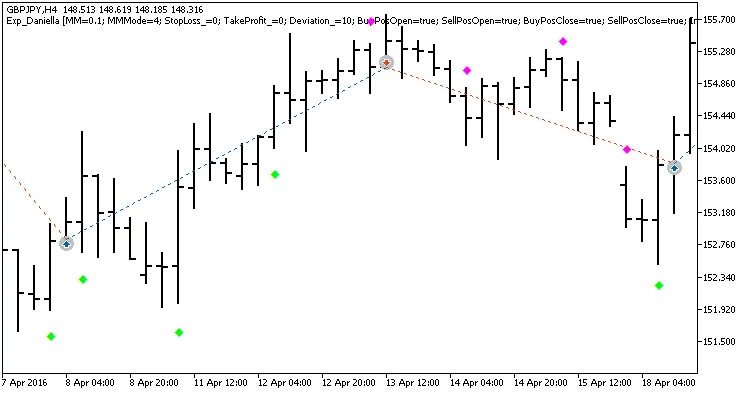
Fig. 1. Examples of deals on the chart.
Here are the results from backtests conducted on GBPJPY in the H4 timeframe for the year 2016:
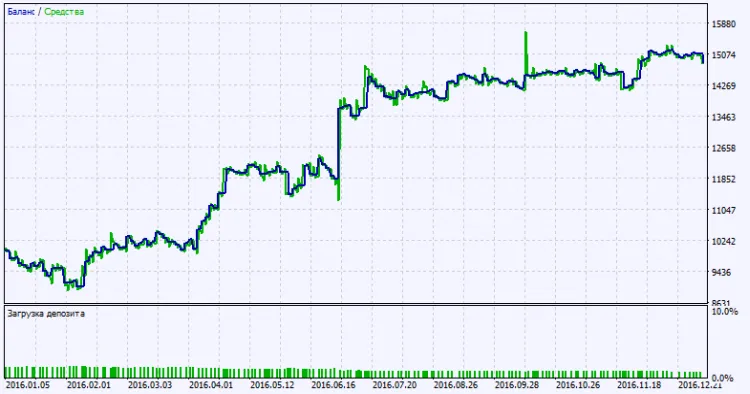
Fig. 2. Testing results chart.




Comments 0