
The Exp_ColorBullsGap Expert Advisor is built on the signals generated by the ColorBullsGap indicator. It triggers signals when a bar closes and there's a shift in the histogram color of the indicator.
To get started, simply place the compiled files ColorBulls.ex5 and ColorBullsGap.ex5 into your <terminal_data_folder>\MQL5\Indicators directory.
Keep in mind that the TradeAlgorithms.mqh library file enables you to use Expert Advisors with brokers that offer a nonzero spread, along with the ability to set Stop Loss and Take Profit right when you open a position. For more variations of this library, check out this link: Trade Algorithms.
During the tests we're discussing below, we used the default input parameters of the Expert Advisor. Notably, Stop Loss and Take Profit settings were not utilized in these tests.
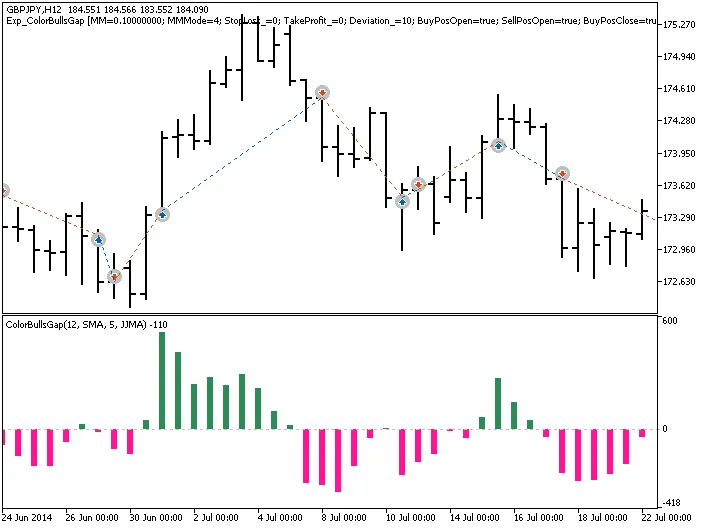
Fig. 1. Trade examples on the chart
Here are the testing results for GBPJPY on a H12 timeframe for the year 2014:
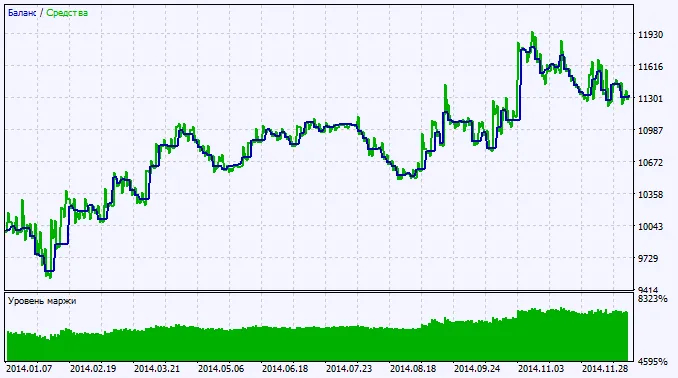
Fig. 2. Chart of testing results




Comments 0