
If you're looking to step up your trading game, the Exp_RSI_Histogram might just be what you need. This trading system leverages the signals from the RSI_Histogram indicator to generate trade signals. The magic happens when the histogram shifts from its neutral gray to vibrant red or lime, indicating that the RSI oscillator has hit the overbought or oversold zones.
To get started, you'll need the compiled indicator file, RSI_Histogram.ex5. Make sure to drop it into your <terminal_data_folder>\MQL5\Indicators directory.
One thing to keep in mind is that the TradeAlgorithms.mqh library file allows you to use Expert Advisors with brokers that offer a nonzero spread. Plus, it gives you the flexibility to set your Stop Loss and Take Profit when you open a position. You can explore more variations of this library here: Trade Algorithms.
The tests below were conducted using the default parameters for the Expert Advisor. Notably, Stop Loss and Take Profit settings weren’t applied during these tests.
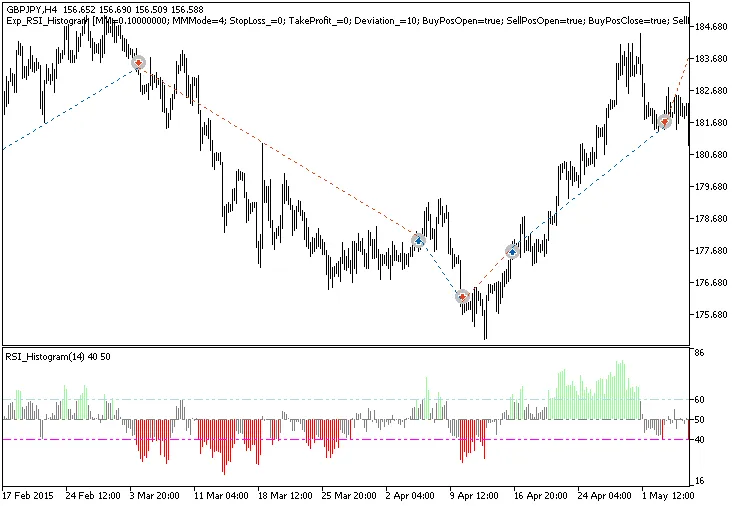
Fig. 1. Examples of trades on the chart
Here’s a look at the testing results for GBPJPY on the H4 timeframe in 2015:
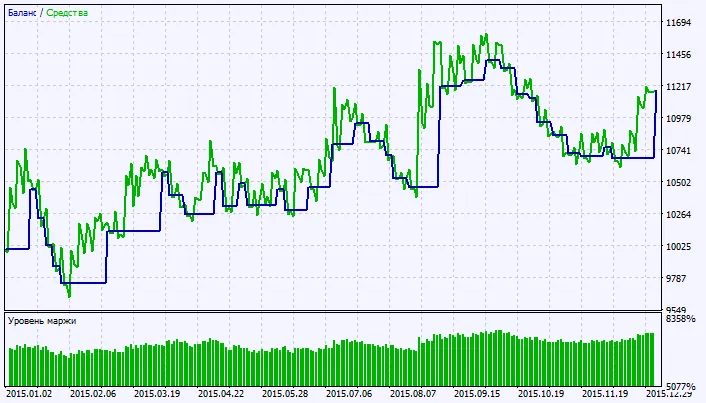
Fig. 2. Chart of testing results




Comments 0