
If you're looking to enhance your trading strategy, the ColorTSI-Oscillator EA is a game changer. This expert advisor is built on the signals generated by the ColorTSI-Oscillator indicator, making it a powerful tool in your trading arsenal.
The magic happens when a bar closes and there's a shift in the indicator's cloud color. This signals potential trading opportunities that you won’t want to miss!
To get started, you’ll need the compiled file for the ColorTSI-Oscillator.ex5 indicator. Make sure to place this file in the terminal_data_folder\MQL5\Indicators directory to ensure everything runs smoothly.
A quick tip: The TradeAlgorithms.mqh library file is essential for using EAs with brokers that offer non-zero spreads. Plus, it gives you the flexibility to set your Stop Loss and Take Profit right when you open a position. You can find additional variants of this library through this link: Trade Algorithms.
For the tests highlighted below, we used the default settings of the expert advisor. Notably, Stop Loss and Take Profit were not applied during these tests, which can be an important consideration for your strategy.
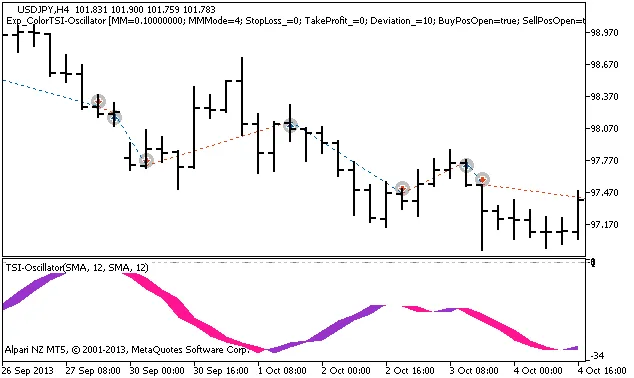
Figure 1: History of trades on the chart
Let's take a look at the testing results for the year 2013 on the USDJPY H4 timeframe:
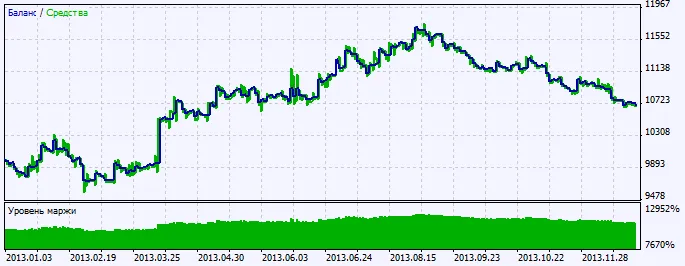
Figure 2: Testing results chart




Comments 0