
Trading Strategy Overview
Meet the custom indicator, PriceChannel_Signal_v2! You can grab it here. This handy tool generates a variety of signals: two types to initiate a BUY position, two types for a SELL position, plus one signal for closing each type. It's straightforward—no Stop Loss, no Take Profit, and no Trailing.
Example of Opening a Position:
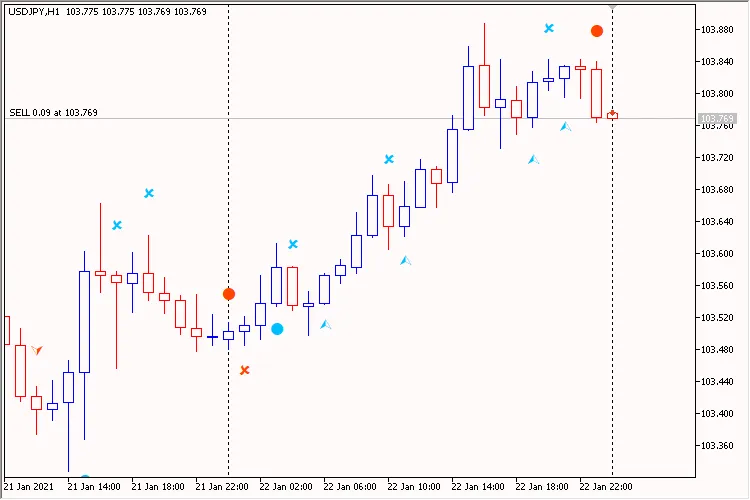
Image: 1. PriceChannel_Signal_v2 EA
Key Features:
- The EA is customizable for your preferred working timeframe.
- Only one trade entry is allowed per bar.
- In inside bar mode (parameter 'Search signals on ...' equals bar #0 (at every tick)), the current bar is bar #0. However, when using the new bar mode (parameter 'Search signals on ...' equals bar #1 (on a new bar)), the current bar becomes bar #1.
Let’s take a closer look at each parameter group:
Trading Settings:
'Working timeframe' defines the timeframe for which the indicators are created and where new bars are searched.
Position Size Management (Lot Calculation)
You can set a fixed lot size ('Money management' set to 'Constant lot' and specify the lot size in 'The value for "Money management"') or a dynamic one, based on the percentage risk per trade ('Money management' set to 'Risk in percent for a deal' and indicate the risk percentage in 'The value for "Money management"'). You can also set a constant lot to the minimum lot size by choosing 'Money management' set to 'Lots Min'.
Additional Features:
The 'Positions: Only one' flag set to 'true' ensures the EA only holds one position in the market at a time. The 'Print log' feature provides an extensive log of all operations, helping you keep track of your trades.




Comments 0