
If you’re looking to enhance your trading game, the Exp_Stochastic_Chaikins_Volatility Expert Advisor might just be the tool you need. This EA is designed around the Stochastic_Chaikins_Volatility indicator, which signals trades based on color changes in the indicator's cloud. Essentially, it triggers a signal when a bar closes and there's a shift in the indicator's color.
To get started, you’ll need to have the compiled indicator file Stochastic_Chaikins_Volatility.ex5 saved in your trading platform. Place it in your <terminal_data_folder>\MQL5\Indicators directory.
One of the best features of this EA is its compatibility with brokers that offer nonzero spreads. Plus, it allows you to set up your Stop Loss and Take Profit right when you open a position. If you’re keen on expanding your toolkit, you can find more variations of the TradeAlgorithms.mqh library here.
The testing showcased below was conducted using the default input parameters of the EA, without applying Stop Loss or Take Profit settings during the tests.

Fig1. Examples of deals on the chart
Here are the testing results for 2015 using the EURUSD pair on the H12 timeframe:
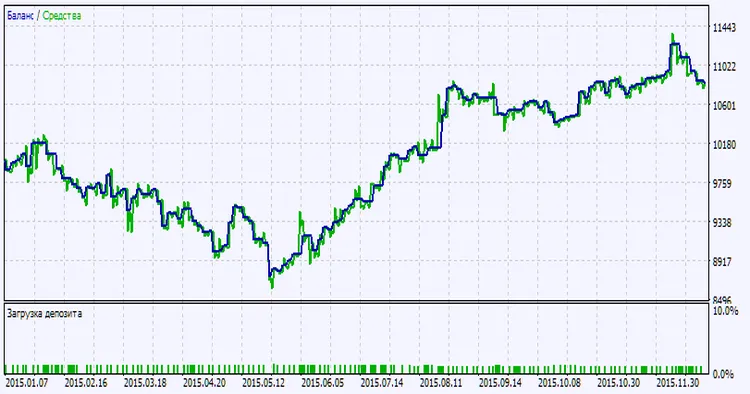
Fig.2. Chart of testing results




Comments 0