
Hey there, fellow traders! Have you ever wanted to streamline your trading process? The Exp_CenterOfGravityOSMA Expert Advisor (EA) is here to help, leveraging the CenterOfGravityOSMA histogram to signal when to make a move. The magic happens when a bar closes and there's a shift in the Moving Average direction—this is your cue to jump in!
Before you get started, make sure you have the compiled indicator file CenterOfGravityOSMA.ex5 in your arsenal. You’ll need to place it in your <terminal_data_folder>\MQL5\Indicators directory to get the EA up and running.
Now, a little tip for the pros out there: the TradeAlgorithms.mqh library file is a game-changer. It allows you to use Expert Advisors with brokers that provide a nonzero spread, and it gives you the flexibility to set Stop Loss and Take Profit right when you open a position. If you want to explore more variants of this nifty library, check out the link here: Trade Algorithms.
When testing the EA, we used the default input parameters, and just a heads up—Stop Loss and Take Profit weren't applied during these tests. Let’s take a look at the results!
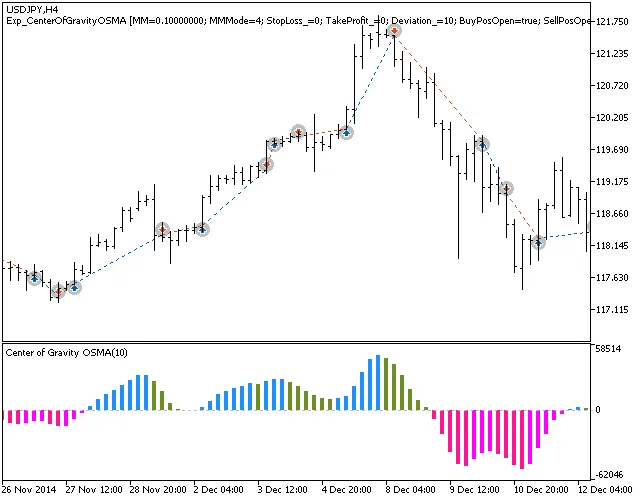
Fig.1. Trade examples on the chart
Here are the testing results for 2014 on the USDJPY H4 timeframe:
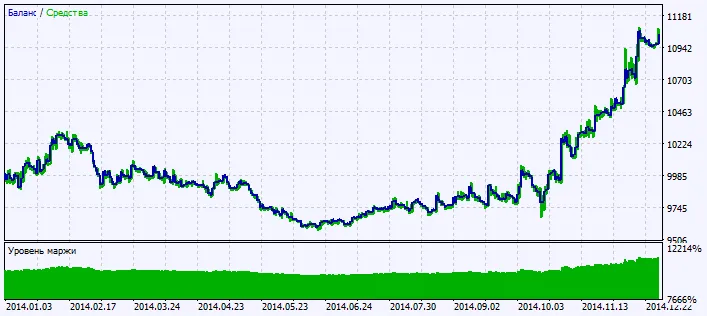
Fig.2. Testing results chart




Comments 0