
Welcome to the world of automated trading! Today, I’m diving into the F2a_AO semaphore signal indicator, a powerful tool to enhance your trading strategy. This system helps filter signals, making your trading decisions more robust.
One of the standout features of this Expert Advisor (EA) is its use of the closing candlestick from a higher timeframe as a filter. Let’s take a closer look at how this works with the two input parameters for this candlestick.
//+----------------------------------------------+//| Input parameters for the trend candlestick |//+----------------------------------------------+inputENUM_TIMEFRAMES Inp_Timeframe=PERIOD_D1; // the trend candlestick timeframeinputuint TrendBar=1; // the trend bar index
To get started, simply place the F2a_AO.ex5 compiled file in your terminal_data_folder/MQL5/Indicators directory.
A quick heads-up: the TradeAlgorithms.mqh library is specifically designed for brokers that offer nonzero spreads and allow you to set Stop Loss and Take Profit when opening a position. You can find alternative versions of this library at https://www.mql5.com/en/code/1578.
The testing results below utilize the default input parameters of the Expert Advisor, and it’s worth noting that Stop Loss and Take Profit were not applied during these tests.
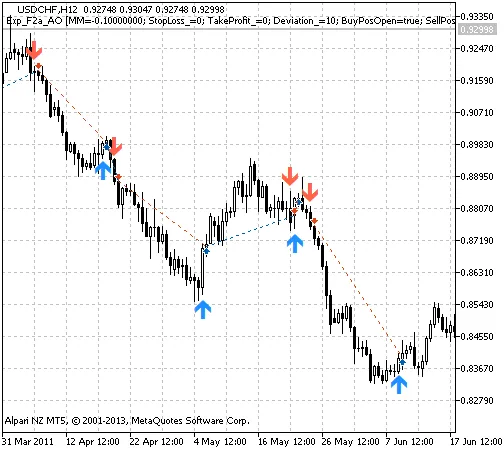
Fig. 1. The instances of history of deals in the chart
Now, let’s take a look at the testing results for 2011 with USDCHF on the H12 timeframe:
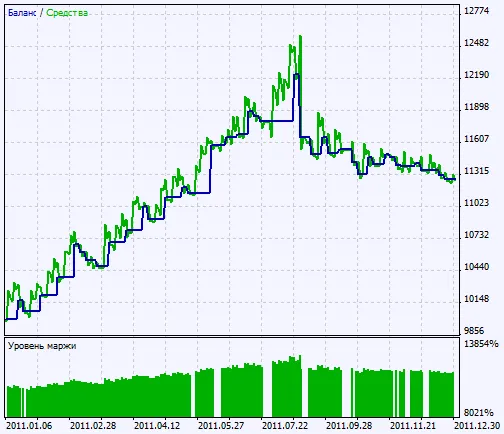
Fig. 2. Chart of testing results




Comments 0