
Hey fellow traders! Today, I want to share an exciting trading system that leverages the Open Oscillator Cloud indicator. This system is designed to help you adjust your trade volumes based on the outcomes of your previous trades. It’s a neat way to manage risk while keeping an eye on market trends.
The magic happens when a bar closes and signals a trend change, indicated by a shift in the cloud's color. Let’s dive into how you can manage your trading volumes effectively using the Expert Advisor (EA).
Customizable Input Parameters
To tailor your trading experience, the EA includes a block of input variables that help you control the volumes of your open positions:
inputuint BuyLossMMTrigger=2; // Number of losing Buy trades to reduce MMinputuint SellLossMMTrigger=2;// Number of losing Sell trades to reduce MMinputdouble SmallMM=0.01; // Portion of funds used in a trade during lossesinputdouble MM=0.1; // Portion of funds used in a trade during standard tradinginput MarginMode MMMode=LOT; // Method for calculating lot size
With these inputs, if your last two trades in a particular direction ended up being losses, the EA will open the next trade in the same direction with a volume of 0.01 lots. However, if at least one of the last two trades was profitable, then the position volume will be set to 0.1 lots. It’s a clever way to scale your trading based on performance!
Setting Up Your EA
For the EA to function correctly, make sure to have the compiled Open_Oscillator_Cloud.ex5 indicator file located in your <terminal_data_directory>\MQL5\Indicators folder. This is essential for smooth operation.
Testing Insights
During testing, default input parameters with stops were utilized, and here are some results from 2017 on the AUDUSD H2:
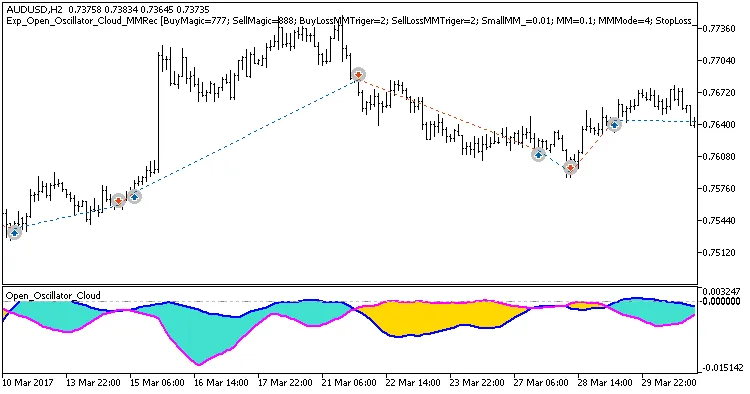
Fig. 1. Examples of trades on the chart
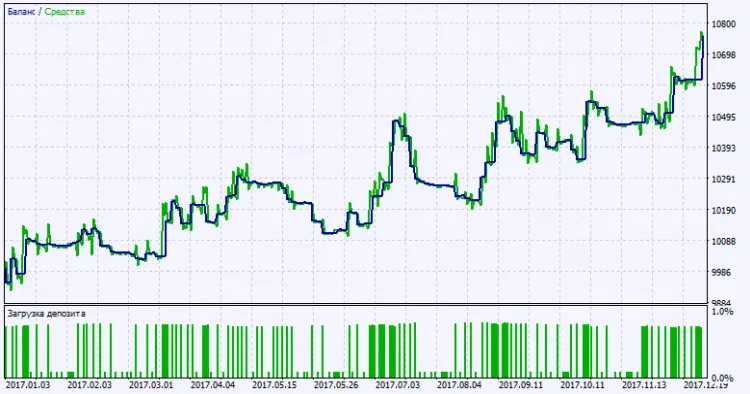
Fig. 2. Testing results chart
So there you have it! The Open Oscillator Cloud EA can be a game-changer for your trading strategy. Happy trading!




Comments 0