
If you're on the lookout for a reliable trading assistant, the wlxBWWiseMan-2 Expert Advisor (EA) could be just what you need. This EA utilizes the semaphore signal indicator, wlxBWWiseMan-2, to help streamline your trading decisions.
Here's how it works: a trade signal is generated when a bar closes and a graphical object of the corresponding color appears on your chart. It's as simple as that!
To get the most out of this EA, make sure you place the compiled indicator file wlxBWWiseMan-2.ex5 in the following directory: terminal_data_folder\MQL5\Indicators.
Additionally, the TradeAlgorithms.mqh library is a game changer. It allows you to use Expert Advisors with brokers that offer a non-zero spread and lets you set your Stop Loss and Take Profit right when you open a position. If you're interested, you can find more versions of this library here: Trade Algorithms.
For the tests below, we used the default input parameters of the EA. Notably, we did not apply any Stop Loss or Take Profit during these tests.
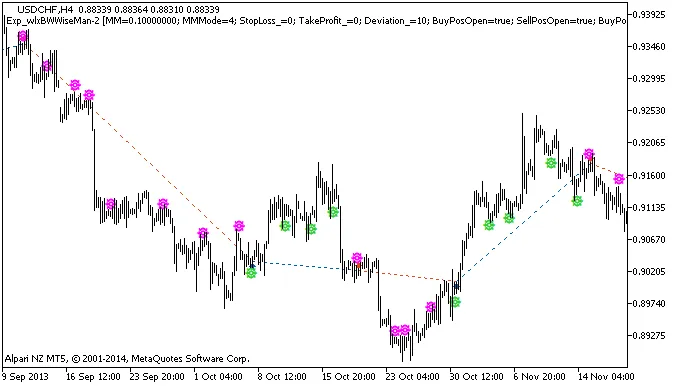
Figure 1: Instances of deal history on the chart.
Now, let’s take a look at the testing results for USDCHF on the H4 timeframe in 2013:
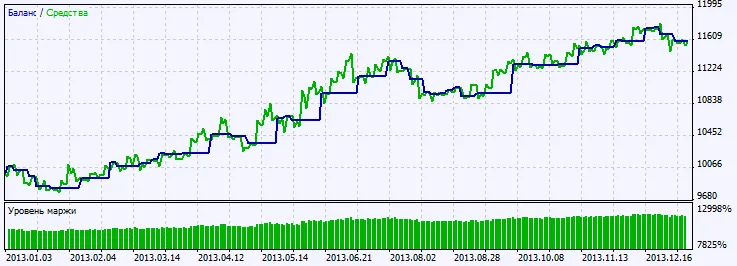
Figure 2: Chart of testing results.




Comments 0