
If you're looking to enhance your trading game on MetaTrader 5, you might want to check out the Combo_Right Expert Advisor (EA). This gem has been revamped from MQL4 by the talented Reshetov. You can dive deeper into the code here.
How It Works
The Combo_Right EA employs a solid trading strategy centered around the CCI (Commodity Channel Index) indicator. When the CCI value pops above zero, it signals a buy. Conversely, if it's below zero, the EA looks to sell. Simple, right?
Of course, no system is foolproof! To minimize errors, this EA incorporates linear perceptrons, which sometimes override the basic trading signals to ensure more accurate decisions.
There are three perceptrons in action: one for sell signals, one for buy signals, and a third that aggregates the results. The exit values of these perceptrons can swing either way. If both the total perceptron and the sell perceptron are negative, a sell order is initiated. If both the total and buy perceptrons are positive, a buy order kicks in. In other situations, the EA relies on the basic trading signals.
Setting up the Combo_Right EA is straightforward, thanks to the clear procedure recommended by the author. It involves a 'pass' parameter that ranges from 1 to 4:
- Pass 1: Default mode, where only the basic trading system is applied. Optimize parameters like tp1, sl1, CCIPeriod, and CCIPrice.
- Pass 2: Configure the sell perceptron by optimizing x12, x22, x32, x42, tp2, sl2, and p2.
- Pass 3: Set the buy perceptron by optimizing x13, x23, x33, x43, tp3, sl3, and p3.
- Pass 4: Finalize with the total perceptron by optimizing x14, x24, x34, x44, and p4.
For optimal performance, the Combo_Right EA operates in pass 4.
Check out the results from the EA in the tester:
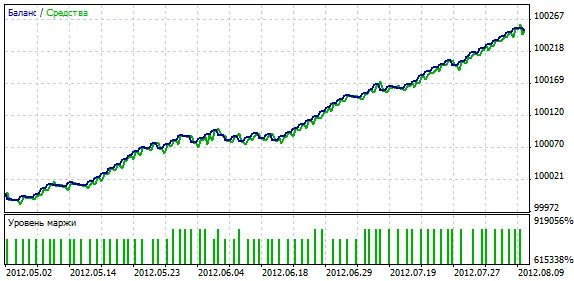
Fig. 1. Optimization results.
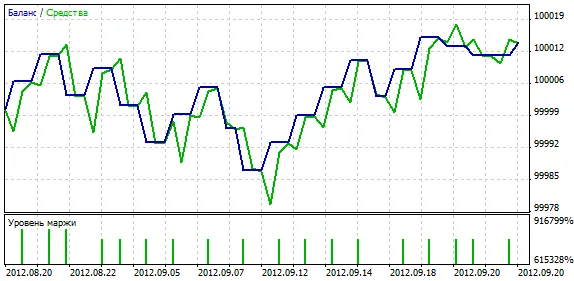
Fig. 2. Forward test results.
Key Parameters
- tp1: Take Profit for positions opened by basic trading signals.
- sl1: Stop Loss for positions opened by basic trading signals.
- CCIPeriod: The period for the CCI indicator.
- CCIPrice: The price data used for the CCI.
- x12, x22, x32, x42: Weights for the sell perceptron.
- tp2: Take Profit for positions opened by sell perceptron signals.
- sl2: Stop Loss for positions opened by sell perceptron signals.
- p2: Historical data coverage period for the sell perceptron.
- x13, x23, x33, x43: Weights for the buy perceptron.
- tp3: Take Profit for positions opened by buy perceptron signals.
- sl3: Stop Loss for positions opened by buy perceptron signals.
- p3: Historical data coverage period for the buy perceptron.
- x14, x24, x34, x44: Weights for the total perceptron.
- p4: Historical data coverage period for the total perceptron.
- pass: Mode of the EA: 1 for the basic system, 2 for the sell perceptron, 3 for the buy perceptron, and 4 for all perceptrons in operational mode.
- lots: Volume of the position.
- Shift: The bar from which price data is used: 0 for the current bar, 1 for the first formed bar.




Comments 0