
Hey there, fellow traders! If you’re looking to enhance your trading game, let me introduce you to the Crypto S&R EA. This Expert Advisor utilizes two different time frames and employs fractals as support and resistance levels. With features like Trailing Stop Loss and Take Profit, it’s designed to work seamlessly across all major forex pairs, cryptocurrencies, and even NASDAQ stocks!
Key Features of Crypto S&R EA
- Always start by testing on a demo account first!
- This EA operates based solely on the price of the open candle!
- If you prefer not to increase your lot size after a losing trade, simply set IncreaseFactor=0.
Input Parameters
- Use_TP_In_Money - Enable Take Profit in monetary terms (true/false).
- TP_In_Money - Take Profit in monetary value (range: 10-100).
- Use_TP_In_percent - Enable Take Profit in percentage (true/false).
- TP_In_Percent - Take Profit in percentage (range: 10-100).
- Enable_Trailing - Turn on trailing with monetary values (true/false).
- Take Profit In Money (in current currency) (range: 25-200).
- Stop Loss In Money (in current currency) (range: 1-20).
- FractalNum - Number of highs and lows (range: 1-20).
- BarsToCount - Specify the bars to count (range: 1-20).
- Exit - Close trades if the trend goes against you and manage drawdown (true/false).
- Lots - Lot size (range: 0.01-1).
- Lots size Exponent (range: 1.01-2).
- IncreaseFactor - Amount to increase lots from total margin after a loss (range: 0.001-0.1).
- Stop_Loss - Stop Loss value (range: 30-500). Set to 600 for multiple trades.
- MagicNumber - Unique identifier for trades (range: 1-100000).
- TakeProfit - Take Profit value (range: 50-200). Set to 600 for multiple trades.
- FastMA - Fast Moving Average (range: 1-20).
- SlowMA - Slow Moving Average (range: 50-200).
- Mom_Sell - Momentum Sell trigger (range: 0.1-0.9).
- Mom_Buy - Momentum Buy trigger (range: 0.1-0.9).
- UseEquityStop - Control drawdown (true/false).
- TotalEquityRisk - Risk exposure (range: 0.01-20).
- Max_Trades - Maximum number of trades (1-12).
Trading Tips
- Make sure to optimize this EA every few months using the parameters mentioned above.
- You can utilize it as a hedging grid EA or as a single trade EA.
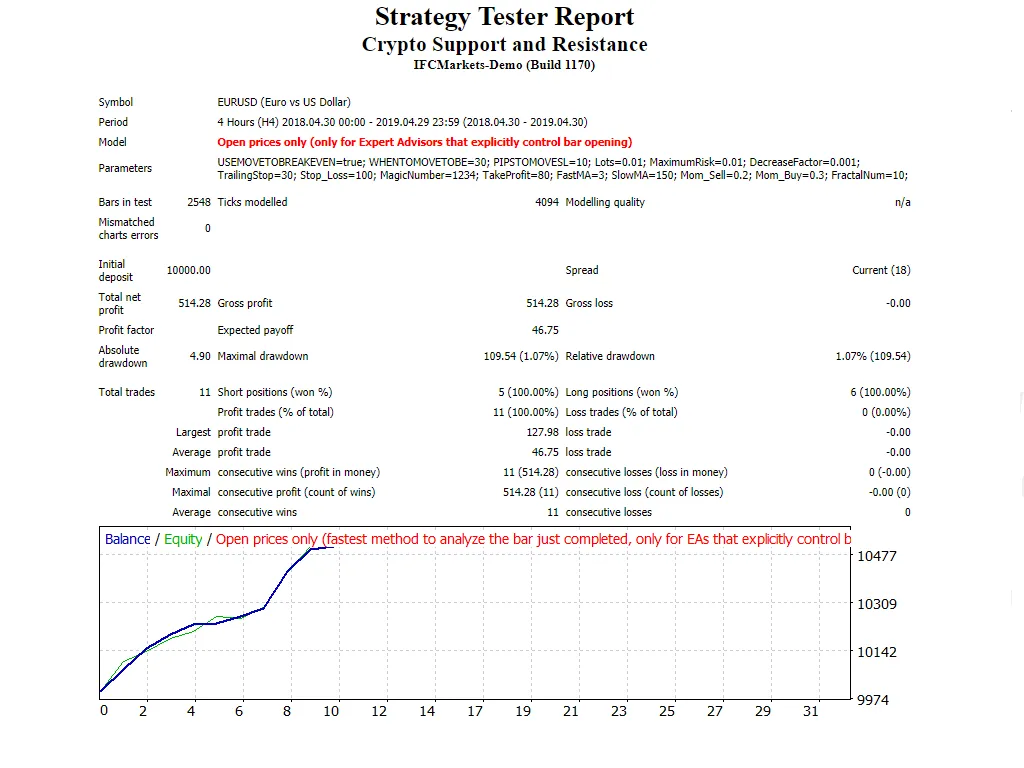
- For a guide on how to perform back-testing, check out this link: Back Testing Guide.




Comments 0