
Introduction to the Exp_ColorJFatl_Digit_ReOpen System
Hey there, fellow traders! If you're looking to elevate your trading game, let’s dive into the Exp_ColorJFatl_Digit_ReOpen trading system. This nifty tool is built on the ColorJFatl_Digit indicator, which reacts to color changes to help you add to your trend-following positions.
How It Works
Here’s the scoop: a trade signal gets triggered at the close of a bar when the color of the indicator line changes. What’s even cooler is that if your profits in points surpass a certain threshold set in the Expert Advisor (EA) inputs, the volume of your trades can be increased.
Tracking Your Additions
All the details regarding your additional trades are neatly stored in a string comment attached to your position. You can expect to see it formatted like this: number of additions/last trade price/last trade volume.
Getting Started
To get the Exp_ColorJFatl_Digit_ReOpen up and running, make sure you have the compiled indicator file ColorJFatl_Digit.ex5. Just drop it into your <terminal_data_folder>\MQL5\Indicators directory, and you’re all set!
Testing Insights
When we ran some tests using the default input parameters, we didn’t include Stop Loss and Take Profit in our analysis. Below are the results from our 2015 tests on the EURUSD H4 timeframe:
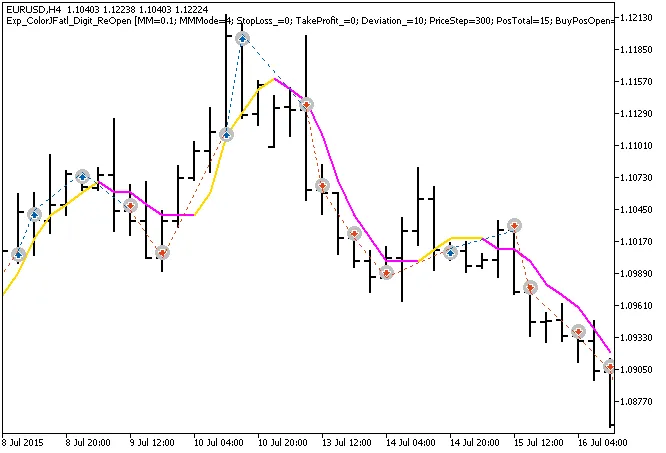
Fig.1. Examples of trades on the chart
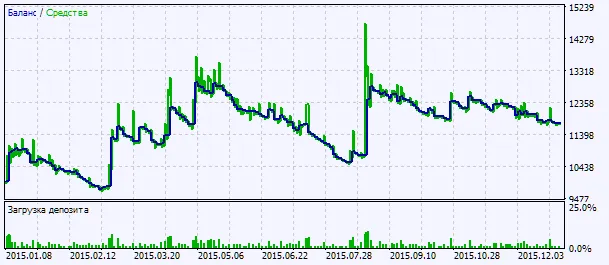
Fig.2. Testing results chart




Comments 0