
If you're on the lookout for a reliable Expert Advisor (EA) for MetaTrader 5, then allow me to introduce you to the Exp_ROC2_VG. This EA harnesses the power of the ROC2_VG indicator, which signals trades based on the color changes in its cloud. Essentially, a trading opportunity arises when a bar closes and the indicator's cloud color shifts. This feature allows you to trade against the trend, giving you a unique edge in the market.
inputbool Invert=false; //Trade against the trend
To get started, you'll need to ensure that the compiled indicator file ROC2_VG.ex5 is saved in your <terminal_data_folder>\MQL5\Indicators directory. This step is crucial for the EA to function correctly.
One of the standout features of this EA is its compatibility with brokers that offer a nonzero spread. Plus, it lets you set both Stop Loss and Take Profit levels right when you open a position. If you're interested in exploring more trading strategies, feel free to check out the Trade Algorithms library for additional variants.
The tests showcased below utilized the default input parameters of the EA, with neither Stop Loss nor Take Profit implemented during the testing phase.
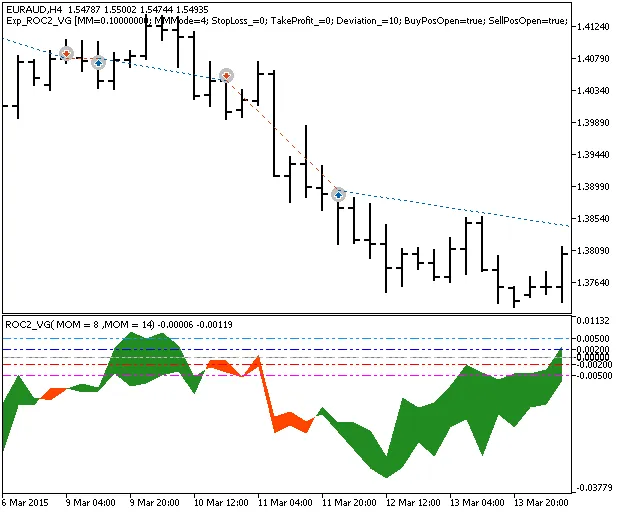
Fig.1. Examples of trades on the chart
Let’s take a look at the testing results from 2015 for the EURAUD H4 pair:
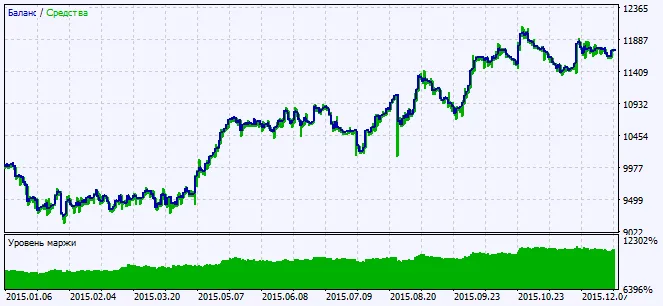
Fig.2. Charts of testing results




Comments 0