
If you're looking to enhance your trading strategy, the Exp_ColorZerolagMomentumOSMA Expert Advisor (EA) could be just what you need. This EA is designed to leverage the ColorZerolagMomentumOSMA histogram, and it generates signals based on changes in the oscillator's direction as each bar closes.
To get this EA up and running, you'll need to have the compiled indicator file ColorZerolagMomentumOSMA.ex5. Simply place it in your <terminal_data_folder>\MQL5\Indicators directory, and you're good to go!
One of the cool features of this EA is its compatibility with brokers offering a nonzero spread. It also supports the simultaneous setting of Stop Loss and Take Profit when you open a position. If you're interested in expanding your toolkit, you can check out additional variants of the Trade Algorithms library.
For the results shown below, we used the default input parameters for the Expert Advisor. It's worth noting that neither Stop Loss nor Take Profit were utilized during the testing phase.
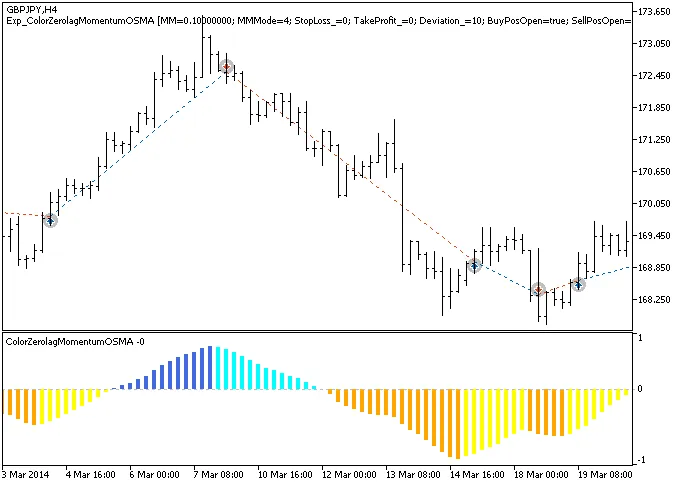
Fig.1. Trade examples on the chart
Let’s take a look at the testing results for 2014 on the GBPJPY H4 pair:
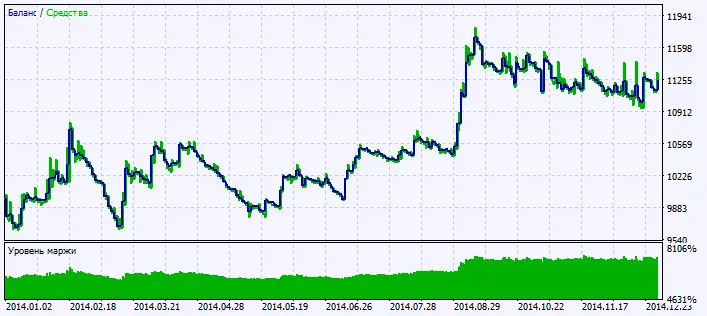
Fig.2. Testing results chart




Comments 0