
If you're looking to elevate your trading game, the Exp_Trigger_Line could be just what you need. This Expert Advisor (EA) is built on the robust signals from the Trigger_Line indicator. It generates signals when a bar closes, specifically when the main and signal lines cross, and there’s a color change in the indicator cloud. This means you can catch those key moments for trade entries!
To get started, make sure you have the Trigger_Line.ex5 indicator compiled and placed in your terminal_data_folder\MQL5\Indicators directory. Without it, the EA won’t function properly.
One thing to keep in mind is that the TradeAlgorithms.mqh library file enables the use of EAs with brokers offering nonzero spreads. Plus, it allows you to set your Stop Loss and Take Profit right when you open a position. If you want to explore more options, you can download additional variants of the library by clicking here: Trade Algorithms.
During our testing, we used the default input parameters for the EA, and it's worth noting that neither Stop Loss nor Take Profit was utilized in these tests.
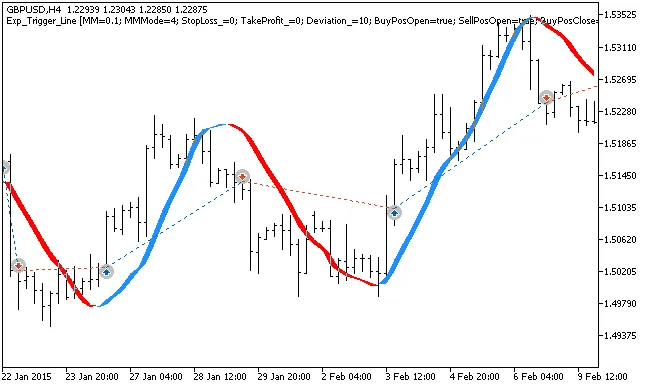
Fig. 1. Examples of trades on the chart
Here’s a look at the testing results for 2015, focusing on GBPUSD on the H4 timeframe:
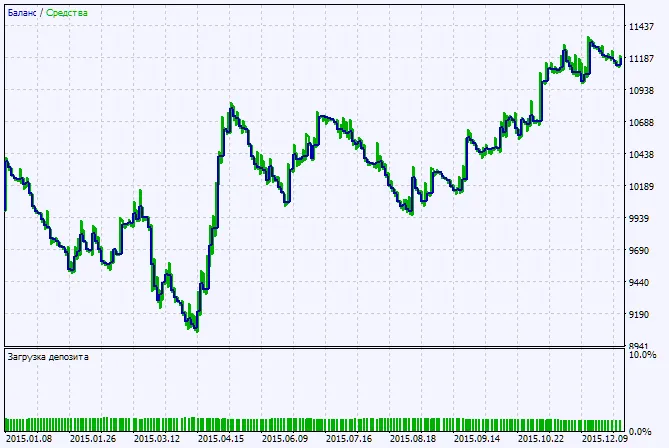
Fig. 2. Testing results chart




Comments 0