
Welcome, fellow traders! Today, we're diving into a trading system that's gaining traction: the JMACandleSign indicator. This nifty tool generates signals based on the closing bars, particularly when a color point appears. It's an easy way to get a handle on market movements.
To get started, make sure to place the JMACandleSign.ex5 and JMA.ex5 files into your <terminal_data_folder>\MQL5\Indicators directory. This is a crucial step to ensure everything runs smoothly.
One handy feature of the TradeAlgorithms.mqh library is its compatibility with brokers offering nonzero spreads. Plus, it allows you to set your Stop Loss and Take Profit levels right when you open a position. If you're interested in exploring more variations of this library, check out this link: Trade Algorithms.
For the tests shown below, we used the default input parameters of the Expert Advisor. It’s worth noting that we didn’t apply Stop Loss or Take Profit during these tests, which gives us a clearer picture of performance.
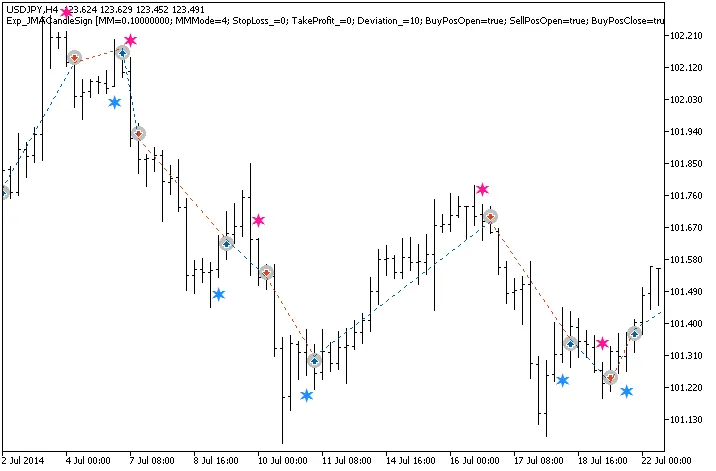
Fig. 1. Trade examples on the chart
Now, let’s take a look at the testing results for 2014 on the USDJPY H4 timeframe:
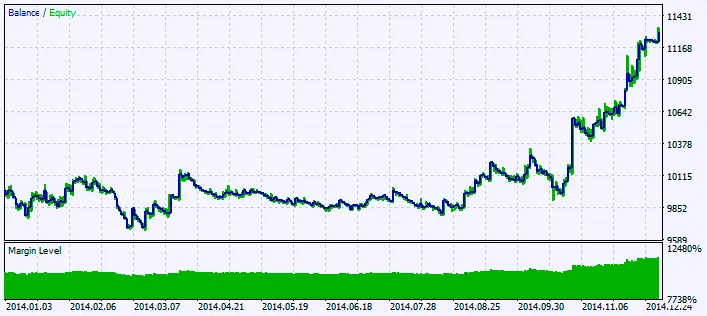
Fig. 2. Chart of testing results




Comments 0