
If you're looking to enhance your trading strategy, the Stochastic Histogram indicator could be your new best friend. This trading system relies on signals generated when a bar closes, giving you a clearer picture of market trends. The Expert Advisor (EA) utilizes one of two methods to define the trend based on your input settings:
input TrendMode TMode=Cross; // Choose your trend detection method
- When the signal line intersects with the main line of the indicator while the signal cloud color shifts;
- When the histogram color moves from neutral gray to pink or lime, indicating that the RVI oscillator is hitting overbought or oversold zones.
To get started, you’ll need the compiled file for the Stochastic Histogram indicator, named Stochastic_Histogram.ex5. Make sure to save it in your <terminal_data_folder>\MQL5\Indicators directory.
It's worth noting that the TradeAlgorithms.mqh library file allows you to use the EA with brokers offering nonzero spreads and enables you to set Stop Loss and Take Profit levels right at the moment you open a position. You can find additional variants of the library here: Trade Algorithms.
The tests showcased below used the default input parameters of the Expert Advisor. For these tests, Stop Loss and Take Profit settings were not applied.
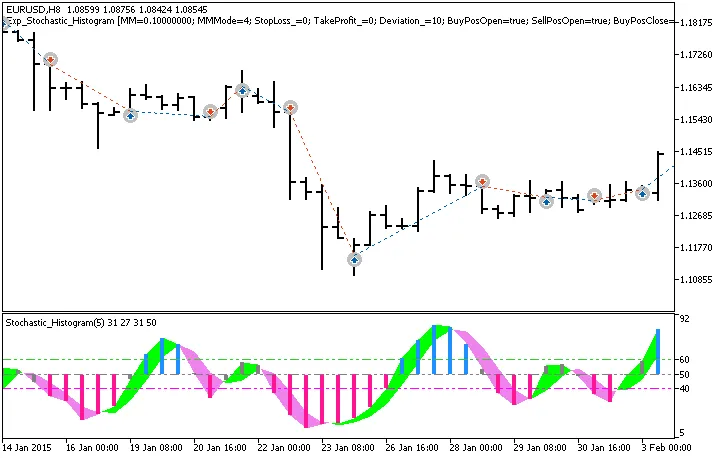
Fig. 1. Examples of trades on the chart
Here are the testing results for 2015 on the EURUSD H8 timeframe:
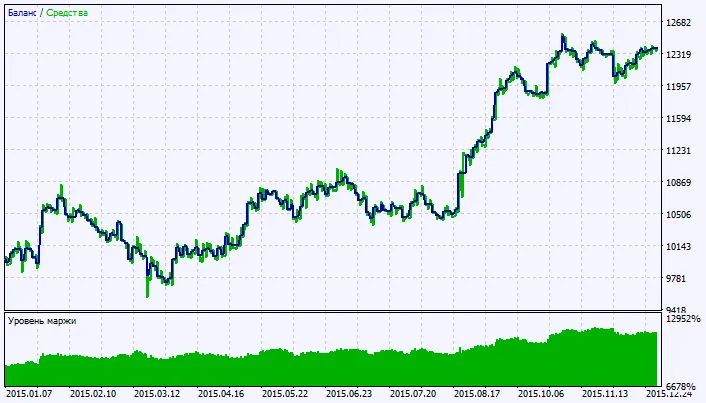
Fig. 2. Chart of testing results




Comments 0