
If you're looking to add a robust trading system to your MetaTrader 5 toolkit, take a look at the Hans Indicator Cloud System. This system is all about making your trading easier with a unique feature: the ability to set a fixed holding time for your positions. Let’s dive into how it works!
The magic happens when a bar closes and there’s a channel breakthrough—this is when the signal is generated. If you set a holding time that exceeds your preset limit, the position will close automatically. It’s like having a safety net for your trades!
inputbool TimeTrade=true; //Enable position exit by timeinputuint nTime=1500; //Open position holding time in minutes
For everything to run smoothly, make sure you have the compiled Hans_Indicator_Cloud_System.ex5 file in your <terminal_data_directory>\MQL5\Indicators folder. This system builds on the original Exp_Hans_Indicator_Cloud_System EA, enhancing it with the fixed time feature for holding positions.
It's worth noting that this EA operates on timeframes no higher than M30:
inputENUM_TIMEFRAMES InpInd_Timeframe=PERIOD_M30;//Hans Indicator Cloud System indicator timeframe
In the tests shown below, we used the default parameters of the Expert Advisor without any stop loss or take profit settings. Sometimes, less is more!
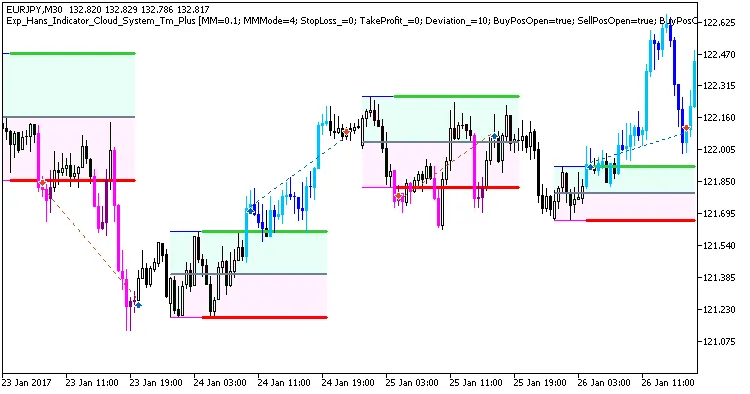
Fig. 1. Examples of trades on the chart
Here are the results from testing on EURJPY for M30 in 2017:
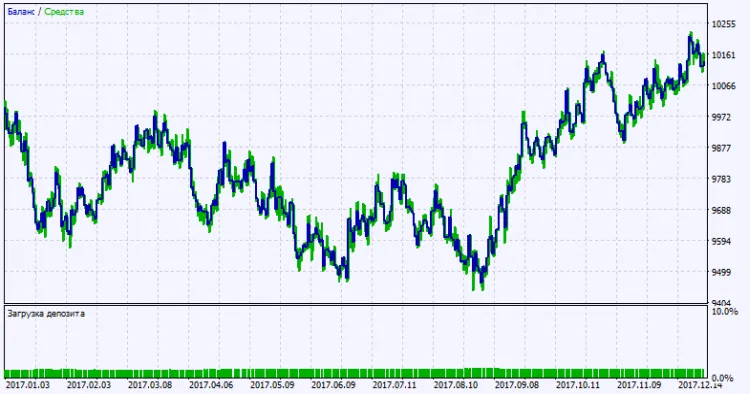
Fig. 2. Test results chart




Comments 0