
Welcome to the exciting world of the Quantum trading system! Today, we're diving into one of the implementations specifically designed for MetaTrader 4.
This version focuses on identifying extreme price values within a specified number of bars that you, as the trader, can set. Let's break it down:
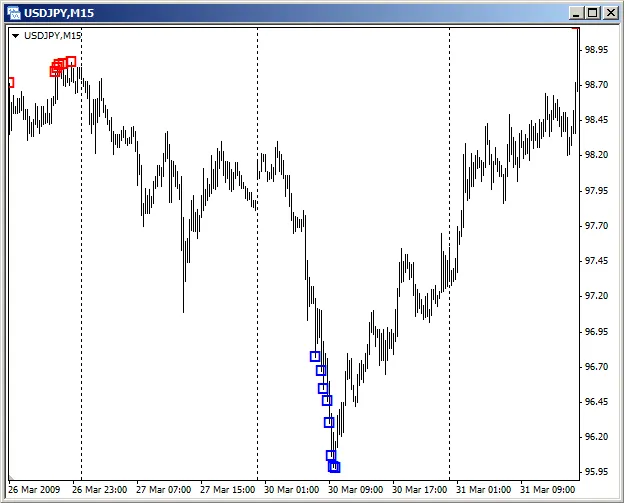
The red labels on the chart indicate local maximums, where it's generally a good idea to consider short trades. Conversely, the blue labels represent local minimums, suggesting it's time to look for long trade opportunities.
One of the key enhancements of this system is the use of the Stochastic indicator to filter the signals we receive. When the main line of the Stochastic moves out of the overbought or oversold zones, it confirms the price extremum, giving you more reliable entry points.
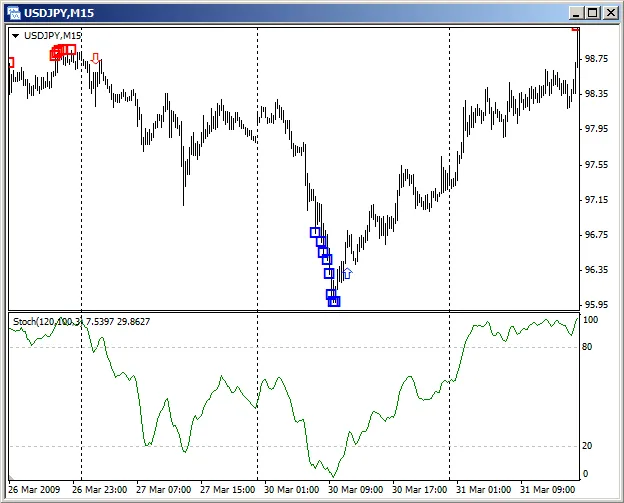
This filtering process significantly reduces false signals. Keep in mind, though, there might be a slight delay, which can affect your entry price. But overall, the benefits of filtering far outweigh this minor setback.
When you open a position, set your Stop Loss just beyond the last identified price extremum. While there's no default Take Profit level, you do have the flexibility to define your own in points from your entry price. You'll close your profitable trades when the Stochastic's main line crosses the levels you've set for "Level to close Buy" and "Level to close Sell."
For a more in-depth analysis of this strategy and the results from its testing, check out the detailed article on The Quantum Trading System.




Comments 0