
If you're on the lookout for a robust trading tool, the Exp_FRASMAv2 Expert Advisor might just be what you need. This system leverages the color changes of the FRASMAv2 moving average to generate trading signals. Simply put, when a bar closes and there's a shift in the indicator line's color, that's your cue to act!
Before you dive in, make sure you have the compiled indicator file FRASMAv2.ex5 loaded up. You'll want to place this in your <terminal_data_folder>\\MQL5\Indicators directory for everything to run smoothly.
One thing to note is that the TradeAlgorithms.mqh library file is essential for using the Expert Advisor with brokers that offer a nonzero spread. Plus, it allows you to set both Stop Loss and Take Profit at the same time as you open your positions. You can grab more versions of this handy library here: Trade Algorithms.
For the tests illustrated below, we used the default input parameters for the Expert Advisor. Just a heads-up: Stop Loss and Take Profit settings weren't utilized during these tests.
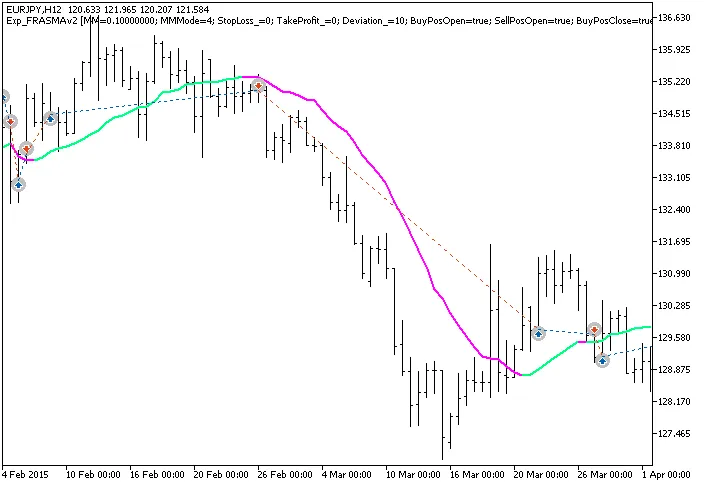
Fig.1. The instances of history of deals on the chart.
Now, let’s take a look at the testing results for 2015 on the EURJPY H12:
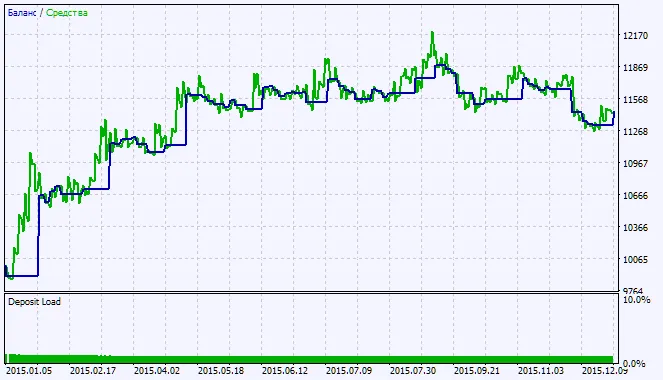
Fig.2. Testing results chart




Comments 0