
If you're looking to up your trading game, the Exp_ColorNonLagDotMACD Expert Advisor is a must-try. This EA is built around signals generated from the ColorNonLagDotMACD histogram, providing you with reliable trading signals that can boost your strategy. A trade signal is triggered at the closing of the bar when there's a breakthrough in the RMACD histogram at the zero level. Additionally, changes in the histogram's direction or the signal line can also indicate a trading opportunity, depending on the settings you choose in the input parameters.
To get started, simply place the ColorNonLagDotMACD.ex5 and NonLagDot.ex5 compiled files in your terminal's data folder, specifically under MQL5\Indicators.
During the tests outlined below, we used the default input parameters for the Expert Advisor. It's worth noting that Stop Loss and Take Profit were not utilized in these tests, which might affect your results, so keep that in mind!
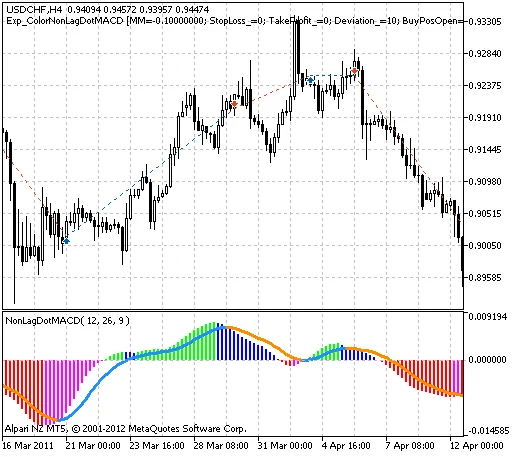
Fig. 1. The instances of history of deals in the chart.
Let's take a look at the testing results from 2011, focusing on the USDCHF pair on the H4 timeframe:
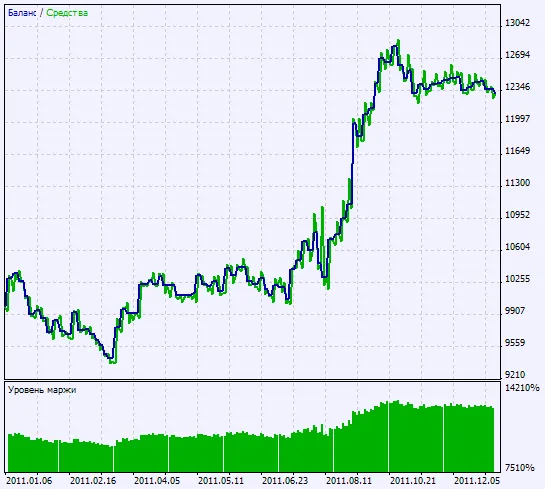
Fig. 2. Chart of testing results




Comments 0