
The Exp_ColorXADX trading system is designed to help traders identify shifts in trend direction, utilizing the ColorXADX indicator. Signals for making trades are generated at the close of each bar, based on the color change of the cloud in the "XDi" indicator.
To avoid false signals in sideways markets, this system incorporates a trend strength filter. This filter assesses whether the trend is strong enough to justify opening a position. The strength of the trend is defined by an input parameter:
inputint ExtraHighLevel=30; //minimum trend strength for opening a trade
It’s important to note that while this system filters trade entries, exits are executed without any filtering.
To set up the system, simply place the ColorXADX.ex5 compiled file in the terminal_data_folder\MQL5\Indicators directory.
During the testing phase, the default input parameters of the Expert Advisor were used, with no Stop Loss or Take Profit settings applied.
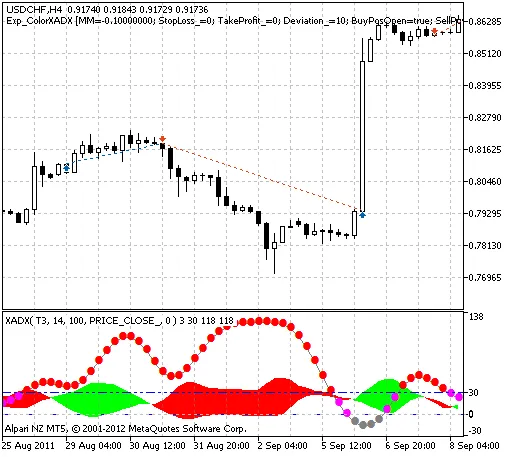
Fig. 1. Trade history instances on the chart.
Here are the testing results for 2011 on the USDCHF H4 timeframe:
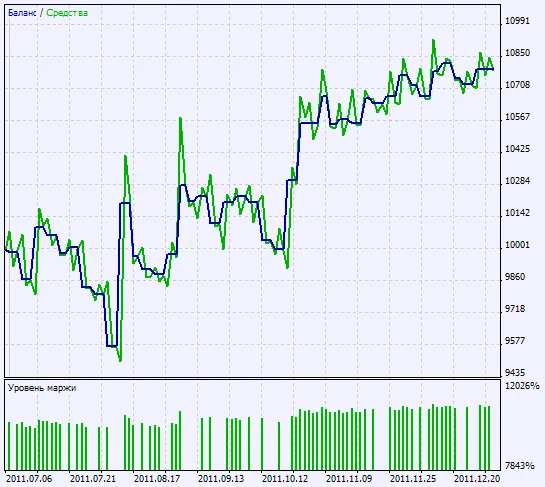
Fig. 2. Testing results overview




Comments 0