
Hey traders! Today, let’s dive into the Exp_TSI_MACD, an Expert Advisor (EA) tailored for MetaTrader 5. This nifty tool is built on the signals generated by the TSI_MACD oscillator.
The magic happens when a bar closes, and there’s a change in the cloud color of the indicator—this is your entry signal!
To get the most out of this EA, make sure to place the compiled indicator file TSI_MACD.ex5 into your terminal data folder under terminal_data_folder/MQL5/Indicators.
One important tip: the TradeAlgorithms.mqh library file is essential for using EAs with brokers offering non-zero spreads. Plus, it allows you to set Stop Loss and Take Profit right when you open a position. You can explore more variants of this library through this link: Trade Algorithms.
It’s worth noting that during our tests, we used the default input parameters of the EA. Interestingly, we didn’t incorporate Stop Loss and Take Profit in those tests, so keep that in mind when analyzing your results.
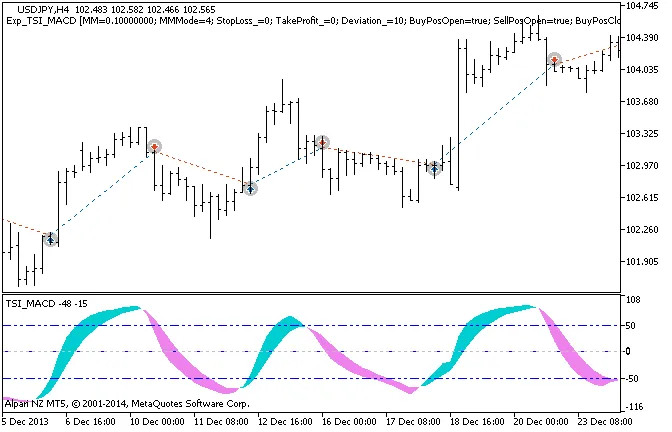
Figure 1 The instances of history of deals on the chart.
Now, let’s take a look at the testing results for 2013, specifically on the USDJPY H4 timeframe:
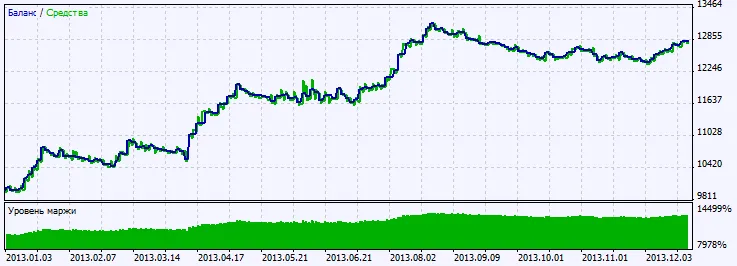
Figure 2. Chart of testing results




Comments 0