
Welcome, fellow traders! Today, let's dive into a fascinating trading system that leverages the PChannel System indicator signals. This system generates signals based on the closing of a bar, particularly when a colored bar appears, and the previous bar shows the opposite color or remains uncolored.
Before we get started, make sure you have the compiled indicator file, PChannel_System.ex5, saved in your <terminal_data_folder>\MQL5\Indicators directory. This is essential for the Expert Advisor (EA) to function properly.
Now, a quick heads-up: The TradeAlgorithms.mqh library file is a game changer. It enables the use of EAs with brokers offering non-zero spreads and lets you set your Stop Loss and Take Profit levels right when you open a position. If you're looking for more options, check out the additional variants you can find here: Trade Algorithms.
For the tests showcased below, we utilized the default input parameters for the Expert Advisor. It's worth noting that we didn't apply Stop Loss or Take Profit during these tests.
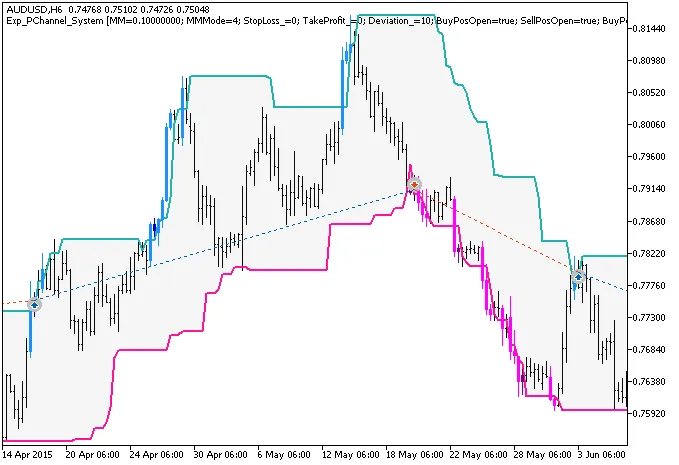
Fig. 1. The instances of history of deals on the chart.
Now, let’s take a look at the testing results for 2015 on the AUDUSD pair using the H6 timeframe:
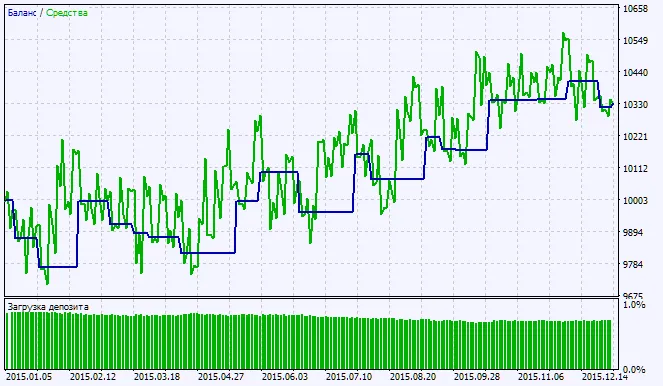
Fig. 2. Testing results chart




Comments 0