
Welcome back, traders! Today, we’re diving into a powerful trading system that utilizes the RSIOMA_V2 indicator. This tool can be a game changer for your trading strategy.
So, how does it work? The system generates trade signals when the fast envelope of the colored cloud shifts direction. This happens at the breakout of overbought or oversold levels, or when the color of the signal line cloud switches. That’s your cue to make a move!
Setting Up Your Entry Algorithm
One vital input parameter you’ll want to consider is:
input AlgMode Mode=breakdown; // This sets the algorithm for entering the market
To get started, you’ll need the compiled indicator file RSIOMA_V2.ex5. Make sure to place it in your terminal data directory under MQL5/Indicators.
Also, keep in mind that the TradeAlgorithms.mqh library file is a must-have. It allows you to use Expert Advisors with brokers that offer a nonzero spread and lets you set your Stop Loss and Take Profit right when you open a position. You can grab more variations of this library at this link: TradeAlgorithms.
Testing the Expert Advisor
In our tests, we used the default input parameters for the Expert Advisor. Notably, we did not employ Stop Loss and Take Profit during these tests.
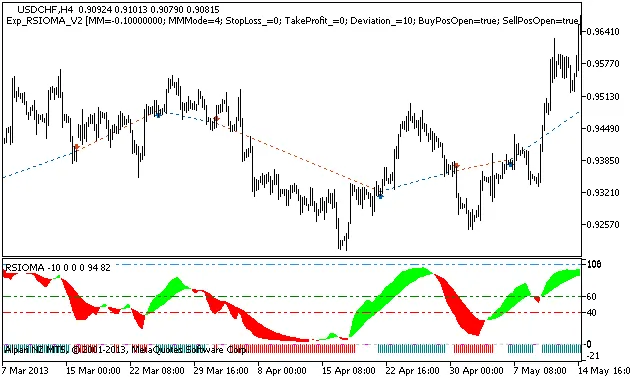
Fig. 1 The instances of history of deals on the chart.
Now, let’s take a look at the testing results from 2013 on the USDCHF H4:
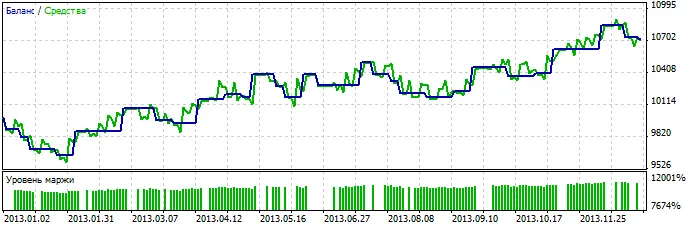
Fig. 2. Chart of testing results




Comments 0