
ColorPEMA_Digit_Trend_x10 지표는 ColorPEMA_Digit 지표의 신호를 10개의 서로 다른 시간대에서 표시해줍니다. 사용자가 설정한 바에서 트렌드 연속은 오른쪽 화살표로, 반전은 대각선으로 위나 아래 화살표로 나타납니다.
//+----------------------------------------------+//| 지표 입력 매개변수 |//+----------------------------------------------+inputENUM_TIMEFRAMES TimeFrame0=PERIOD_H1; //차트 1 기간inputENUM_TIMEFRAMES TimeFrame1=PERIOD_H2; //차트 2 기간inputENUM_TIMEFRAMES TimeFrame2=PERIOD_H3; //차트 3 기간inputENUM_TIMEFRAMES TimeFrame3=PERIOD_H4; //차트 4 기간inputENUM_TIMEFRAMES TimeFrame4=PERIOD_H6; //차트 5 기간inputENUM_TIMEFRAMES TimeFrame5=PERIOD_H8; //차트 6 기간inputENUM_TIMEFRAMES TimeFrame6=PERIOD_H12; //차트 7 기간inputENUM_TIMEFRAMES TimeFrame7=PERIOD_D1; //차트 8 기간inputENUM_TIMEFRAMES TimeFrame8=PERIOD_W1; //차트 9 기간inputENUM_TIMEFRAMES TimeFrame9=PERIOD_MN1; //차트 10 기간inputuint SignalBar=1; //신호를 받을 바 번호(0 - 현재 바)//---- ColorPEMA_Digit 매개변수inputdouble EmaLength=50.01; //스무딩 깊이 input Applied_price_ IPC=PRICE_CLOSE_; //가격 상수inputuint Digit=2; //반올림할 자리수//---- 지표 그리기 매개변수inputcolor CpColor=clrBlueViolet; //지표 이름 색상inputcolor BuyColor=clrDodgerBlue; //매수 신호 색상inputcolor UpColor=clrMediumBlue; //상승 추세 연속 색상inputcolor NnColor=clrGray; //무추세 색상inputcolor DnColor=clrPurple; //하락 추세 연속 색상inputcolor SellColor=clrMagenta //매도 신호 색상inputint FontSize=15 //폰트 크기input type_font FontType=Font14; //폰트 종류inputENUM_BASE_CORNER WhatCorner=CORNER_LEFT_LOWER; //위치 코너inputuint Y_=20 //수직 위치inputuint X_=5 //수평 위치
이 지표가 작동하려면 ColorPEMA_Digit.ex5 지표를 <terminal_data_directory>\MQL5\Indicators 폴더에 추가해야 합니다. 지표를 컴파일하려면 GetFontName.mqh 파일이 <terminal_data_directory>\MQL5\Include 폴더에 있어야 합니다.
이 지표는 GetFontName.mqh 라이브러리의 클래스를 사용합니다. (terminal_data_directory\MQL5\Include에 복사해야 함)
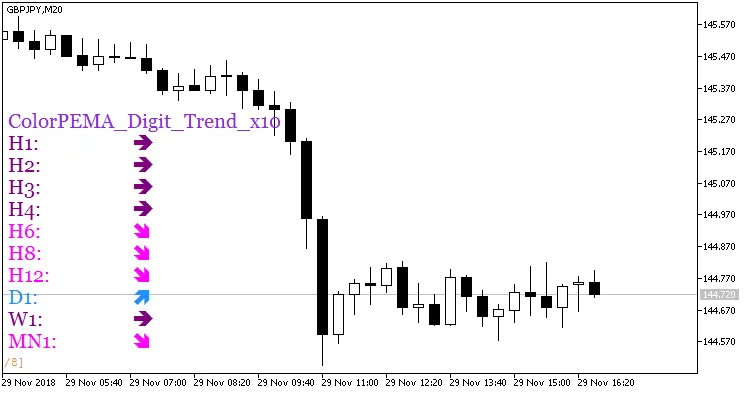
Fig. 1. ColorPEMA_Digit_Trend_x10 지표




댓글 0