
The ColorPEMA_Digit_Trend_x10 indicator is a powerful tool for traders using MetaTrader 5. It provides insights into market trends by displaying signals from the ColorPEMA_Digit indicator across ten different timeframes. A right arrow indicates a trend continuation, while diagonal arrows (up or down) signal a potential reversal.
Setting Up the Indicator
To get started with the ColorPEMA_Digit_Trend_x10 indicator, you’ll need to set it up correctly in your MetaTrader environment. Here are the key input parameters you can customize:
//+----------------------------------------------+//| Input parameters for ColorPEMA_Digit_Trend_x10|//+----------------------------------------------+inputENUM_TIMEFRAMES TimeFrame0=PERIOD_H1; // 1-hour chartinputENUM_TIMEFRAMES TimeFrame1=PERIOD_H2; // 2-hour chartinputENUM_TIMEFRAMES TimeFrame2=PERIOD_H3; // 3-hour chartinputENUM_TIMEFRAMES TimeFrame3=PERIOD_H4; // 4-hour chartinputENUM_TIMEFRAMES TimeFrame4=PERIOD_H6; // 6-hour chartinputENUM_TIMEFRAMES TimeFrame5=PERIOD_H8; // 8-hour chartinputENUM_TIMEFRAMES TimeFrame6=PERIOD_H12; // 12-hour chartinputENUM_TIMEFRAMES TimeFrame7=PERIOD_D1; // Daily chartinputENUM_TIMEFRAMES TimeFrame8=PERIOD_W1; // Weekly chartinputENUM_TIMEFRAMES TimeFrame9=PERIOD_MN1; // Monthly chart
Important Notes
To ensure the indicator works smoothly, make sure to have the ColorPEMA_Digit.ex5 indicator placed in your <terminal_data_directory>\MQL5\Indicators folder. Additionally, the file GetFontName.mqh should be located in the <terminal_data_directory>\MQL5\Include folder for proper compilation.
Visual Representation
The ColorPEMA_Digit_Trend_x10 indicator uses classes from the library GetFontName.mqh. Here’s how it looks in action:
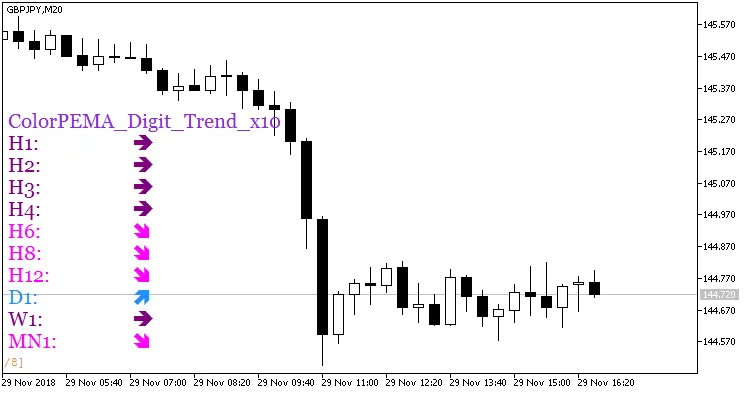
Fig. 1. Indicator ColorPEMA_Digit_Trend_x10




Comments 0