
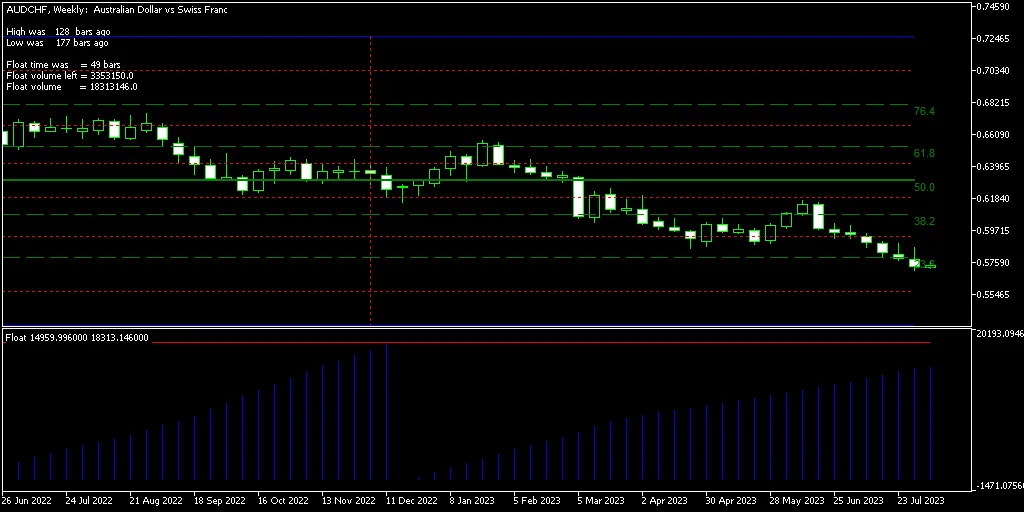
Float MetaTrader Indicator is a powerful tool designed for traders who want to dive deep into the trends of their chosen currency pairs. It analyzes historical chart data and helps identify where trends begin and end in a dedicated chart window. With features like Fibonacci retracement levels and DiNapoli levels displayed directly on your main chart, it’s like having a personal trading assistant right at your fingertips. Plus, it indicates how recently local highs and lows were identified, giving you crucial insights into market movements. This indicator is available for both MT4 and MT5 platforms.
It’s important to note that the indicator repaints its levels based on the last 200 bars it processes by default. This means you might find that its signals for new highs or lows could change as the market evolves. So, while it’s a great tool for analyzing trend durations and key chart levels, it shouldn’t be your sole trading signal.
Input Parameters
- Float (default = 200) — This sets the number of bars analyzed for trend detection. A lower number gives you more current data but can affect accuracy.
- ObjectPrefix (default = "FI-") — This prefix helps maintain compatibility with other indicators.
- DisableDinapoli (default = false) — Set to true to hide DiNapoli levels from the main chart window.
- DisableFibonacci (default = false) — Set to true to exclude Fibonacci levels from your main chart.
- DrawVerticalLinesAsBackground (default = false) — Choose true to display vertical trend lines as a background, keeping your chart clear.
- SwingBorderColor (default = clrBlue) — Defines the color of the swing zone borders.
- SwingBorderWidth (default = 1) — Sets the width of the swing zone borders.
- SwingBorderStyle (default = STYLE_SOLID) — Determines the style of the swing zone border lines.
- SwingLinesColor (default = clrRed) — Color for the swing lines on your chart.
- SwingLinesWidth (default = 1) — Adjusts the width of the swing lines.
- SwingLinesStyle (default = STYLE_DOT) — Sets the line style for the swing lines.
- FiboColor (default = clrGreen) — Color for the Fibonacci levels.
- FiboWidth (default = 1) — Width of the Fibonacci lines.
- FiboStyle (default = STYLE_DASH) — Line style for the Fibonacci levels.
- DinapoliColor (default = clrRed) — Color for the DiNapoli levels.
- DinapoliWidth (default = 1) — Width of the DiNapoli lines.
- DinapoliStyle (default = STYLE_DOT) — Line style for the DiNapoli levels.




Comments 0