
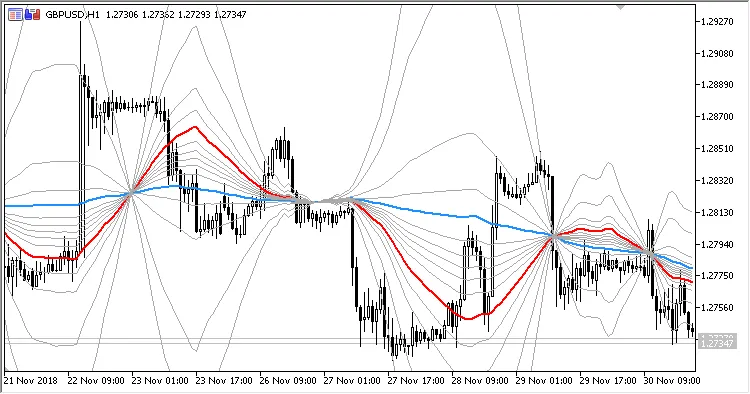
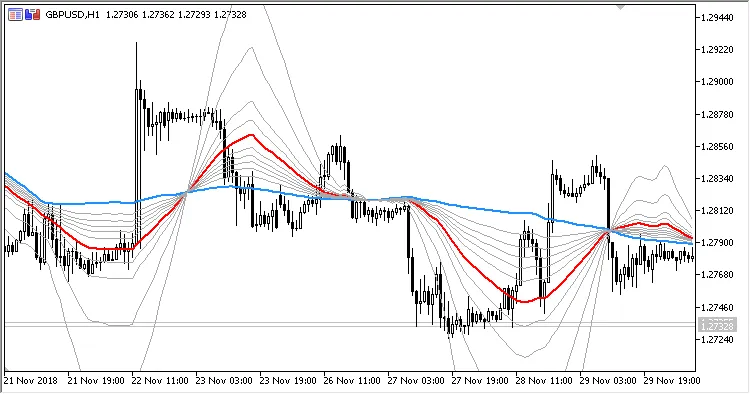
Hey fellow traders! If you’re looking to sharpen your trading edge, let me introduce you to the MicroPivots indicator for MetaTrader 5. This nifty tool displays selected Fibonacci levels between two moving averages, helping you pinpoint potential support and resistance levels with ease.
One of the standout features of MicroPivots is its thirty-two adjustable parameters that let you tailor the settings to fit your trading style:
- First MA period - sets the period for the first moving average calculation.
- First MA method - choose how the first moving average is calculated.
- First MA applied price - select the price used for the first moving average calculation.
- Second MA period - sets the period for the second moving average calculation.
- Second MA method - choose how the second moving average is calculated.
- Second MA applied price - select the price used for the second moving average calculation.
- Show Fibo-level 1 - display Fibonacci level 1.
- Fibo-level 1 value - adjust the value of Fibonacci level 1.
- Show Fibo-level 2 - display Fibonacci level 2.
- Fibo-level 2 value - adjust the value of Fibonacci level 2.
- Show Fibo-level 3 - display Fibonacci level 3.
- Fibo-level 3 value - adjust the value of Fibonacci level 3.
- Show Fibo-level 4 - display Fibonacci level 4.
- Fibo-level 4 value - adjust the value of Fibonacci level 4.
- Show Fibo-level 5 - display Fibonacci level 5.
- Fibo-level 5 value - adjust the value of Fibonacci level 5.
- Show Fibo-level 6 - display Fibonacci level 6.
- Fibo-level 6 value - adjust the value of Fibonacci level 6.
- Show Fibo-level 7 - display Fibonacci level 7.
- Fibo-level 7 value - adjust the value of Fibonacci level 7.
- Show Fibo-level 8 - display Fibonacci level 8.
- Fibo-level 8 value - adjust the value of Fibonacci level 8.
- Show Fibo-level 9 - display Fibonacci level 9.
- Fibo-level 9 value - adjust the value of Fibonacci level 9.
- Show Fibo-level 10 - display Fibonacci level 10.
- Fibo-level 10 value - adjust the value of Fibonacci level 10.
- Show Fibo-level 11 - display Fibonacci level 11.
- Fibo-level 11 value - adjust the value of Fibonacci level 11.
- Show Fibo-level 12 - display Fibonacci level 12.
- Fibo-level 12 value - adjust the value of Fibonacci level 12.
- Show Fibo-level 13 - display Fibonacci level 13.
- Fibo-level 13 value - adjust the value of Fibonacci level 13.
When it comes to moving averages, you have a variety of calculation methods to choose from:
- Simple - Simple Moving Average
- Exponential - Exponential Moving Average
- Smoothed - Smoothed Moving Average
- Linear-Weighted - Linear Weighted Moving Average
- Wilder Exponential - Welles Wilder's EMA
- Sine-Weighted - Sine-Weighted Moving Average
- Triangular - Triangular Moving Average
- Least Square - Least Square Moving Average (LSMA)
- Hull MA by Alan Hull - Hull's Moving Average (HMA)
- Zero-Lag Exponential - Exponential Moving Average with minimal delay
- Instantaneous Trendline by J. Ehlers - John Ehlers' Trendline
- Moving Median - Moving Median
- Geometric Mean - Average based on Geometric Mean
- Regularized EMA by Chris Satchwell - Chris Satchwell's Regularized EMA
- Integral of Linear Regression Slope - ILRS Moving Average
- Combination of LSMA and ILRS - a combination of LSMA and ILRS methods
- Triangular MA generalized by J. Ehlers - Ehlers' Triangular Moving Average
- Volume-Weighted - Volume-Weighted Moving Average




Comments 0