
Hey there, fellow traders! If you're looking to refine your technical analysis skills, let me introduce you to the RSI in MA indicator. This powerful tool can help you spot trends in your trading pairs with ease.
What is the RSI in MA Indicator?
The RSI in MA indicator changes color based on the Relative Strength Index (RSI) crossing specific levels. When the RSI crosses above a certain level, it indicates an uptrend, while a cross below suggests a downtrend. This visual cue can significantly enhance your trading decisions.
Key Parameters to Set
- MA_Periods — This sets the period for the moving average (iMA).
- MA_Method — Choose the method for calculating the moving average.
- RSI_Periods — This defines the period for the RSI calculation.
- RSI_AppliedPrice — Select the price type used for calculating the RSI.
- RSI_LevelsUp — Set the RSI level indicating an uptrend.
- RSI_LevelsDN — Set the RSI level indicating a downtrend.
- BarsCount — Determine how many bars will display the trend line.
- ReverseSignals — This option allows you to reverse the signals from uptrend to downtrend.
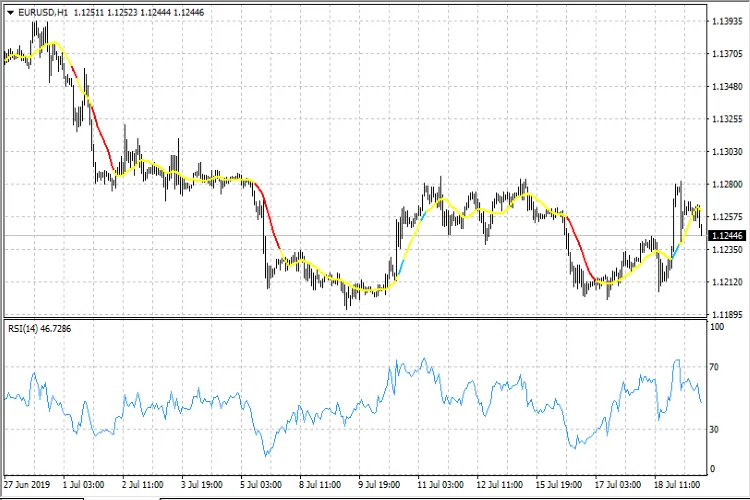
Using the RSI in MA can be a game changer for your trading strategy. By visualizing trends more effectively, you can make more informed decisions and improve your overall trading performance. Happy trading!




Comments 0