
Welcome aboard, fellow traders! Today, we're diving into the Beginner EA for MetaTrader 5. This trading system utilizes a single indicator that generates signals right at the bar's closing when a color point appears.
To kick things off, simply place the Beginner.ex5 file into your terminal_data_folder/MQL5/Indicators. It’s that easy!
What’s great about this Expert Advisor is its ability to showcase the indicator directly on your current chart, eliminating the hassle of manual installation. Once you’ve got the EA up and running, the indicator will automatically display on your chart. Plus, it syncs perfectly with the EA's input parameters, ensuring everything matches up seamlessly. Just a heads-up, the indicator will only appear if it aligns with your chart’s time frame!
For the tests shown below, the default input parameters were used. Notably, both Stop Loss and Take Profit settings were not applied during these tests.
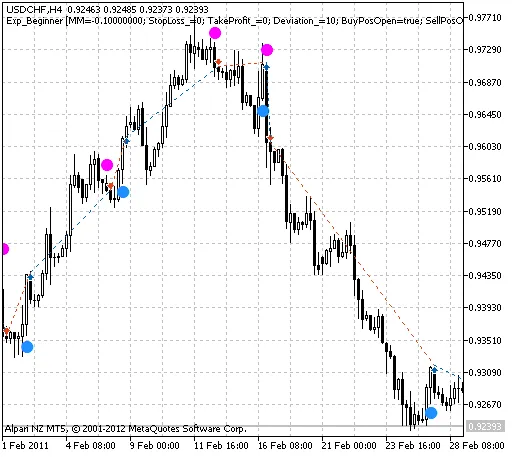
Fig. 1. The instances of history of deals in the chart.
Let’s take a look at the testing results for USDCHF on the H4 timeframe for the year 2011:
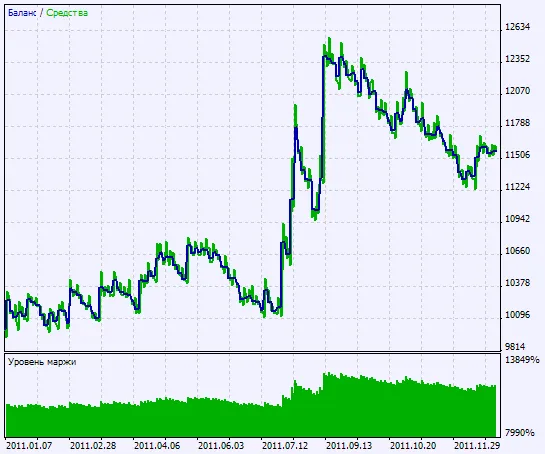
Fig. 2. Chart of testing results




Comments 0