
Hey there, fellow traders! Today, I want to introduce you to a nifty tool that can help streamline your trading sessions—the Exp_ColorJFatl_Digit_Tm Expert Advisor. This EA is built on the signals from the ColorJFatl_Digit indicator and gives you the flexibility to set a strict trading time interval.
So, how does it work? The EA generates a trade signal when a bar closes, provided that the indicator color has shifted. This means you can get in on the action at just the right moment!
Setting Your Trading Hours
You can easily specify your trading times in the input parameters to ensure you're trading during your preferred hours:
inputbool TimeTrade=true; // Allow trading in the specified intervalinput HOURS StartH=ENUM_HOUR_0; // Trading start (hours)input MINUTS StartM=ENUM_MINUT_0; // Trading start (minutes)input HOURS EndH=ENUM_HOUR_23; // Trading end (hours)input MINUTS EndM=ENUM_MINUT_59; // Trading end (minutes)
With two variables each for the starting and ending times, you have complete control over your trading window. By default, the EA is set to trade from midnight (00:00) to just before midnight (23:59), closing all positions at the end of the trading day.
If your start time happens to be later than your end time, no worries! The EA will automatically close your positions the following day at the specified time.
Installation and Compatibility
For the Expert Advisor to function correctly, make sure you save the ColorJFatl_Digit.ex5 compiled indicator file into <terminal_data_folder>\MQL5\Indicators. This step is crucial for seamless operation.
Another cool feature is the TradeAlgorithms.mqh library, which enables the use of EAs with brokers that offer a nonzero spread and allows you to set Stop Loss and Take Profit levels right as you open a position. You can find more versions of this library here: Trade Algorithms.
During the tests shown below, the default input parameters were used, and we didn't apply Stop Loss or Take Profit for testing purposes.
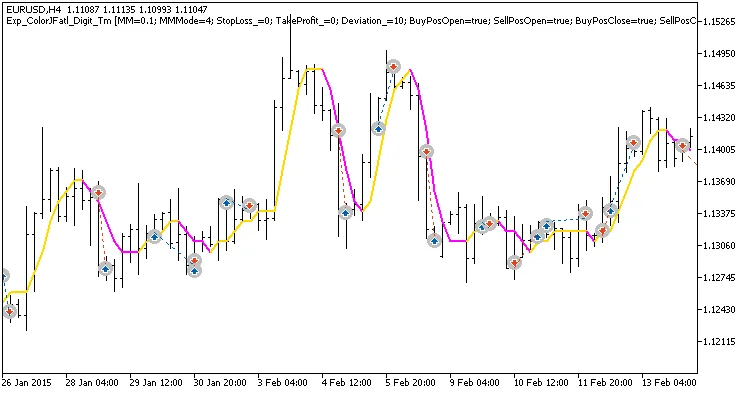
Fig. 1. Examples of deals on the chart
Here are the testing results for 2015 on the EURUSD H4:
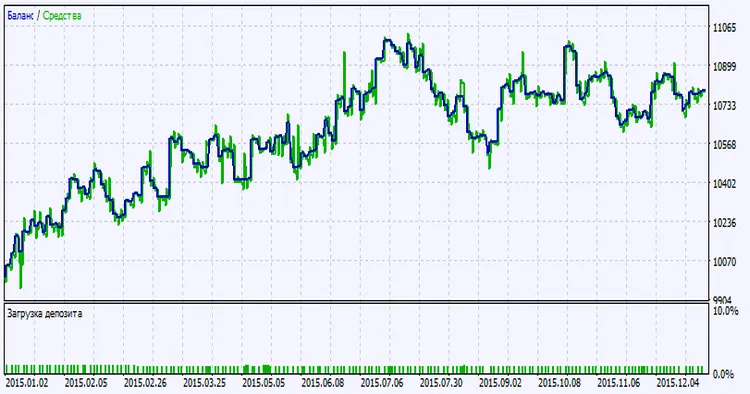
Fig. 2. Testing results chart




Comments 0