
Hey fellow traders! Let’s dive into the world of the Fishing Expert Advisor (EA) for MetaTrader 4. This handy tool opens positions based on price movements: when the price steps up by a specified distance, it sells; when it steps down, it buys. This method creates a grid of trades that you can manage easily with just a few clicks.
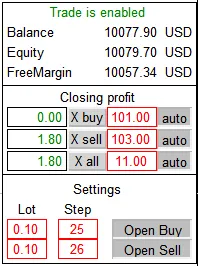
To manage your trades, you’ll find several buttons at your disposal. The 'X buy' button will close all buy positions, while the 'X sell' button does the same for sell positions. If you want to close everything the EA has opened, just hit the 'X all' button. Want to automate your closures? Press the corresponding 'auto' buttons to close trades automatically once your specified profit target is hit. You can set your profit target in the box next to the 'auto' button.
When it comes to settings, you can easily specify the lot size and the step for both buy and sell positions. No need to navigate away to the main parameters—everything can be adjusted right in the trading window. Plus, all your parameters and button settings are saved in global variables, so they’ll automatically restore after a restart.
Keep in mind that this EA is semi-automatic, so it’s best tested in visualization mode. There’s no need for optimization here; it’s straightforward enough to get a good feel for it.
Understanding the operation principle is a breeze. Look for your desired profit in either direction, hit the button, and then wait for the other direction to reach your target. With a bit of practice in the strategy tester, you’ll be able to visualize the process and confidently step into real trading.




Comments 0