
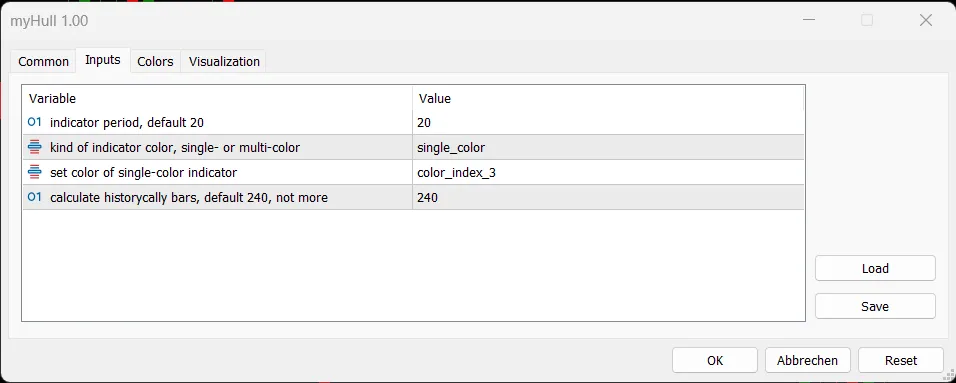
皆さん、こんにちは!今日はHull移動平均線(HMA)についてお話ししたいと思います。このインディケーターは、MetaTrader 5で使用できる非常に便利なツールです。私自身、他のHMAの実装について理解できなかったため、独自に実装してみました。HMAには4つの入力パラメーターがあります。
HMAのパラメーター
- InpHmaPeriod = 20
- InpColorKind = single_color
- InpColorIndex = color_index_3
- InpMaxHistoryBars = 240
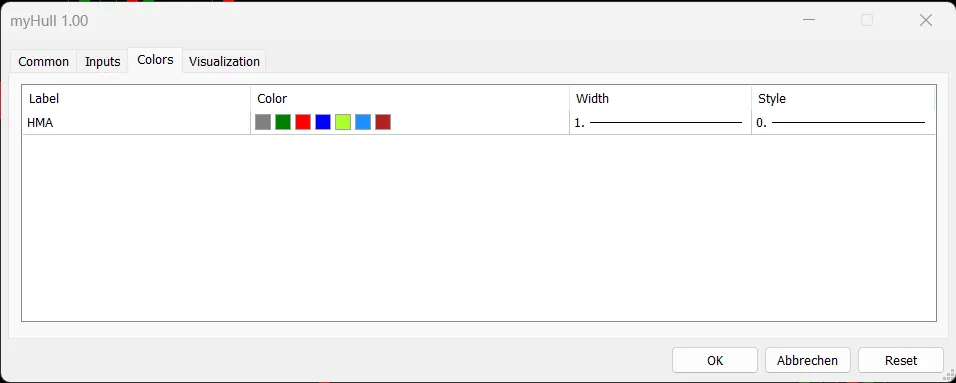
これらのパラメーターは自明です。ENUM_COLOR_KINDは単色と多色の切り替えを行い、デフォルトは単色です。多色モードでは、HMAの上昇と下降で異なる色が適用されます。単色モードでは、ENUM_COLOR_INDEXがHMAの単一色を設定します。多色モードのデフォルト色はグレーで、上昇時は緑、下降時は赤になります。以下の画像で確認できます。
では、実際のコードも見てみましょう。
//+------------------------------------------------------------------+ //| Hull移動平均線の実装 | //+------------------------------------------------------------------+ enum ENUM_COLOR_KIND { single_color, multi_color }; enum ENUM_COLOR_INDEX { color_index_0, color_index_1, color_index_2, color_index_3, color_index_4, color_index_5, color_index_6 }; // インディケーターの設定 #property copyright "Copyright 2022 by W. Melz" #property link "https://melz.one" #property version "1.00" #property indicator_chart_window #property indicator_buffers 4 #property indicator_plots 1 #property indicator_type1 DRAW_COLOR_LINE #property indicator_color1 clrGray, clrGreen, clrRed, clrBlue, clrGreenYellow, clrDodgerBlue, clrFireBrick #property indicator_width1 1 #property indicator_label1 "HMA" // 入力パラメーター input int InpHmaPeriod = 20; input ENUM_COLOR_KIND InpColorKind = single_color; input ENUM_COLOR_INDEX InpColorIndex = color_index_3; input int InpMaxHistoryBars = 240; // インディケーターのバッファ double valueBuffer[]; double colorBuffer[]; double fullWMABuffer[]; double halfWMABuffer[]; // インディケーターのグローバル変数 int hmaPeriod, fullPeriod, halfPeriod, sqrtPeriod, maxHistoryBars; //+------------------------------------------------------------------+ //| カスタムインディケーターの初期化関数 | //+------------------------------------------------------------------+ int OnInit() { ENUM_INIT_RETCODE result = checkInput(); SetIndexBuffer(0, valueBuffer, INDICATOR_DATA); SetIndexBuffer(1, colorBuffer, INDICATOR_COLOR_INDEX); SetIndexBuffer(2, fullWMABuffer, INDICATOR_CALCULATIONS); SetIndexBuffer(3, halfWMABuffer, INDICATOR_CALCULATIONS); IndicatorSetInteger(INDICATOR_DIGITS, _Digits); string shortName = StringFormat("HMA(%d)", hmaPeriod); IndicatorSetString(INDICATOR_SHORTNAME, shortName); fullPeriod = hmaPeriod; halfPeriod = fullPeriod / 2; sqrtPeriod = (int)round(sqrt((double)fullPeriod)); return (result); } //+------------------------------------------------------------------+ //| カスタムインディケーターの計算関数 | //+------------------------------------------------------------------+ int OnCalculate(const int rates_total, const int prev_calculated, const datetime &time[], const double &open[], const double &high[], const double &low[], const double &close[], const long &tick_volume[], const long &volume[], const int &spread[]) { if (rates_total このコードを使って、あなたもぜひHMAを試してみてください!楽しいトレードライフをお過ごしください。




コメント 0