System Trading

Mastering the Market with the 1MA Expert Advisor for MetaTrader 4
MetaTrader4
Mastering the Market with the 1MA Expert Advisor for MetaTrader 4

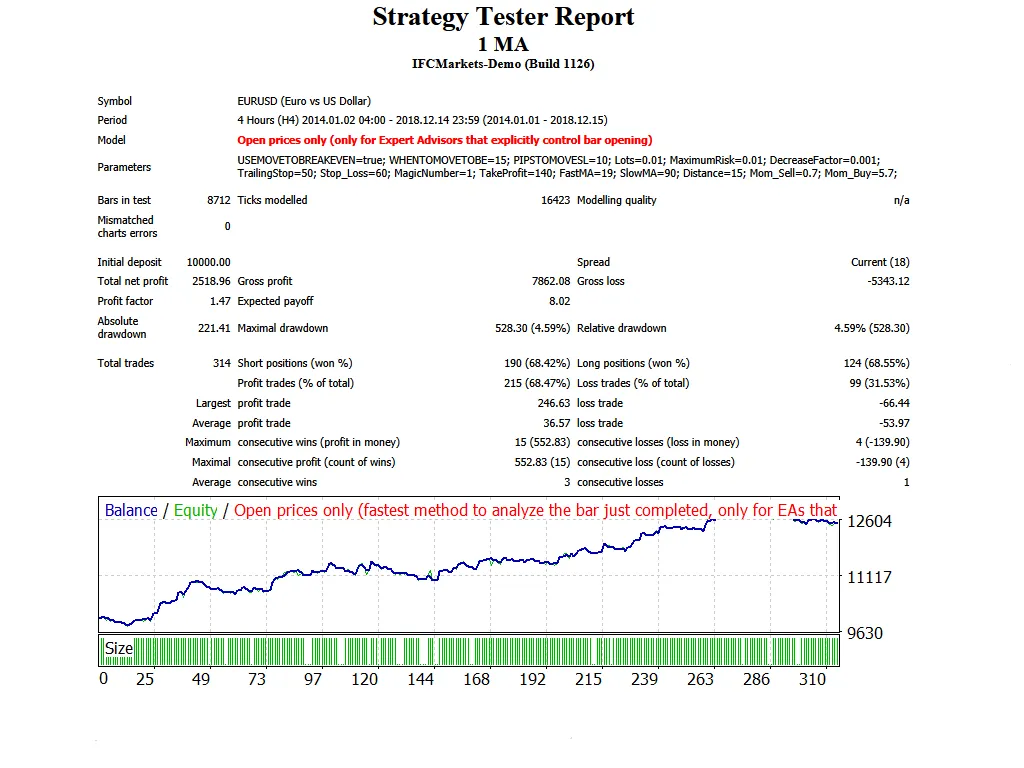
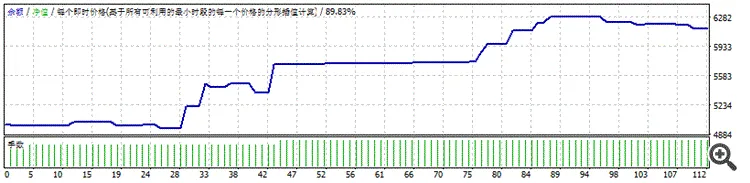
Welcome, fellow traders! Today, let's dive into a powerful tool that can enhance your trading strategy: the 1MA Expert Advisor for MetaTrader 4. This EA utilizes a straightforward strategy based on a 20-period moving average, equipped with Trailing Stop Loss and Take Profit features that work seamlessly across all major forex pairs and time frames. Key Features of the 1MA EA Start with a Demo: Always test the EA on a demo account first to get a feel for its performance. Open Candle Trading: This EA trades only based on the price of the open candle, so keep that in mind. Lot Size Control: If you prefer not to increase your lot size after a losing trade, simply set IncreaseFactor=0. Input Settings to Optimize Your Trading Use_TP_In_Money: Enable Take Profit in monetary value (true/false). TP_In_Money: Set your Take Profit in money (values: 10-100). Use_TP_In_Percent: Enable Take Profit in percentage (true/false). TP_In_Percent: Set your Take Profit in percentage (values: 10-100). ------------Money Trailing Stop for Multiple Trades---------------------- Enable_Trailing: Enable trailing with monetary value (true/false). Take Profit In Money: Set this in your current currency (values: 25-300). Stop Loss In Money: Set your Stop Loss in your current currency (values: 1-20). ------------------------------------------------------------------------------------- tick: If set to false, trades on every tick; if true, trades on open prices (true/false). Exit: Close trades if the trend turns against you to manage drawdown (true/false). Lots: Set your lot size (values: 0.01-1). Lots Size Exponent: Define the exponent for your lot size (values: 1.01-2). IncreaseFactor: Specify how much to increase the lot size after a loss (values: 0.001-0.1). Stop_Loss: Set your Stop Loss (values: 30-500). / Set value 600 for Multiple Trades MagicNumber: Assign a magic number for your trades (values: 1-100000). TakeProfit: Set your Take Profit (values: 50-200). / Set value 600 for Multiple Trades FastMA: Define your fast moving average (values: 1-20). SlowMA: Define your slow moving average (values: 50-200). Mom_Sell: Set the momentum sell trigger (values: 0.1-0.9). Mom_Buy: Set the momentum buy trigger (values: 0.1-0.9). ---------------------Control Drawdown----------------------------- UseEquityStop: Enable equity stop (true/false). TotalEquityRisk: Set your total equity risk (values: 0.01-30). ------------------------------------------------------------------------------ Max_Trades: Set the maximum number of trades (1-12). If you use only 1 trade: ////////////////////////////////////////////////// USETRAILINGSTOP: Enable trailing stop (true/false). WHENTOTRAIL: Specify when to start trailing (values: 40-100). TRAILAMOUNT: Define the trail amount (values: 40-100). Distance From Candle: Set the distance from the candle (values: 1-100). USECANDELTRAIL: Enable candle trailing (true/false). X: Number of candles (values: 1-100). USEMOVETOBREAKEVEN: Enable break-even (true/false). WHENTOMOVETOBE: Specify when to move to break-even (values: 1-30). PIPSTOMOVESL: Set how many pips to move your stop loss (values: 1-30). Tips for Using the 1MA EA It's a good idea to optimize this EA every few months and stick with the same input settings mentioned above. You can use it as a hedging grid EA or as a single trade EA, depending on your strategy. Backtesting Your Strategy Interested in backtesting? Check out this guide for a step-by-step process.

2018.12.17
Mastering the Hedging Martingale Strategy for MetaTrader 4
MetaTrader4
Mastering the Hedging Martingale Strategy for MetaTrader 4

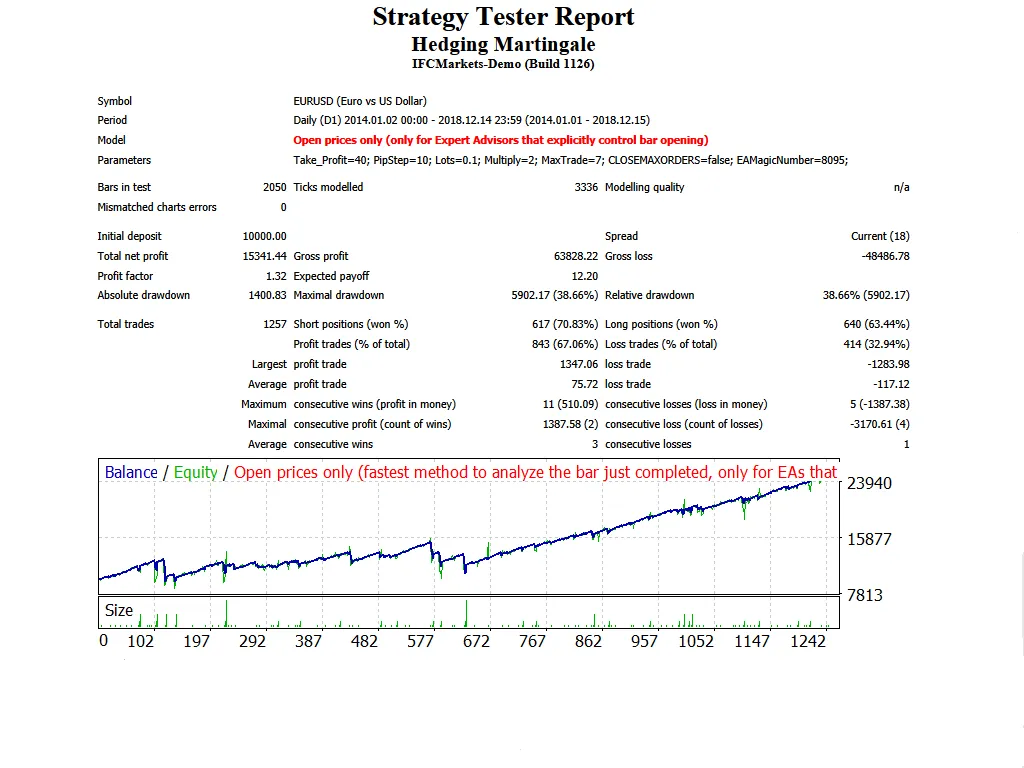
What is the Hedging Martingale Strategy? The Hedging Martingale is a popular strategy among traders, boasting five different versions. It simultaneously opens both buy and sell trades and employs the Martingale approach to manage trades effectively. How It Works If the market moves against your initial trade by a set number of pips, the system will open another trade in the same direction as the first. This cycle continues until a profit is realized. This strategy opens new trades only with the formation of a new candle, which minimizes the risk of multiple open trades, making it a safer option. The Hedging Martingale EA is versatile and can be applied to all currency pairs and timeframes. For optimal results, it’s best to use this strategy on a daily timeframe. Always start with a demo account to get the hang of it! Version Features Version 1: Comes with a trailing stop loss. Version 2: Features a unique method for calculating lot sizes. Version 3: Allows the use of an Equity Stop. Version 4: Provides options to add or multiply lot sizes. Version 5: Maintains both buy and sell orders simultaneously. Input Settings Use_TP_In_Money: Enable Take Profit in money (true/false). TP_In_Money: Take Profit in money (values: 10-100). Use_TP_In_percent: Enable Take Profit in percent (true/false). TP_In_Percent: Take Profit in percent (values: 10-100). Enable_Trailing: Activate trailing stop (true/false). Take Profit In Money: (values: 25-200). Stop Loss In Money: (values: 1-20). TakeProfit: TP value for each trade in this EA (values: 10-60). PipStep: Distance in pips for opening new trades (values: 10-50). Lots: Initial lot size, which will be duplicated at each step (values: 0.01-1). Multiply: Multiplier for each new trade step (values: 2-4). MaxTrade: Maximum number of trades that can be active (values: 2-10). CLOSEMAXORDERS: Close all orders if they exceed the maximum allowed. MagicNumber: Unique identifier for trades (values: 1-100000). TrailingStop: Set a value between 10 and 100 to activate the trailing stop loss; use "0" to disable it. It's important to optimize this EA every few months and use the same input settings listed above. For guidance on performing backtests, check out this link: Backtesting Guide

2018.12.17
Mastering the Accelerator EA for MetaTrader 4: A Trader's Guide
MetaTrader4
Mastering the Accelerator EA for MetaTrader 4: A Trader's Guide

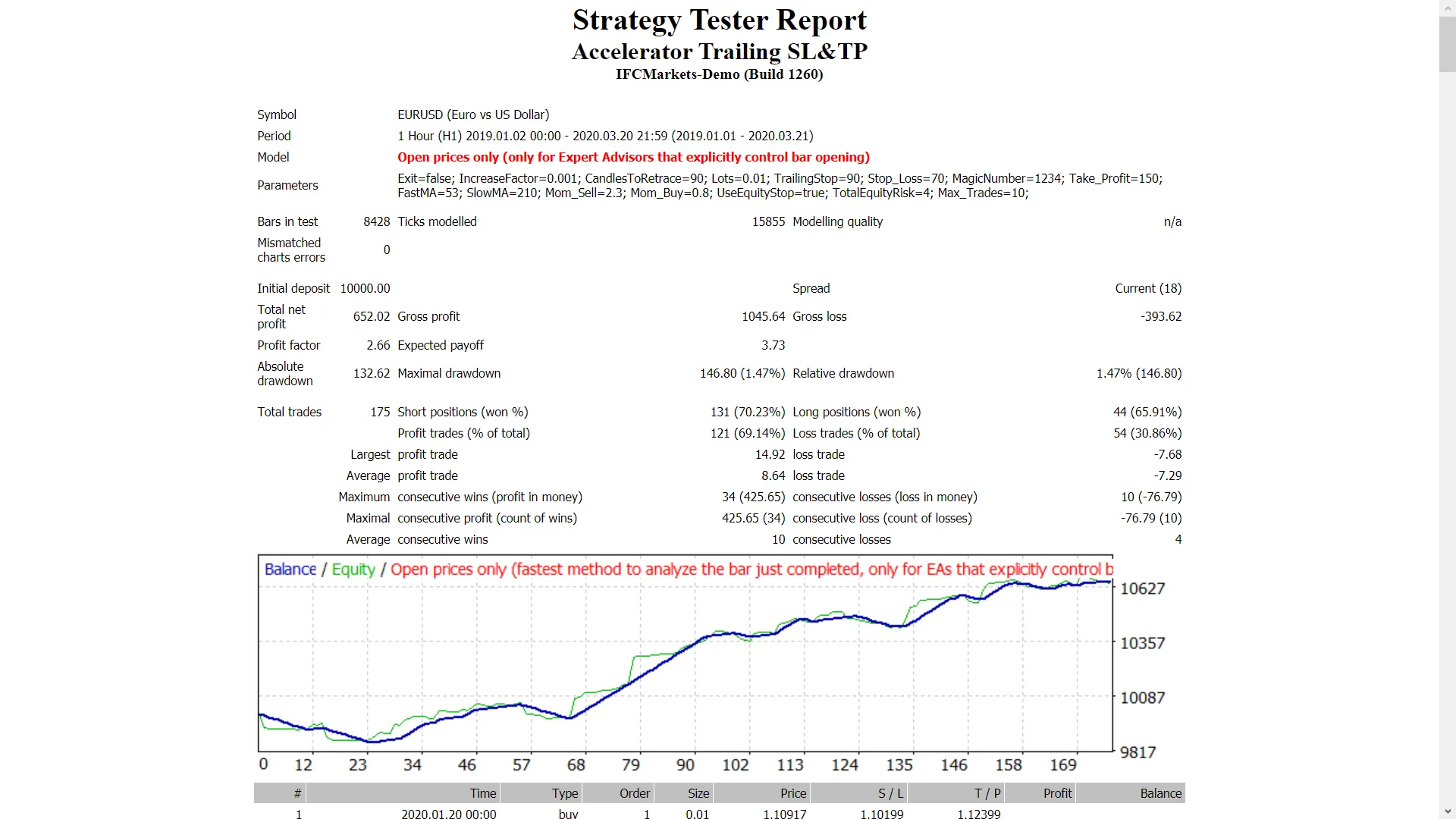
The Accelerator EA is a powerful tool that trades using the Accelerator indicator, featuring a Trailing Stop Loss and Take Profit options. It works seamlessly across all time frames and is compatible with major forex pairs as well as NASDAQ stocks. Key Features of the Accelerator EA Always start with a demo account to test it out. This EA operates only on the price of the open candle! If you prefer not to increase lot sizes after losing a trade, set IncreaseFactor=0. Inputs Use_TP_In_Money: Use Take Profit in monetary value (true/false). TP_In_Money: Set Take Profit in money (values: £10-£100). Use_TP_In_percent: Use Take Profit in percentage (true/false). TP_In_Percent: Set Take Profit in percentage (values: 10-100). Enable_Trailing: Enable trailing stop with monetary value (true/false). Take Profit In Money: Set in current currency (values: £25-£200). Stop Loss In Money: Set in current currency (values: £1-£20). Exit: Close trades if the trend reverses to control drawdown (true/false). Lots: Lot size (values: 0.01-1). Lots size Exponent: (values: 1.01-2). IncreaseFactor: How much to increase lots after a loss (values: 0.001-0.1). Stop_Loss: Set Stop Loss (values: 30-500). For multiple trades, set to 600. MagicNumber: Magic number for the EA (values: 1-100000). TakeProfit: Set Take Profit (values: 50-200). For multiple trades, set to 600. FastMA: Fast Moving Average (values: 1-20). SlowMA: Slow Moving Average (values: 50-200). Mom_Sell: Momentum Sell trigger (values: 0.1-0.9). Mom_Buy: Momentum Buy trigger (values: 0.1-0.9). UseEquityStop: Equity stop feature (true/false). TotalEquityRisk: Risk percentage (values: 0.01-20). Max_Trades: Maximum number of trades (1-12). USETRAILINGSTOP: If you want to use a trailing stop (true/false). WHENTOTRAIL: When to start trailing (values: 40-100). TRAILAMOUNT: Amount to trail (values: 40-100). Distance From Candle: Set distance from the candle (values: 1-100). USEMOVETOBREAKEVEN: Enable break-even feature (true/false). WHENTOMOVETOBE: When to move to break-even (values: 1-30). PIPSTOMOVESL: How many pips to move stop loss (values: 1-30). Remember, it’s a good idea to optimize this EA every few months and use the same inputs mentioned above. You can use it as a hedging grid EA or as a single trade EA. If you’re curious about how to perform a backtest, check out this guide: Backtesting Guide.

2018.12.17
Maximize Your Trading Success with the Risk Reward Ratio Expert for MetaTrader 4
MetaTrader4
Maximize Your Trading Success with the Risk Reward Ratio Expert for MetaTrader 4

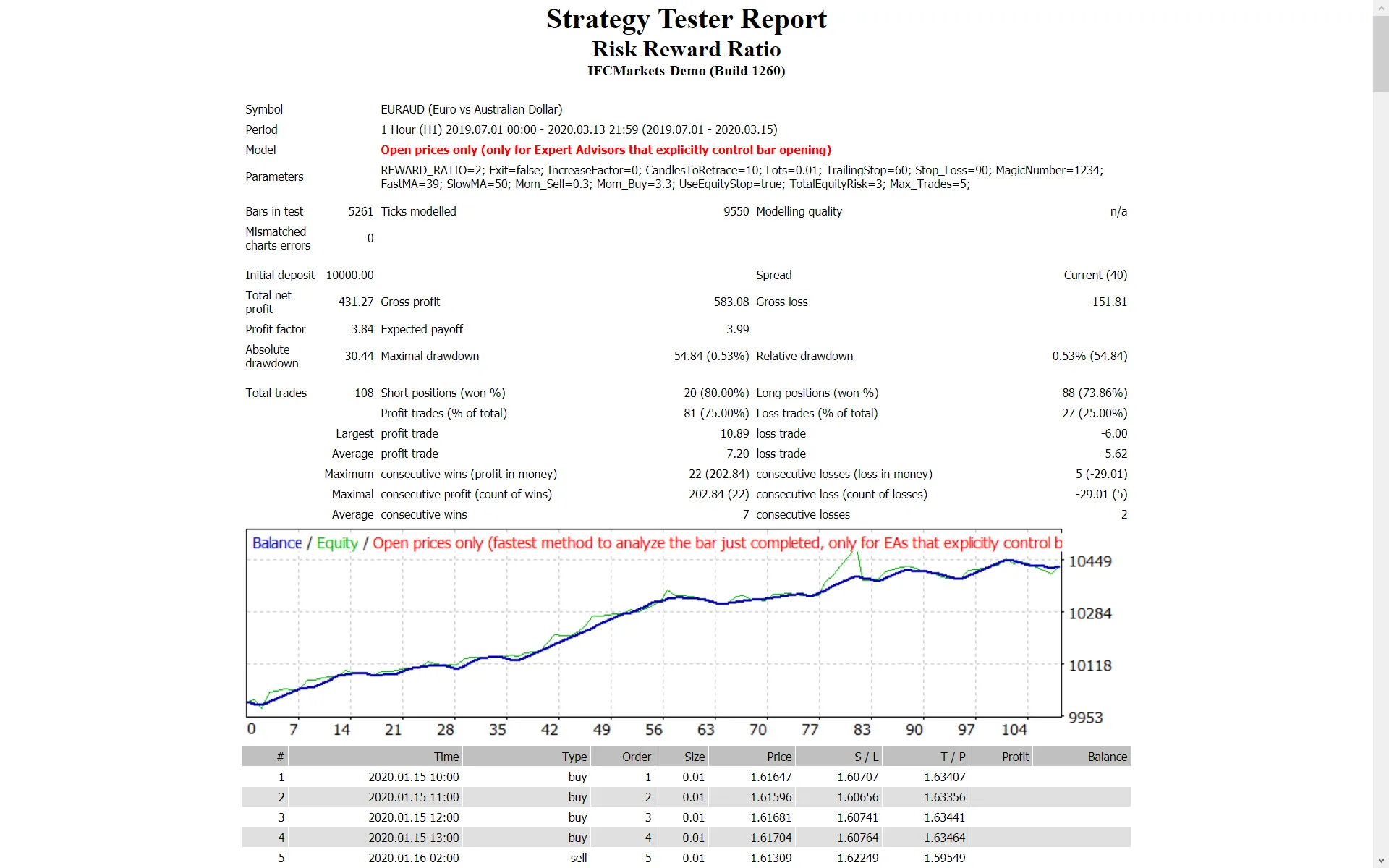
If you’re serious about trading, you’ve likely heard the buzz around the "Risk Reward Ratio" Expert Advisor (EA). This handy tool leverages RSI, Moving Averages, and Stochastic indicators to help you make informed trading decisions. The beauty of this EA lies in its ability to incorporate a customizable Risk Reward Ratio, along with Trailing Stop Loss and Take Profit features. Plus, it works seamlessly across all time frames and major forex pairs, as well as NASDAQ stocks. Key Features to Consider Start with a Demo: Always test this EA on a demo account before diving in with real money. Open Candle Trading: This EA executes trades based solely on the price of the open candle! No Lot Size Increase: If you prefer not to increase your lot size after a losing trade, simply set IncreaseFactor=0. Inputs to Optimize Your Trading Strategy Use_TP_In_Money: Toggle Take Profit in Money (values: true/false). TP_In_Money: Set your Take Profit in Money (values: 10-100). Use_TP_In_percent: Toggle Take Profit in Percent (values: true/false). TPIn_Percent: Set your Take Profit in Percent (values: 10-100). Enable_Trailing: Enable Trailing Stop with money (values: true/false). Take Profit In Money: Set this in your current currency (values: 25-300). Stop Loss In Money: Set your Stop Loss in current currency (values: 1-20). REWARD_RATIO: Define your Risk Reward Ratio (values: 0.01-1). Exit: Automatically close trades if the trend is against you to manage drawdown (values: true/false). Lots: Set your lot size (values: 0.01-1). IncreaseFactor: Control how much to increase lots from total margin after a loss (values: 0.001-0.1). Stop_Loss: Set your Stop Loss (values: 30-500). MagicNumber: A unique identifier for your trades (values: 1-100000). FastMA: Set your Fast Moving Average (values: 1-20). SlowMA: Set your Slow Moving Average (values: 50-200). Additionally, you can set parameters for managing drawdown, such as: UseEquityStop: Enable this feature to limit equity risk (values: true/false). TotalEquityRisk: Define your total equity risk (values: 0.01-30). For those using only one trade, consider: TrailingStop: Set a value from 40 to 100 to activate trailing stop loss and take profit; a value of "0" will not activate it. Enable Break Even: Toggle this option (values: true/false). Move Break Even: Set how many pips to move to break even (values: 5-30). It’s a good practice to optimize this EA every few months and use consistent inputs. You can even use it as a hedging grid EA or for single trades. Want to learn how to perform a backtest? Check out this backtesting guide.

2018.12.09
Maximize Your Trading with the Fractals Martingale EA for MetaTrader 4
MetaTrader4
Maximize Your Trading with the Fractals Martingale EA for MetaTrader 4

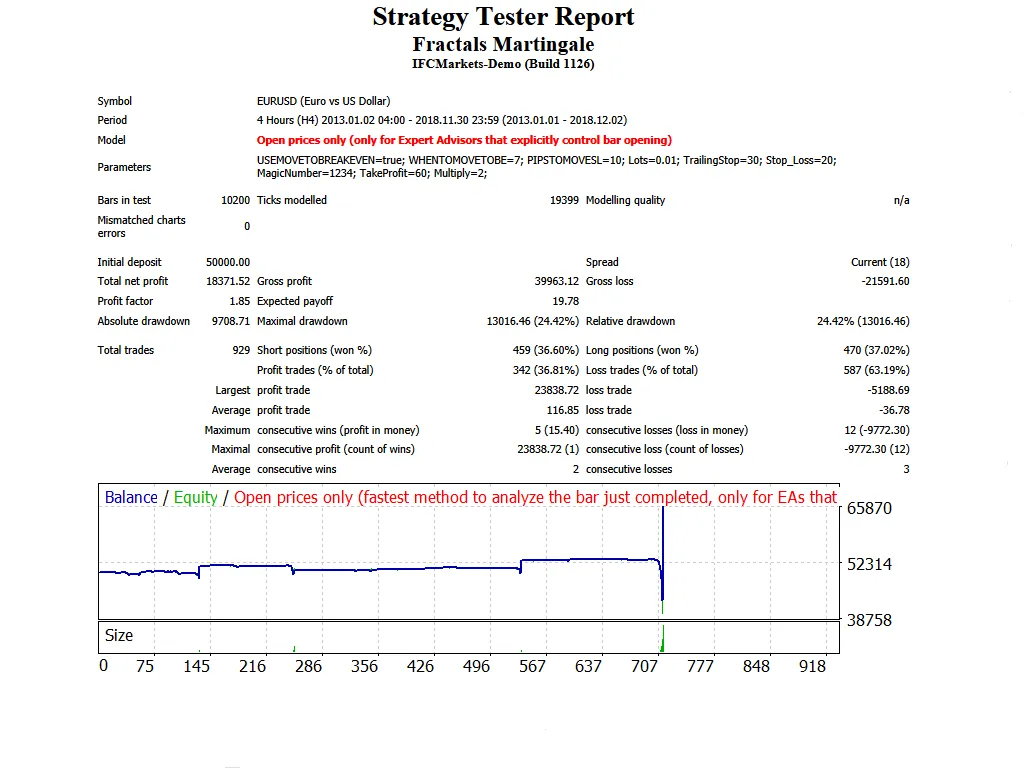
Looking to up your trading game? The Fractals Martingale EA is designed to trade using the powerful Fractals and Ichimoku indicators. Here’s how it works: when a trade doesn’t go your way, this EA takes a new trade with a larger lot size to help recover losses. It also features a Trailing Stop Loss and Take Profit, making it suitable for all time frames, major forex pairs, and even NASDAQ stocks. Start by testing it on a demo account. This EA only trades based on the price of the open candle! Inputs Use_TP_In_Money - Enable Take Profit in Money (values: true/false). TP_In_Money - Take Profit in Money (values: 10-100). Use_TP_In_percent - Enable Take Profit in Percent (values: true/false). TP_In_Percent - Take Profit in Percent (values: 10-100). ------------[Money Trailing Stop]------------------------------------------------ Enable_Trailing - Enable Trailing with money (values: true/false). Take Profit In Money (in your current currency) (values: 25-200). Stop Loss In Money (in your current currency) (values: 1-20). -------------------------------------------------------------------------------------- Exit - Close trades if the trend goes against you to manage drawdown (values: true/false). Lots - Lot size (values: 0.01-10). TrailingStop - Trailing Stop (values: 10-100). Stop_Loss - Stop Loss (values: 10-100). MagicNumber - Magic number (values: 1-100000). TakeProfit - Take Profit (values: 10-100). period - Demarker indicator period (values: 5-30). Multiply - Multiplier value for each new trade (values: 2-4). Remember, it's a good idea to optimize this EA every few months and stick to the inputs mentioned above. How to perform a backtest: Click here for a guide.

2018.12.08
Mastering the 1-Hour Bollinger Bands EA for MetaTrader 4
MetaTrader4
Mastering the 1-Hour Bollinger Bands EA for MetaTrader 4

Are you ready to elevate your trading game? The 1-Hour Bollinger Bands EA is designed to execute trades based on the popular Bollinger Bands indicator and two moving averages. With built-in features like Trailing Stop Loss and Take Profit, this expert advisor shines in both the 1H and 4H time frames for major forex pairs and NASDAQ stocks. Getting Started Make sure to test it out on a demo account first! This EA only trades using the price of the open candle! If you prefer not to increase the lot size after a losing trade, simply set IncreaseFactor=0. Input Settings Use_TP_In_Money: Enable Take Profit in monetary values (true/false). TP_In_Money: Set your Take Profit in monetary values (10-100). Use_TP_In_percent: Enable Take Profit in percentage (true/false). TP_In_Percent: Set your Take Profit in percentage (10-100). ------------[Money Trailing Stop for Multiple Trades]---------------------- Enable_Trailing: Enable trailing stop with monetary values (true/false). Take Profit In Money: Set your trailing take profit (25-200). Stop Loss In Money: Set your stop loss (1-20). -------------------------------------------------------------------------------------- Exit: Close trades if the trend turns against you to control drawdown (true/false). Lots: Define your lot size (0.01-1). Lots size Exponent: Set an exponent for lot size increment (1.01-2). IncreaseFactor: Specify how much to increase lot size if you lose a trade (0.001-0.1). Stop_Loss: Set your stop loss (30-500). Use 600 for multiple trades. MagicNumber: Define a unique magic number for your trades (1-100000). TakeProfit: Set your take profit (50-200). Use 600 for multiple trades. FastMA: Fast moving average period (1-20). SlowMA: Slow moving average period (50-200). Mom_Sell: Momentum sell trigger (0.1-0.9). Mom_Buy: Momentum buy trigger (0.1-0.9). ---------------------CONTROL DRAW DOWN----------------------------- UseEquityStop: Enable equity stop (true/false). TotalEquityRisk: Set your risk tolerance (0.01-20). ------------------------------------------------------------------------------- Max_Trades: Set the maximum number of trades (1-12). ----------------IF YOU USE ONLY 1 TRADE:----------------------- ///////////////////////////////////////////////////////////////////// USETRAILINGSTOP: Enable trailing stop (true/false). WHENTOTRAIL: Define when to start trailing (40-100). TRAILAMOUNT: Set your trailing amount (40-100). Distance From Candle: Set the distance from the candle (1-100). USECANDELTRAIL: Enable candle trailing (true/false). X: Number of candles to consider (1-100). USEMOVETOBREAKEVEN: Enable break-even move (true/false). WHENTOMOVETOBE: Specify when to move to break-even (1-30). PIPSTOMOVESL: Set how many pips to move stop loss (1-30). It's crucial to optimize this EA every few months to get the best results. Stick to the input settings mentioned above for optimal performance. Whether you want to use it as a hedging grid EA or simply for single trades, this EA has you covered. For those interested in back-testing, check out this guide.

2018.12.06
Bladerunner EA: Your Go-To Expert Advisor for MetaTrader 4
MetaTrader4
Bladerunner EA: Your Go-To Expert Advisor for MetaTrader 4

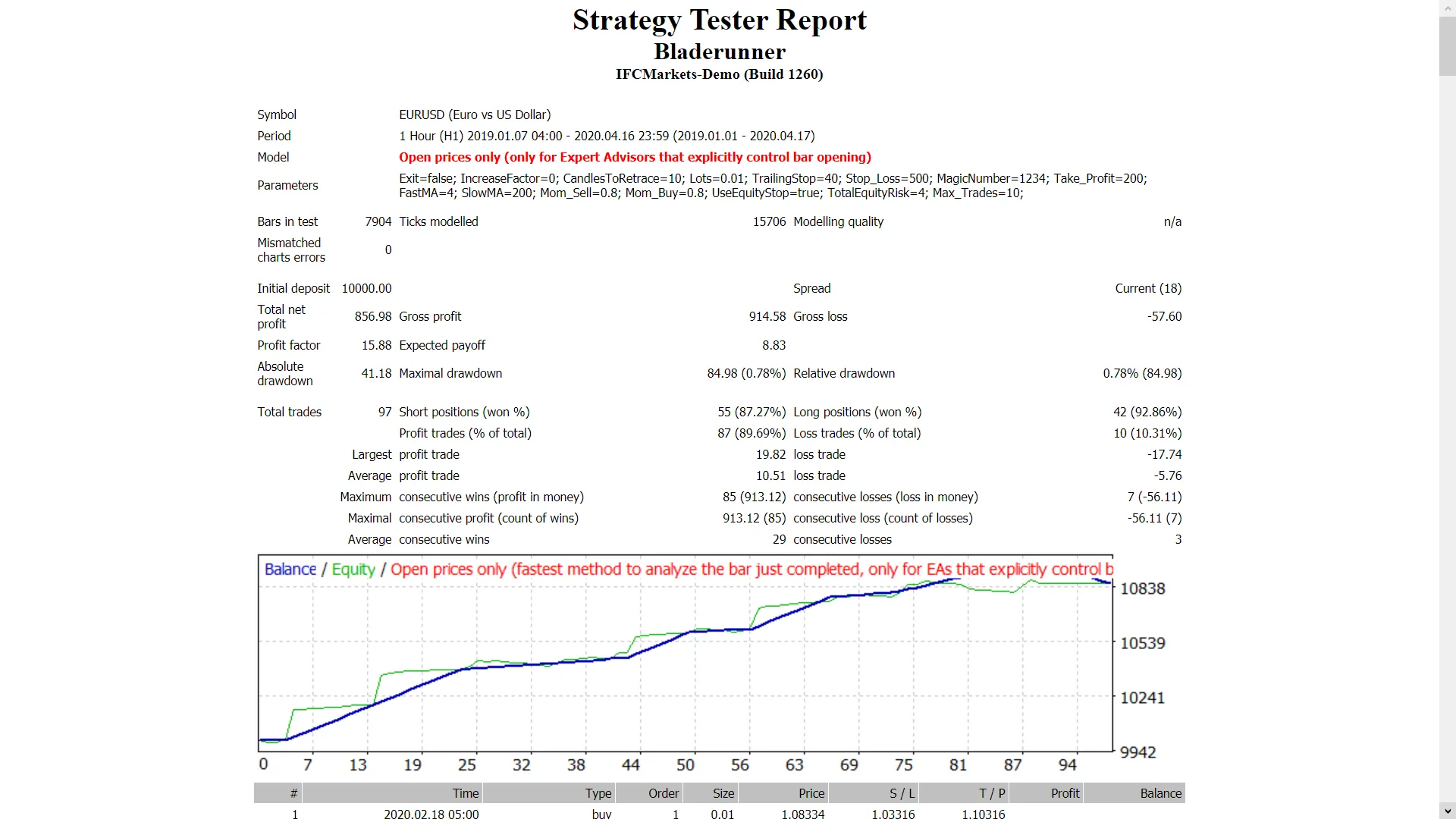
Hey fellow traders! Today, let’s dive into the world of automated trading with the Bladerunner Expert Advisor (EA). This powerful tool leverages the "Fractals" indicator along with a 20-period moving average strategy to help you navigate the forex market and NASDAQ stocks effectively. It’s designed specifically for the 1-hour timeframe, making it a solid choice for those who prefer trading major currency pairs and stocks. Here’s why you should consider giving Bladerunner a go: Always start with a demo account to test the waters. This EA executes trades based solely on the open price of the candle! If you’d rather not increase the lot size after a loss, simply set IncreaseFactor=0. Now, let’s break down some of the key inputs you’ll be working with: Inputs Overview Use_TP_In_Money: Enable Take Profit in monetary values (true/false). TP_In_Money: Set your Take Profit in monetary terms (values: 10-100). Use_TP_In_percent: Enable Take Profit in percentage (true/false). TP_In_Percent: Set your Take Profit in percentage (values: 10-100). Enable_Trailing: Activate trailing stop with money (true/false). Take Profit In Money: Set trailing take profit in your current currency (values: 25-100). Stop Loss In Money: Define your stop loss in current currency (values: 1-20). Exit: Close trades if the trend turns against you to control drawdown (true/false). Lots: Choose your lot size (values: 0.01-1). Lots size Exponent: Lot size exponent settings (values: 1.01-2). IncreaseFactor: Set how much to increase lots from total margin after a loss (values: 0.001-0.1). Stop_Loss: Define your stop loss (values: 30-500). MagicNumber: Assign a magic number for your trades (values: 1-100000). TakeProfit: Set your take profit (values: 50-200). FastMA: Set your fast moving average (values: 1-20). SlowMA: Define your slow moving average (values: 50-200). Mom_Sell: Set your momentum sell trigger (values: 0.1-0.9). Mom_Buy: Set your momentum buy trigger (values: 0.1-0.9). UseEquityStop: Activate equity stop (true/false). TotalEquityRisk: Define your equity risk level (values: 0.01-20). Max_Trades: Limit your open trades (1-12). If using only 1 trade, consider these settings: USETRAILINGSTOP: Enable trailing stop (true/false). WHENTOTRAIL: Set when to trail (values: 40-100). TRAILAMOUNT: Specify the trail amount (values: 40-100). Distance From Candle: Set the distance (values: 1-100). USECANDELTRAIL: Enable candle trail (true/false). X: Number of candles (values: 1-100). USEMOVETOBREAKEVEN: Activate break-even feature (true/false). WHENTOMOVETOBE: Set when to move to break-even (values: 1-30). PIPSTOMOVESL: Define how many pips to move stop loss (values: 1-30). Remember, it’s wise to optimize this EA every few months using the same inputs mentioned above. You can utilize it as either a hedging grid EA or a single trade EA, depending on your strategy. For those interested in back testing, check out this back testing guide.

2018.12.06
Unlocking Profits with the 555 Scalper: Your Go-To EA for MetaTrader 4
MetaTrader4
Unlocking Profits with the 555 Scalper: Your Go-To EA for MetaTrader 4

If you’re looking to up your trading game, the 555 Scalper EA might just be what you need. This expert advisor operates on the MetaTrader 4 platform and utilizes two 5-period exponential moving averages. With features like Trailing Stop Loss and Take Profit, it’s designed to work on the 5-minute time frame for major forex pairs and NASDAQ stocks. Getting Started Make sure to test it on a demo account first. This EA trades strictly based on the price of the open candle! If you prefer not to increase your lot size after a losing trade, simply set: IncreaseFactor=0. Input Settings Here’s a quick rundown of the key inputs you can tweak: Use_TP_In_Money - Enable Take Profit in monetary values (values: true/false). TP_In_Money - Set Take Profit in monetary terms (values: 10-100). Use_TP_In_percent - Enable Take Profit in percentage (values: true/false). TP_In_Percent - Set Take Profit in percentage (values: 10-100). Enable_Trailing - Activate trailing with money (values: true/false). Take Profit In Money (in current currency) (values: 25-200). Stop Loss In Money (in current currency) (values: 1-20). Close trades if the trend goes against you to control drawdown (values: true/false). Lots - Set your lot size (values: 0.01-1). Lots size Exponent (values: 1.01-2). IncreaseFactor - Determine how much to increase lots from total margin if you lose a trade (values: 0.001-0.1). Stop_Loss (values: 30-500). Set value 600 for multiple trades. MagicNumber (values: 1-100000). TakeProfit (values: 50-200). Set value 600 for multiple trades. Optimizing Your EA To maximize your success, remember to optimize this EA every few months using the same input values mentioned above. It can serve as a hedging grid EA or a single trade EA based on your trading style. Backtesting Wondering how to perform a backtest? Check out this guide: Backtesting Guide.

2018.12.05
Candle Trader EA: Maximize Your MetaTrader 4 Trading Strategy
MetaTrader4
Candle Trader EA: Maximize Your MetaTrader 4 Trading Strategy

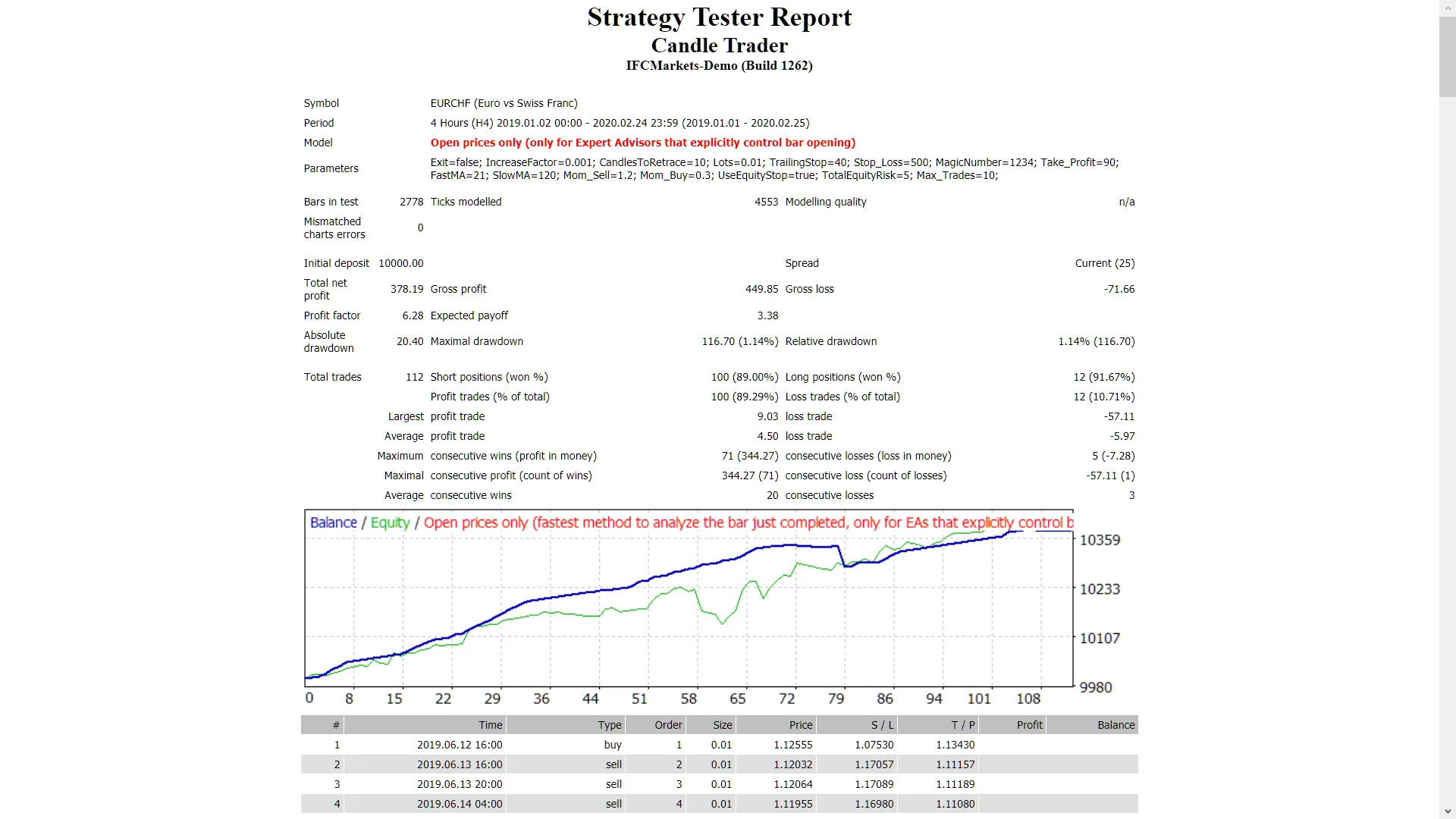
If you’re looking to enhance your trading game on MetaTrader 4, the Candle Trader EA could be your new best friend. This expert advisor leverages the previous day's high and low candle prices, making it a nifty tool for both major forex pairs and NASDAQ stocks, especially when you’re trading on the H4 and daily time frames. Key Features of Candle Trader EA Start with a demo account to get a feel for it. This EA operates based solely on the price of the open candle! Want to avoid increasing your lot size after a loss? Simply set IncreaseFactor=0. Input Settings Use_TP_In_Money - Activate Take Profit in monetary terms (values: true/false). TP_In_Money - Set your Take Profit in money (values: 10-100). Use_TP_In_percent - Activate Take Profit in percentage (values: true/false). TP_In_Percent - Set your Take Profit in percentage (values: 10-100). ------------[Money Trailing Stop For Multiple Trades]---------------------- Enable_Trailing - Turn on trailing stop using money (values: true/false). Take Profit In Money (in current currency) (values: 25-200). Stop Loss In Money (in current currency) (values: 1-20). -------------------------------------------------------------------------------------- Exit - Close trades if the trend is against you to manage drawdown (values: true/false). Lots - Define your lot size (values: 0.01-1). Lots size Exponent (values: 1.01-2). IncreaseFactor - Adjust how much to increase lots if you lose a trade (values: 0.001-0.1). Stop_Loss - Set your Stop Loss (values: 30-500). / Set value 600 for Multiple Trades. MagicNumber - Assign a magic number (values: 1-100000). TakeProfit - Define your Take Profit (values: 50-200). / Set value 600 for Multiple Trades. FastMA - Set Fast Moving Average (values: 1-20). SlowMA - Set Slow Moving Average (values: 50-200). Mom_Sell - Momentum Sell trigger (values: 0.1-0.9). Mom_Buy - Momentum Buy trigger (values: 0.1-0.9). ---------------------CONTROL DRAW DOWN----------------------------- UseEquityStop - (values: true/false). TotalEquityRisk - (values: 0.01-20). ------------------------------------------------------------------------------- Max_Trades (1-12). FractalNum - Number of High and Low (values: 1-10). ----------------IF YOU USE ONLY 1 TRADE:----------------------- ///////////////////////////////////////////////////////////////////// USETRAILINGSTOP - If using trailing stop (values: true/false). WHENTOTRAIL - When to trail (values: 40-100). TRAILAMOUNT - Trail amount (values: 40-100). Distance From Candle - Distance From Candle (values: 1-100). USECANDELTRAIL - If using trailing stop (values: true/false). X - Number of candles (values: 1-100). USEMOVETOBREAKEVEN - Enable "break even" (values: true/false). WHENTOMOVETOBE - When to move to break even (values: 1-30). PIPSTOMOVESL = 30 - How many pips to move stop loss (values: 1-30). - Don't forget to optimize this EA every few months using the inputs mentioned above. - You can use it as a hedging grid EA or as a single trade EA. - Curious about backtesting? Here’s a helpful guide: Backtesting Guide.

2018.12.05
Mastering Stochastic Trading: Your Guide to the Stochastic EA for MetaTrader 4
MetaTrader4
Mastering Stochastic Trading: Your Guide to the Stochastic EA for MetaTrader 4

Looking to spice up your trading strategy? The Stochastic Expert Advisor (EA) is a powerful tool that utilizes two Stochastic indicators and incorporates a Trailing Stop Loss and Take Profit feature. This EA works seamlessly across all time frames for major forex pairs and even stocks like NASDAQ. Key Features of the Stochastic EA Test it on a demo account first! This is crucial to get a feel for how the EA operates. Price Action Focus: This EA only trades based on the price of the open candle, ensuring precision in your trading decisions! Lot Size Control: If you prefer not to increase lot sizes during losing trades, simply set IncreaseFactor=0. Inputs Overview Use_TP_In_Money: Enable Take Profit in monetary terms (true/false). TP_In_Money: Set your Take Profit amount (values: 10-100). Use_TP_In_percent: Enable Take Profit in percentage (true/false). TP_In_Percent: Set your Take Profit percentage (values: 10-100). Money Trailing Stop for Multiple Trades: Enable_Trailing: Turn on trailing with money (true/false). Take Profit in Money (current currency): Set value (25-200). Stop Loss in Money (current currency): Set value (1-20). Stochastic Parameters: Stocbuy: Stochastic buy level (values: 1-40). StocSell: Stochastic sell level (values: 60-90). Exit: Close trades if the trend is against you to manage drawdown (true/false). Lots: Set lot size (values: 0.01-1). IncreaseFactor: Specify how much to increase lots after a losing trade (values: 0.001-0.1). Stop_Loss: Set Stop Loss (values: 30-500). Use 600 for Multiple Trades. MagicNumber: Unique identifier for trades (values: 1-100000). FastMA: Fast Moving Average (values: 1-20). SlowMA: Slow Moving Average (values: 50-200). Mom_Sell: Momentum sell trigger (values: 0.1-0.9). Mom_Buy: Momentum buy trigger (values: 0.1-0.9). Risk Management: UseEquityStop: Enable equity stop (true/false). TotalEquityRisk: Set equity risk (values: 0.01-20). Max_Trades: Specify max trades (1-12). For those using only one trade: TrailingStop: Set a value from 40 to 100 to activate trailing stop loss and take profit. A value of "0" will prevent activation. Enable Break Even: Turn on break even feature (true/false). Break Even Move: Set the value for moving break even (values: 5-30). Remember, it's a good idea to optimize this EA every few months using the inputs mentioned above. You can use it as a hedging grid EA or as a single trade EA. Want to backtest this EA? Check out this guide: Backtesting Guide Happy trading, and may the pips be ever in your favor!

2018.12.02
Mastering Ichimoku: A Trader’s Guide to the Ultimate EA for MetaTrader 4
MetaTrader4
Mastering Ichimoku: A Trader’s Guide to the Ultimate EA for MetaTrader 4

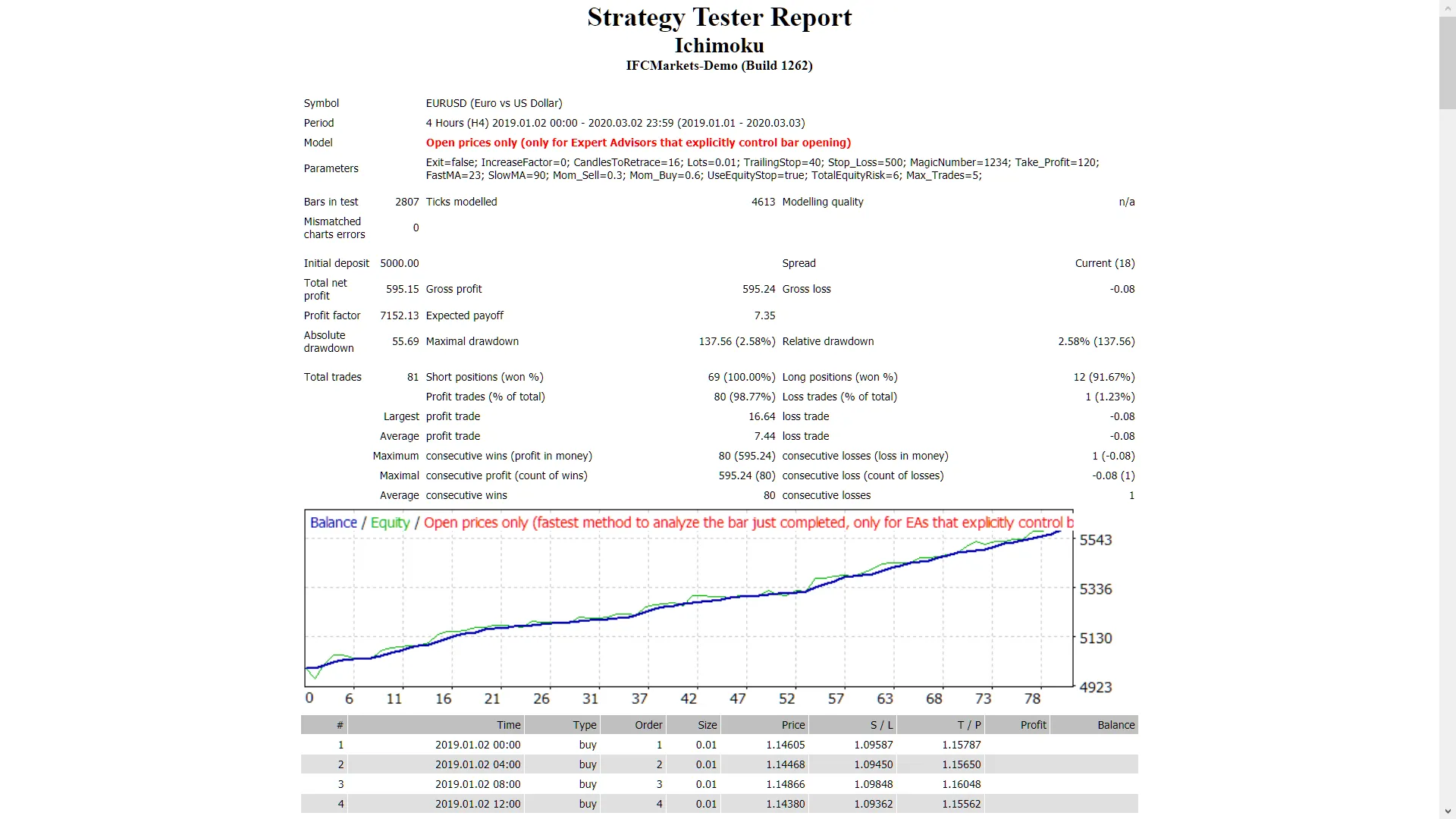
If you're looking to up your trading game, the Ichimoku EA is a solid choice. This expert advisor leverages both the Ichimoku and Parabolic indicators to navigate major forex pairs and NASDAQ stocks. It’s versatile enough to work across all time frames and comes packed with features like a Trailing Stop Loss and Take Profit. Getting Started with Ichimoku EA Start by testing it on a demo account first—it’s always better to play it safe! This EA operates strictly on the open candle price, ensuring you’re making trades based on solid data. If you prefer not to increase your lot size after a losing trade, simply set the IncreaseFactor to 0. Here are some key inputs to consider when setting up your Ichimoku EA: Use_TP_In_Money: Enable Take Profit in money (true/false). TP_In_Money: Set your Take Profit in money (values: 10-100). Use_TP_In_percent: Enable Take Profit in percent (true/false). TP_In_Percent: Set your Take Profit in percent (values: 10-100). Enable_Trailing: Activate trailing stop with money (true/false). Exit: Close trades if the trend turns against you (true/false). Lots: Lot size (values: 0.01-1). Stop_Loss: Set your Stop Loss (values: 30-500). MagicNumber: Unique identifier for your trades (values: 1-100000). FastMA: Fast Moving Average (values: 1-20). SlowMA: Slow Moving Average (values: 50-200). Mom_Sell: Momentum Sell trigger (values: 0.1-0.9). Mom_Buy: Momentum Buy trigger (values: 0.1-0.9). Max_Trades: Set the maximum number of trades (1-12). TrailingStop: Activate trailing stop loss and take profit by setting a value from 40 to 100; a value of 0 will deactivate it. Enable "Break Even": Set this to true/false to manage your trades effectively. It’s a good practice to optimize your EA every few months using the same inputs mentioned above. Whether you want to use it as a hedging grid EA or a single trade EA, it can adapt to your trading style. For backtesting, check out this helpful guide.

2018.12.02
Unlocking the Demarker Martingale EA for MetaTrader 4: A Trader's Guide
MetaTrader4
Unlocking the Demarker Martingale EA for MetaTrader 4: A Trader's Guide

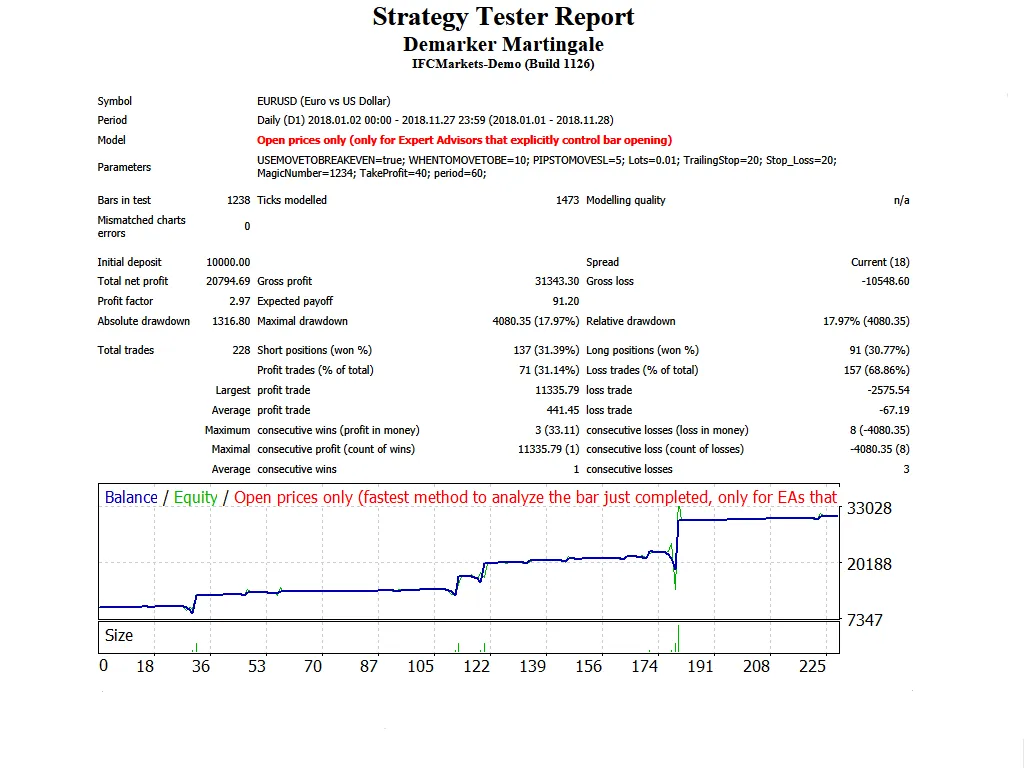
Hey traders! Today, let's dive into the Demarker Martingale EA designed for MetaTrader 4. This expert advisor (EA) is gaining traction for its unique approach to trading, utilizing the 'Demarker' indicator. It’s worth noting that it’s relatively safe as it limits itself to only one trade at a time (just set 'max trades' to 1). This EA comes packed with features like a Trailing Stop Loss and Take Profit options, making it versatile across all time frames and for major forex pairs and stocks on the NASDAQ. Martingale Strategy: If a trade results in a loss, the EA automatically opens a new position with a multiplied lot size. It employs a smart formula to calculate the lot size based on previous trades. Demo First: Always test your strategies on a demo account before going live. Open Candle Trades: This EA only trades based on the price of the open candle. Volume Control: The trade volume is adjusted based on past trading outcomes. Risk Management: You can set limits for the maximum risk as a percentage of your deposit. Constant Lot Size: If you prefer to trade a fixed lot size (like 0.01 lots), set 'MaximumRisk = 0' and 'DecreaseFactor = 0'. Risk-Based Trading: Otherwise, the EA will calculate the lot size based on a percentage of your deposit and your set maximum risk. Key Inputs: Use_TP_In_Money: Set to true or false to enable Take Profit in monetary terms. TP_In_Money: Define your Take Profit in money (values: 10-100). Use_TP_In_Percent: Enable or disable Take Profit in percentage. TP_In_Percent: Set your Take Profit in percentage (values: 10-100). Enable_Trailing: Activate trailing stop with true or false. Take Profit In Money: Set in current currency (values: 25-200). Stop Loss In Money: Define your stop loss in current currency (values: 1-20). Exit: Close trades if the trend reverses to manage drawdown. Multiply: Set how much to multiply for the Martingale strategy (values: 1-4). Lots: Choose your lot size (values: 0.01-1). Double_Lotsize: Set to true if you want to double your lot size. Lot_Size_Increment: Additional orders will increase by this amount. Stop_Loss: Define the stop loss in pips. Take_Profit: Define the take profit in pips. Period: Set the Demarker period (values: 1-50). MagicNumber: Specify a magic number for your EA (values: 1-100000). Time Settings: Define start and end hours (values: 0-24). Maximum_loss: Set the maximum allowed loss (values: 1-500). WaitTime: Define wait time for loss in minutes (values: 1-360). Max_Trades: Set maximum trades (values: 1-10). TrailingStop: Activate trailing stop loss between 40 to 100, or set it to 0 to disable. Enable Break Even: Set to true or false. Break Even Move: How much to move to break even (values: 5-30). Pips Move: How many pips to move to break even (values: 5-30). Remember, it's crucial to optimize this EA every few months using the same inputs mentioned above. Curious about backtesting? Check out this link for a step-by-step guide.

2018.11.30
Fine-Tuning Your Trading Strategy with the FineTuningMACandle EA for MT5
MetaTrader5
Fine-Tuning Your Trading Strategy with the FineTuningMACandle EA for MT5

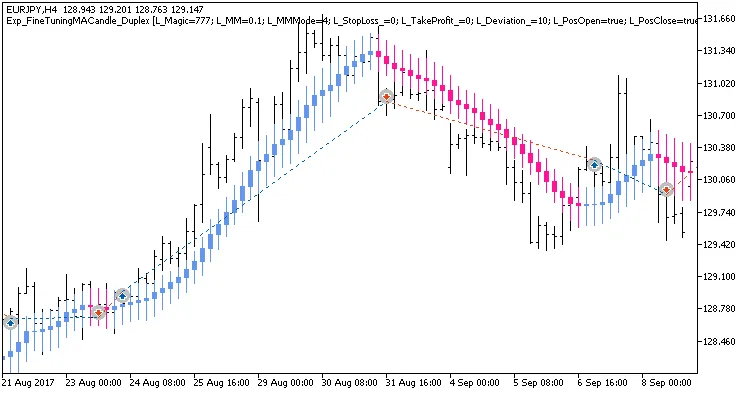
If you're looking to optimize your trading strategy, you're in the right place! Today, we’ll dive into a unique trading system that utilizes the FineTuningMACandle indicator designed for both long and short positions. This Expert Advisor (EA) can be tailored in various ways, and I’m here to walk you through it. Understanding the Input Parameters The input parameters for this EA are split into two main groups: Parameters for Long Positions: Look for names starting with 'L'. Parameters for Short Positions: Look for names starting with 'S'. //+----------------------------------------------+ //| Input parameters for Long Trades | //+----------------------------------------------+ magic numberinput uint    L_Magic=777;          // L magic number input double  L_MM=0.1;             // L share of deposit per trade input MarginMode L_MMMode=LOT;      // L lot setting mode //+----------------------------------------------+ //| Input parameters for Short Trades | //+----------------------------------------------+ input uint    S_Magic=555;          // S magic number input double  S_MM=0.1;             // S share of deposit per trade input MarginMode S_MMMode=LOT;      // S lot setting mode Each trading system is assigned a different magic number, making them operate independently. Remember, real financial markets aren’t always straightforward, and often require different parameters for bullish and bearish conditions. It’s a good practice to start by testing one system at a time. Disable the other system using the relevant switches. input bool    L_PosOpen=true;       // Permission to enter long positions input bool    L_PosClose=true;      // Permission to exit long positions Once you’ve tested the long positions, repeat the same process for the short positions. For the EA to function correctly, ensure that the compiled FineTuningMACandle.ex5 indicator file is placed in the <terminal_data_directory>\MQL5\Indicators directory. During the tests below, default input parameters for the Expert Advisor were utilized, and neither Stop Loss nor Take Profit was applied. Fig. 1. Examples of deals on the chart with symmetrical settings Here are the testing results for 2017 on EURJPY H4: Fig. 2. Testing results chart Fig. 3. Examples of deals on the chart with non-symmetrical settings

2018.11.20
First Previous 21 22 23 24 25 26 27 28 29 30 31 Next Last