
Have you ever noticed gaps in your trading charts? It can be frustrating to look at your MetaTrader 4 and wonder if you're missing crucial data. But don't worry, I've got some handy tools that can help you spot those missing bars with ease!
Description:
I created these indicators to help visualize where my data was a bit patchy. They were never meant for wide distribution, so consider this a little sneak peek!
Feel free to use them for personal or even company purposes, but please don't sell them without permission—that's a no-go!
These indicators take into account weekends (a full 49 hours) but don't factor in public holidays. My broker operates on Central European Time (CET) and doesn't display bars on Sundays, so I'm not entirely sure how this works with US time zones.
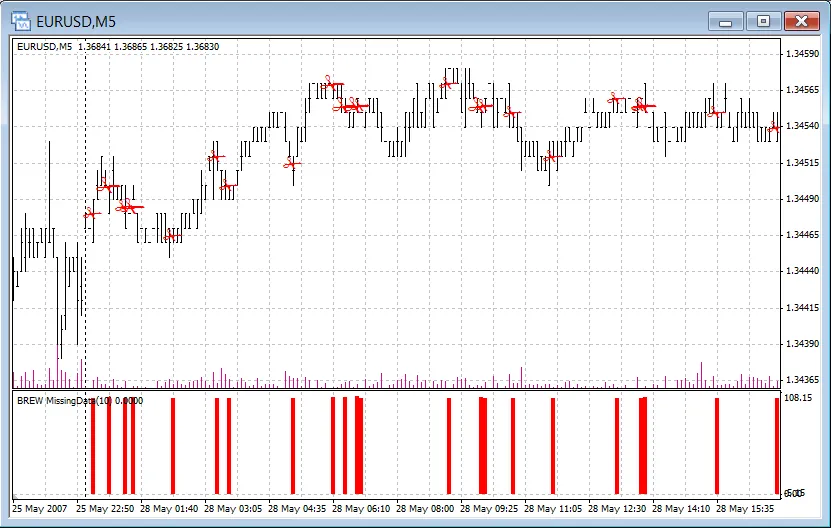
The separate chart version gives you a pop-up alert if there are any missing bars right at startup, which saves you the hassle of hunting down gaps. The other version logs messages in the 'Experts' log for your convenience.
Just a heads up: the 'same chart' indicator features five sizes of scissors—bigger scissors indicate more missing data. The separate chart version also shows slightly taller bars when more data is missing.
Feel free to tweak the logic if you want to customize it to your trading style!
Image:
Conclusion:
- Use the indicators to identify missing bars easily.
- Customize the logic to suit your trading strategy.
- Stay informed with alerts, so you never miss a beat!




Comments 0