
Murrey Math Line X for MetaTrader 4 is an indispensable tool for any trader familiar with support, resistance, and pivot lines. This indicator showcases eight primary lines, plus five additional ones, directly on your main chart. Its primary purpose? To help you pinpoint optimal buy, sell, and exit opportunities. Plus, it can send alerts when a candle closes after breaching any of the pivot lines. You can easily download this indicator for both the MT4 and MT5 platforms.
Input Parameters
- Period (default = 64) — this parameter represents the number of bars or upper timeframe periods (set via the UpperTimeFrame input) used to calculate the lines. A lower number means more up-to-date but less accurate calculations.
- UpperTimeframe (default = PERIOD_D1) — this is your base period. If it differs from your current timeframe, the indicator will calculate its lines using Period × UpperTimeframe. If not, it will use the Period of the current chart bars.
- StepBack (default = 0) — this setting allows a shift back in calculating the lines (either in the current bars or using the number of UpperTimeframe periods).
- LabelSide (default = Left) — this indicates where the line labels will appear on the screen. If you choose Right, ensure your chart is shifted left; otherwise, you won’t see the labels.
- [N]/8 Color — customize the colors for the indicator lines.
- [N]/8 Width — adjust the width of the indicator lines as per your preference.
- MarkColor (default = clrBlue) — this sets the color for the arrow marking the last calculated bar.
- MarkNumber (default = 217) — the arrow code for the last calculated bar's arrow.
- FontFace (default = "Verdana") — choose the font face for the display.
- FontSize (default = 10) — set your preferred font size for the display.
- ObjectPrefix (default = "MML-") — this prefix is used for chart objects to ensure compatibility with other indicators.
- TriggerCandle (default = Previous) — this parameter allows you to choose which candle will trigger alerts: Previous (the most recently closed candle) or Current (the ongoing candle).
- NativeAlerts (default = false) — if set to true, a native MetaTrader popup alert will trigger when a signal appears. This feature is not available in cTrader.
- EmailAlerts (default = false) — if this is set to true, you will receive an email notification when a signal appears. Make sure your email is properly configured in MetaTrader under Tools->Options->Email.
- NotificationAlerts (default = false) — if set to true, you will receive notifications when a signal appears. Notifications should be configured in MetaTrader via Tools->Options->Notifications.
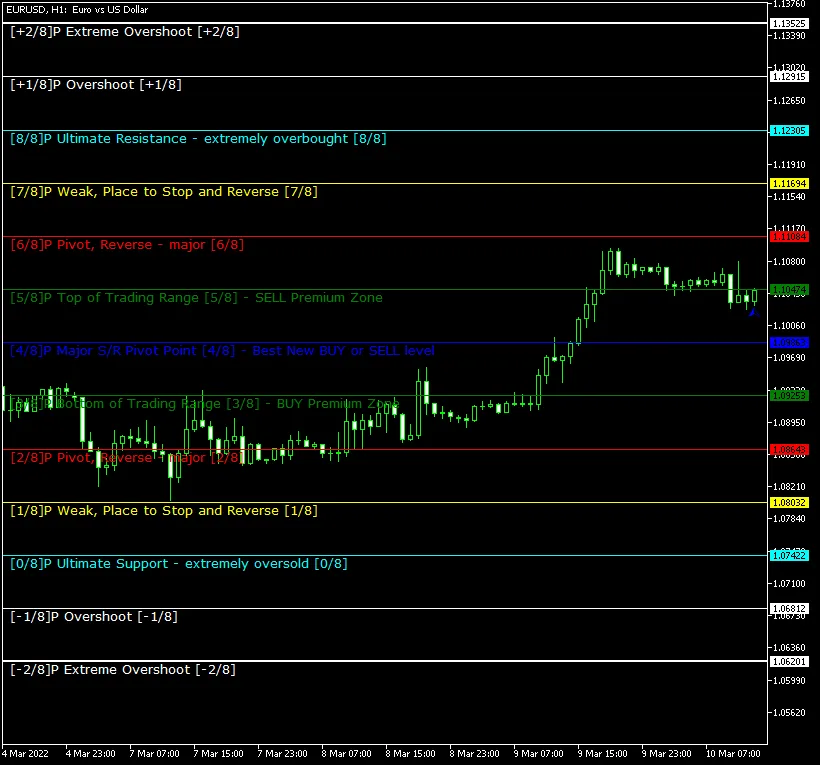
Using the Murrey Math Line X is straightforward. The 0/8P and 8/8P lines represent the ultimate resistance and support levels, making them tough to breach. The 1/8P and 7/8P lines are considered weak support and resistance; if the price hovers near these levels, a reversal is likely. The 2/8P and 6/8P lines serve as strong reversal points, while the 3/8P and 5/8P lines mark the extremes of the average trading range. The price may break through this range quickly or linger within it for an extended period. The 4/8P line is a crucial support and resistance level where you can execute high-probability trades when the price crosses it. The blue arrow indicates the last calculated bar.




Comments 0