
Overview of the MaxRange Indicator
Hey fellow traders! Today, I want to introduce you to a nifty tool that can really enhance your trading experience on MetaTrader 4—the MaxRange indicator. This little gem displays the highest and lowest prices over a specified number of bars, giving you a clear visual on price movements.
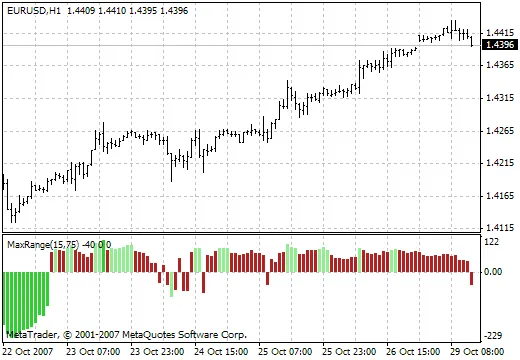
Why Use the MaxRange Indicator?
Understanding price extremes can be a game-changer in your trading strategy. The MaxRange indicator helps you:
- Identify Key Levels: Spot potential support and resistance levels easily.
- Enhance Your Trading Strategy: Use the highs and lows to inform your entry and exit points.
- Stay Ahead of the Game: Keep your finger on the pulse of market movements.
How to Set It Up
Setting up the MaxRange indicator is a breeze. Just follow these simple steps:
- Download the MaxRange indicator file.
- Open your MetaTrader 4 platform.
- Navigate to File >Open Data Folder.
- Place the indicator file in the Indicators folder.
- Restart MetaTrader 4, and voilà, you’re ready to roll!
Final Thoughts
Incorporating the MaxRange indicator into your trading routine can provide valuable insights and help you make informed decisions. Give it a try, and see how it works for you!




Comments 0