
Discover the Power of TD Sequential Ultimate for MetaTrader 5
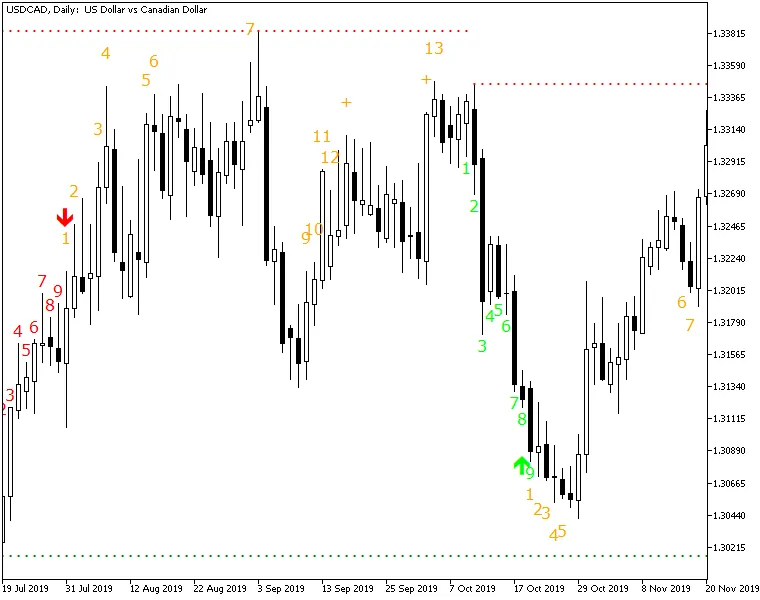
TD Sequential Ultimate is a game-changer for traders, showcasing all the essential elements of the TD Sequential method developed by the renowned analyst, Tom DeMark. This indicator doesn't just stop at displaying Buy and Sell Setups; it also includes Setup Perfection arrows, Buy and Sell Countdowns, and identifies those tricky failed count 13 attempts, along with TDST Support and Resistance levels. Unlike other versions of the TD Sequential method, this indicator packs a punch with numerous enhancements.
Input Parameters
Calculation
- MaxBars (default = 1000) — This setting determines how many bars the TD Sequential will calculate for. If set to zero, the indicator will compute counts for all available bars. Just keep in mind, the higher the number, the slower the indicator will operate.
Display
- BuySetupColor (default = clrLime) — The color for Buy Setup counts and Perfection arrows.
- SellSetupColor (default = clrRed) — The color for Sell Setup counts and Perfection arrows.
- CountdownColor (default = clrOrange) — The color of the Countdown values.
- FontFace (default = "Verdana") — The font face used for the counts.
- FontSize (default = 12) — The font size for counts.
- ArrowWidth (default = 2) — The width of the arrows for Setup Perfection.
- PixelDistance (default = 3) — The vertical distance between count objects in pixels.
- Prefix (default = "TDS_") — The text prefix for naming your chart objects.
Alerts
- AlertOnSetup (default = false) — This option triggers an alert when a Buy/Sell Setup is completed (when count #9 appears).
- AlertOnPerfecting (default = false) — Get alerted when a Buy/Sell Setup is perfected (an arrow shows up).
- AlertOnCount13 (default = false) — Receive a notification when Countdown candle #13 is printed.
- AlertOnSupportResistance (default = false) — Alerts you when a candle closes above resistance or below support.
- AlertNative (default = false) — If set to true, a native popup alert will appear for every alert event.
- AlertEmail (default = false) — If set to true, alerts will be sent via email. Make sure your email is correctly set up in MetaTrader via Tools -> Options -> Email.
- AlertNotification (default = false) — If true, alerts will be pushed to your mobile device. You'll need to have your MetaQuotes ID configured in MetaTrader via Tools -> Options -> Notifications.




Comments 0