
If you're looking to level up your trading game, the Exp_Delta_WPR Expert Advisor (EA) is worth your attention. This EA operates on the principle of the Delta_WPR indicator, specifically triggering trades when the indicator's histogram changes color to either blue or orange at the close of a bar.
To get started, make sure you have the compiled indicator file named Delta_WPR.ex5. You’ll need to drop it into your terminal_data_folder/MQL5/Indicators directory for everything to work seamlessly.
One thing to keep in mind: the TradeAlgorithms.mqh library is essential if you want to use EAs with brokers offering a nonzero spread. Plus, it allows you to set Stop Loss and Take Profit levels right when you open a position. You can find more variations of this library at this link: Trade Algorithms.
For the tests showcased below, we used the default input parameters of the Expert Advisor. Notably, Stop Loss and Take Profit settings were not included in these tests.
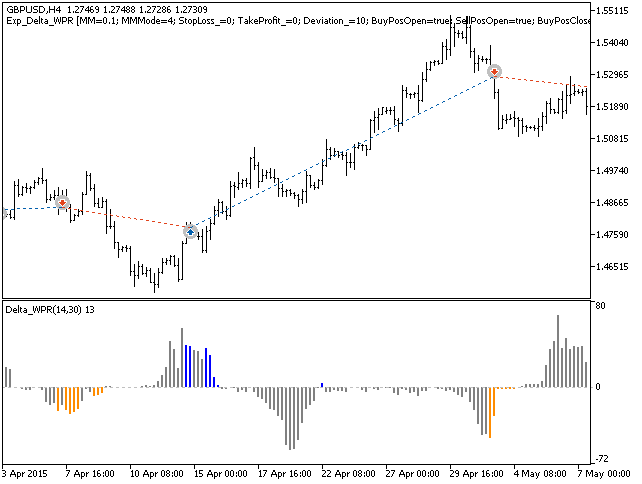
Fig1. Examples of deals on the chart
We ran a thorough backtest for the year 2015 on the GBPUSD with a H4 timeframe. Here’s a look at the results:
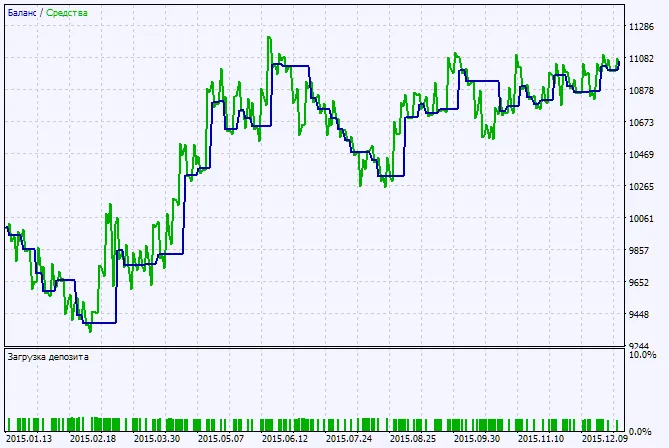
Fig.2. Chart of testing results




Comments 0