
The Exp_Waddah_Attar_Trend Expert Advisor (EA) is designed to capitalize on the color changes of the Waddah_Attar_Trend indicator. This EA generates signals based on the closing of a bar, triggered by a shift in the color of the indicator’s histogram.
To get started, you’ll need to have the compiled indicator file Waddah_Attar_Trend.ex5 in your MetaTrader 5 setup. You can place this file in your terminal_data_folder\MQL5\Indicators directory.
Keep in mind that the TradeAlgorithms.mqh library file is essential for using EAs with brokers that provide non-zero spreads. It also allows you to set both Stop Loss and Take Profit when opening a position. If you’re looking for more variants of this library, you can check them out here: Trade Algorithms.
For the tests displayed below, we used the default input parameters of the Expert Advisor. Notably, Stop Loss and Take Profit were not employed during these tests.
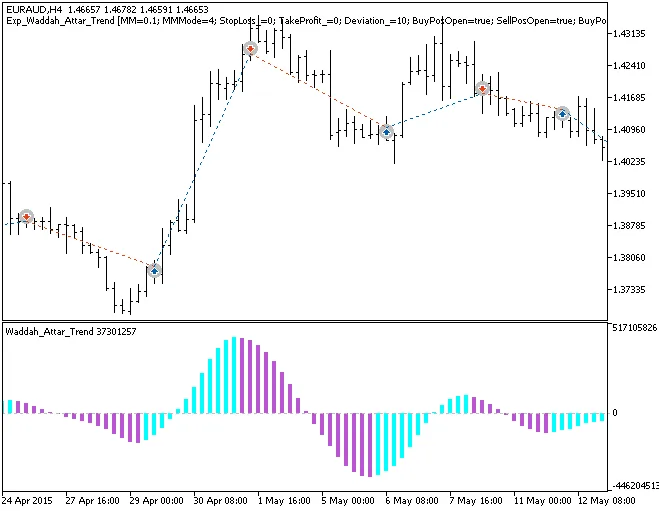
Fig1. Examples of deals on the chart
Here are the testing results for the year 2015 on the EURAUD H4 timeframe:
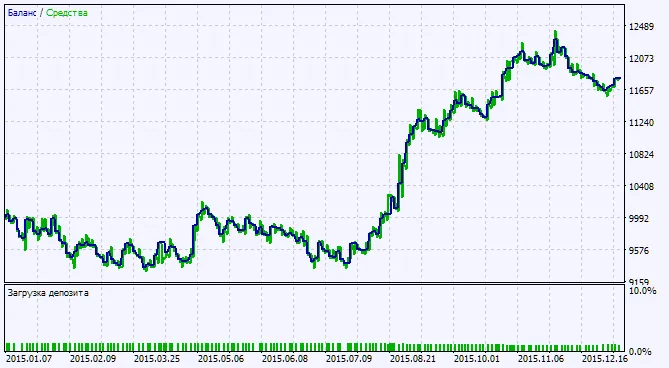
Fig.2. Chart of testing results




Comments 0