
Description:
Hedge The Hedge Trader is designed to take your hedging game to the next level by managing the usual risks involved when hedging pairs like EURUSD with USDCHF. Anyone who's dabbled in pairs trading knows it can sometimes lead to significant drawdowns, but this strategy aims to hedge the hedge to mitigate those heavy losses.
With HTH Trader, you’ll be hedging EURUSD against USDCHF and GBPUSD against AUDUSD, employing a solid hedge the hedge approach. This strategy typically executes four trades each day. To keep drawdowns in check, the hedged positions are only active for one day. The EA kicks off when the Hour() is greater than zero, and it closes out all positions by 23:00. It resets as soon as the new trading day begins.
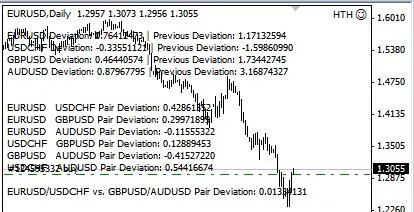
- When the previous day's deviation for EURUSD is positive, the EA will enter with LONG positions on EURUSD and USDCHF, SHORT on GBPUSD, and LONG on AUDUSD. In this scenario, EURUSD is hedged with USDCHF, GBPUSD is hedged with AUDUSD, and so on.
- If the previous day's deviation for EURUSD is negative, the EA reverses course and goes SHORT on EURUSD and USDCHF, while going LONG on GBPUSD and SHORT on AUDUSD.
- There’s a strong correlation between the EURUSD/USDCHF ratio and the GBPUSD/AUDUSD ratio, which makes it feasible to hedge the hedge.
New Function: Emergency Trading
Emergency Trading is a new feature that kicks in if 'enable_emergency_trading' is set to 'true'. This function allows the EA to monitor losses and enter new trades once the loss reaches a specified 'emergency_loss' in PIPs. So, for instance, if you find yourself with losses in EURUSD and USDCHF but profits in GBPUSD and AUDUSD, once that 'emergency_loss' threshold is hit, the EA will open new positions mirroring the profitable trades. This setup is designed for one execution per day, and will only trigger once the emergency loss is reached, resetting for the next day. Importantly, this function can’t be disabled unless the code is removed.
if(enable_emergency_trading==true && totalprofit<=-emergency_loss){doubleorders();}EA Options:
Here are the customizable options available:
- Trade | Enables trading if set to true
- C1 | 1st currency
- C2 | 2nd currency
- C3 | 3rd currency
- C4 | 4th currency
- Show_Profit | Enables tracking of profit/loss of all trades executed by this EA
- Enable_Profit | Enables profit monitoring to close all positions
- Enable_Loss | Enables loss monitoring to close all positions
- Enable_Emergency_Trading | Enables new trades when profit reaches the Emergency_Loss PIP value
- Profit | PIP value
- Loss | PIP value
- MagicNumber1 | Number to track C1
- MagicNumber2 | Number to track C2
- MagicNumber3 | Number to track C3
- MagicNumber4 | Number to track C4
- E_MagicNumber | Number to track Emergency Trades
- Lot | Order lots




Comments 0