
If you're looking to streamline your trading on MetaTrader 4, you've come to the right place! This handy Expert Advisor (EA) is designed to automate the placement of both Buy Stop and Sell Stop pending orders simultaneously. It also allows you to set your Stop Loss and Take Profit levels according to your preferences. Once a long position (BUY) is triggered as the ASK price crosses your specified levels, the remaining Sell Stop order is automatically deleted. The reverse happens when a short position (SELL) is opened—your pending Buy Stop is cleared. After any trade closes, both pending orders are reinstated, ensuring you don't have to worry about sudden spread widening affecting your strategy. With this EA, you can better manage your risk and avoid getting stopped out unexpectedly.
Key Features
- Automates the process of placing Buy Stop and Sell Stop pending orders, along with Stop Loss and Take Profit levels, especially useful if your broker restricts orders close to the market price.
- Reduces the chances of Stop Loss triggering without proper market confirmation.
- Allows you to set Take Profit levels tailored to your trading style.
- Enables Trailing Stop functionality to lock in profits as the market moves in your favor.
Personalizing Your EA Settings
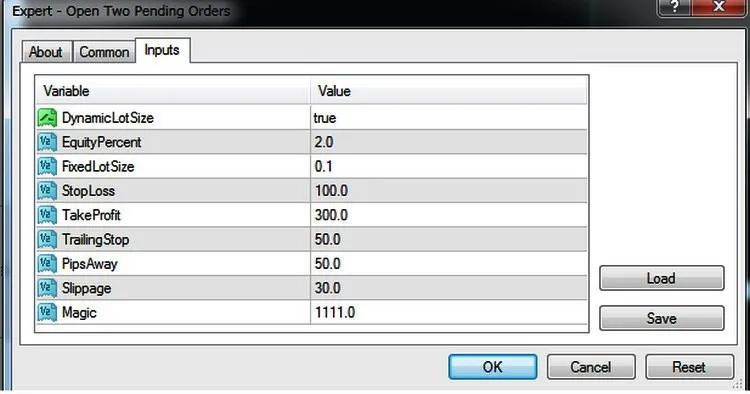
- DynamicLotSize - Opt to use a money management system for calculating lot sizes based on your equity (true by default).
- EquityPercent - Set the risk percentage of your equity (default is 2%).
- FixLotSize - Specify the lot size if DynamicLotSize is set to false (default is 0.1).
- StopLoss - Define your Stop Loss level in points on the price chart (default is 100).
- TakeProfit - Set your Take Profit level in points on the price chart (default is 300).
- TrailingStop - Determine your Trailing Stop level in points on the price chart (default is 100).
- PipsAway - Specify the trigger level for pending orders in points on the price chart (default is 50).
- Slippage - Input your desired slippage tolerance.
- Magic - Assign a unique magic number to identify your orders.
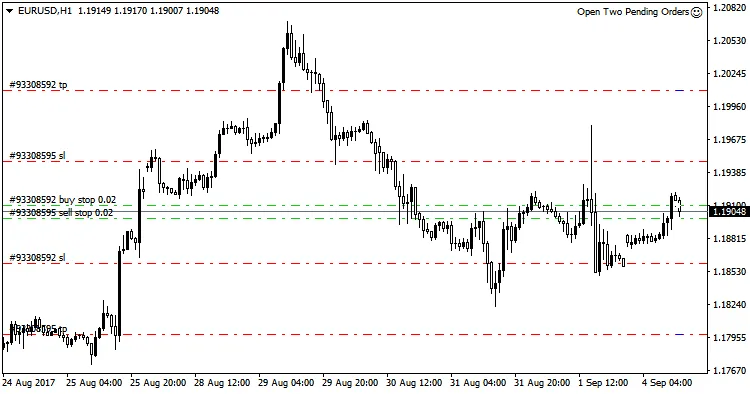
The levels for entering a position, along with your Stop Loss and Take Profit, are visually marked on your chart with different colored lines, making it easy to spot at a glance.




Comments 0