
MQL5 Wizard is a fantastic tool that lets you automate the creation of Expert Advisors (EAs). If you're interested in how to make your own trading robot, check out Creating Ready-Made Expert Advisors in MQL5 Wizard.
In this post, we’ll dive into a strategy centered around price crossover using the Moving Average (MA) indicator, confirmed by the Average Directional Index (ADX). This strategy is known as "Signals based on price crossover with MA confirmed by ADX" when you’re generating your EA in MQL5 Wizard.
Trade Signals:
- Buy Signal: The closing price of the last completed bar is above the moving average, and the moving average is increasing for both the current and last completed bars.
- Sell Signal: The closing price of the last completed bar is below the moving average, and the moving average is decreasing for both the current and last completed bars.
- To weed out false signals, we check for trend strength (ADX > ADXmin) and trend direction using the Directional Movement Indexes (DI+ and DI-).
This strategy is implemented in the CSignalADX_MA class, which you’ll need to place in your terminal data folder at MQL5\Include\Expert\Signal\SignalADX-MA.mqh.
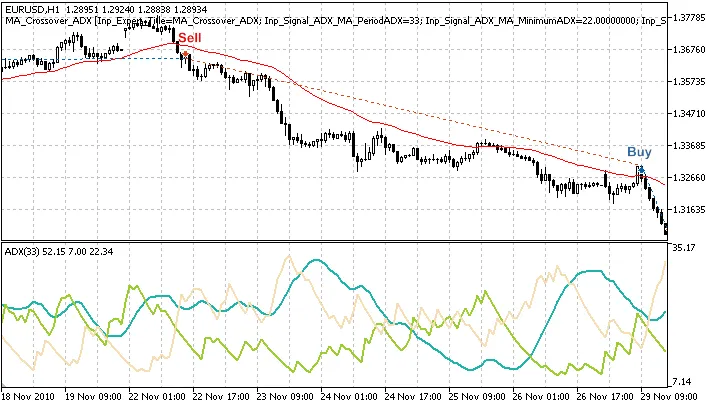
Figure 1. Trade signals based on price crossover with Moving Average, confirmed by ADX
Understanding the Trading Conditions
Within the CSignalADX_MA class, there are several protected methods that simplify access to indicators and price values:
double PlusADX(int ind) // returns the value of DI+ line of the bardouble MainADX(int ind) // returns the value of main line of the bardouble MinusADX(int ind) // returns the value of DI- line of the bardouble EMA(int ind) // returns the value of moving average of the bardouble Close(int ind) // returns the value of closing price of the bardouble StateADX(int ind) // returns the difference between the DI+ and DI- linesdouble StateEMA(int ind) // returns a positive value if EMA increases and negative if it decreasesdouble StateClose(int ind) // returns the difference between the closing price and moving average
1. Opening Long Positions
To open a long position, the following conditions need to be met:
- StateEMA(0) < 0 and StateEMA(1) > 0: the moving average is rising on the current and last completed bars.
- StateClose(1) > 0: the closing price of the last completed bar is above the moving average.
- MainADX(0) > minimum_ADX: the ADX value of the current bar is above the specified minimum value (for trend confirmation).
- StateADX(0) > 0: DI+ is greater than DI- for the current bar.
//+------------------------------------------------------------------+//| Checks conditions to open long position (buy)                      |//+------------------------------------------------------------------+bool CSignalADX_MA::CheckOpenLong(double& price,double& sl,double& tp,datetime& expiration) {
   //--- condition 1: moving average rises on the current and last completed bars
   bool Buy_Condition_1=(StateEMA(0)>0 && StateEMA(1)>0);
   //--- condition 2: closing price of the last completed bar is above the moving average
   bool Buy_Condition_2=(StateClose(1)>0);
   //--- condition 3: ADX value of the current bar is above the minimum
   bool Buy_Condition_3=(MainADX(0)>m_minimum_ADX);
   //--- condition 4: DI+ is greater than DI- for the current bar
   bool Buy_Condition_4=(StateADX(0)>0);
   price=0.0;
   sl   =m_symbol.Ask()-m_stop_loss*m_adjusted_point;
   tp   =m_symbol.Ask()+m_take_profit*m_adjusted_point;
   //--- checking all conditions
   return(Buy_Condition_1 && Buy_Condition_2 && Buy_Condition_3 && Buy_Condition_4);
}
2. Closing Long Positions
Conditions to close a long position include:
- StateEMA(0) < 0 and StateEMA(1) < 0: the moving average is falling on the current and last completed bars.
- StateClose(1) < 0: the closing price of the last completed bar is below the moving average.
- MainADX(0) > minimum_ADX: the ADX value of the current bar is above the specified minimum value (for trend confirmation).
- StateADX(0) < 0: DI- is greater than DI+ for the current bar.
//+------------------------------------------------------------------+//| Checks conditions to close long position                         |//+------------------------------------------------------------------+bool CSignalADX_MA::CheckCloseLong(double& price) {
   //--- condition 1: moving average decreases on the current and last completed bars
   bool Sell_Condition_1=(StateEMA(0)<0 && StateEMA(1)<0);
   //--- condition 2: closing price of the completed bar is lower than moving average
   bool Sell_Condition_2=(StateClose(1)<0);
   //--- condition 3: ADX value of the current bar is above the minimum
   bool Sell_Condition_3=(MainADX(0)>m_minimum_ADX);
   //--- condition 4: DI- is greater than DI+ for the current bar
   bool Sell_Condition_4=(StateADX(0)<0);
   price=0.0;
   //--- checking all conditions
   return(Sell_Condition_1 && Sell_Condition_2 && Sell_Condition_3 && Sell_Condition_4);
}
3. Opening Short Positions
Opening short positions follows the same conditions as closing long positions:
//+------------------------------------------------------------------+//| Checks conditions to open short position (sell)                  |//+------------------------------------------------------------------+bool CSignalADX_MA::CheckOpenShort(double& price,double& sl,double& tp,datetime& expiration) {
   //--- condition 1: moving average decreases on the current and last completed bars
   bool Sell_Condition_1=(StateEMA(0)<0 && StateEMA(1)<0);
   //--- condition 2: closing price of the completed bar is lower than moving average
   bool Sell_Condition_2=(StateClose(1)<0);
   //--- condition 3: ADX value of the current bar is above the minimum
   bool Sell_Condition_3=(MainADX(0)>m_minimum_ADX);
   //--- condition 4: DI- is greater than DI- for the current bar
   bool Sell_Condition_4=(StateADX(0)<0);
   price=0.0;
   sl   =m_symbol.Bid()+m_stop_loss*m_adjusted_point;
   tp   =m_symbol.Bid()-m_take_profit*m_adjusted_point;
   //--- checking all conditions
   return(Sell_Condition_1 && Sell_Condition_2 && Sell_Condition_3 && Sell_Condition_4);
}
4. Closing Short Positions
To close short positions, the same criteria apply as when opening long positions.
//+------------------------------------------------------------------+//| Checks conditions to close short position                        |//+------------------------------------------------------------------+bool CSignalADX_MA::CheckCloseShort(double& price) {
   //--- condition 1: moving average increases on the current and last completed bars
   bool Buy_Condition_1=(StateEMA(0)>0 && StateEMA(1)>0);
   //--- condition 2: closing price of the last completed bar is above the moving average
   bool Buy_Condition_2=(StateClose(1)>0);
   //--- condition 3: ADX value of the current bar is above the minimum
    bool Buy_Condition_3=(MainADX(0)>m_minimum_ADX);
   //--- condition 4: DI+ is greater than DI- for the current bar
   bool Buy_Condition_4=(StateADX(0)>0);
   price=0.0;
   //--- checking all conditions
   return(Buy_Condition_1 && Buy_Condition_2 && Buy_Condition_3 && Buy_Condition_4);
}
Creating Your Expert Advisor with MQL5 Wizard
To create a trading robot based on the strategy, you’ll want to select the signal property as "Signals based on price crossover with MA confirmed by ADX" in the "Creating Ready-Made Expert Advisors" section of MQL5 Wizard:
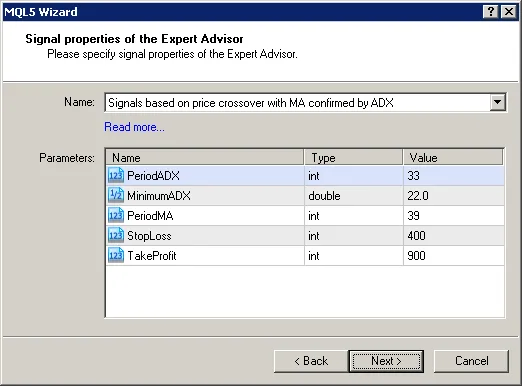
Figure 2. Choose "Signals based on price crossover with MA confirmed by ADX" in MQL5 Wizard
Next, specify the necessary trailing stop algorithm and money and risk management system. The EA’s code will be generated automatically, and you can compile and test it in the Strategy Tester of your MetaTrader 5 client terminal.
Testing Results
Let’s take a look at the backtesting results of our EA using historical data (EUR/USD H1, testing period: January 1, 2010 - January 5, 2011, PeriodADX = 33, MinimumADX = 22, PeriodMA = 39, StopLoss = 400, TakeProfit = 900).
For this EA, we used a fixed volume (Trading Fixed Lot, 0.1), and we did not apply a trailing stop (Trailing not used).
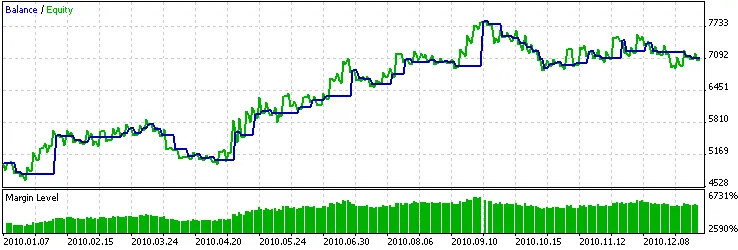
Figure 3. Historical backtesting results of the Expert Advisor, based on price crossover with MA confirmed by ADX
Attachments: The SignalADX-MA.mqh file containing the CSignalADX_MA class needs to be placed in your terminal data folder at MQL5\Include\Expert\Signal\. Additionally, the ma_crossover_adx.mq5 file includes the code of the Expert Advisor created using MQL5 Wizard.




Comments 0