
Idea by: Aleksandr.
MQL5 code by: Vladimir Karputov.
Today, we’re diving into the EA Moving Average for MetaTrader 5. This EA is built on the standard Moving Average example included in MQL5 and comes packed with enhancements that make it a must-have for traders.
What’s New?
This EA brings some nifty features to the table:
- Each of the four signals—Buy Open, Buy Close, Sell Open, and Sell Close—now comes with its own customizable Moving Average indicator. You can tweak parameters like period (the averaging period), shift (the horizontal shift of the indicator), method (the averaging technique), and price (the price type used for the indicator calculations).
- The EA features flags for Use Buy positions and Use Sell positions, allowing you to enable or disable opening BUY and SELL positions with ease.
- Another cool flag is Consider Price Last Out. If enabled, this will consider the price of the last closed trade. For instance, a new BUY position will only be opened at a price equal to or lower than the last transaction, while a new SELL position will be opened at a price equal to or higher than the last closed trade.
This EA keeps tabs on the last closed position using the OnTradeTransaction function. It’s designed to maintain only one position in the market at a time, making it suitable for both netting and hedging accounts.
Inputs You Need to Know
- Maximum Risk in Percentage - sets your maximum risk level;
- Decrease Factor - adjusts the risk in case of losing trades in your history;
- xxx: Period - the averaging period for each indicator;
- xxx: Shift - the horizontal shift for each indicator;
- xxx: Method - the averaging method for each indicator;
- xxx: Price - the price type used for indicator calculations;
- Use Buy Positions - enables opening BUY positions;
- Use Sell Positions - enables opening SELL positions;
- Consider Price Last Out - allows for consideration of the last closed trade price;
- Magic Number - a unique identifier for the EA.
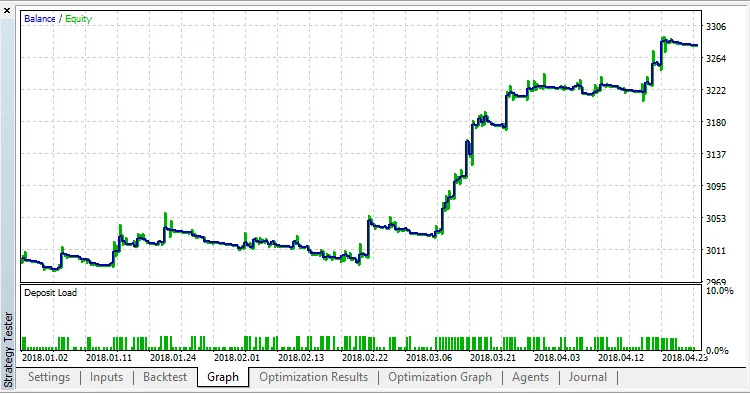
The default settings are optimized for the EURUSD on the M15 timeframe, covering the period from January 1, 2018, to May 3, 2018.
Optimizing on M15: Tips and Tricks
For optimal performance, consider using genetic optimization in the "1 minute OHLC" tick generation mode. Start by adjusting the period (set Start to 12, Step to 1, and Stop to 30) and shift (set Start to 0, Step to 1, and Stop to 6).
Once you’ve run the genetic optimization, switch to the "Every tick" or "Every tick based on real ticks" mode and execute a single test for the selected pass.




Comments 0