
Author of the idea:Andrey, with MQL5 code by:barabashkakvn.
In this post, we're diving into how to calculate the Moving Average using the data from the Commodity Channel Index (CCI).
//--- create handle of the indicator iMA
   handle_iMA=iMA(m_symbol.Name(),Period(),15,0,MODE_EMA,handle_iCCI);
//--- check if the handle was created successfully
   if(handle_iMA==INVALID_HANDLE)
     {
      //--- output error if handle creation failed
      PrintFormat("Failed to create handle of the iMA indicator for the symbol %s/%s, error code %d",
                  m_symbol.Name(),
                  EnumToString(Period()),
                  GetLastError());
      //--- terminate early if indicator fails
      return(INIT_FAILED);
     }
This process is akin to running the Moving Average indicator in the CCI window while selecting "Previous Indicator's Data" in the settings.
How to Open and Close Positions:
- If the Moving Average calculated from the CCI dips below the standard CCI, it’s time to open a BUY position.
- If the Moving Average from the CCI rises above the standard CCI, that's your cue to open a SELL position.
- If the Moving Average from the CCI climbs above the standard CCI, close your BUY position.
- If the Moving Average from the CCI falls below the standard CCI, close your SELL position.
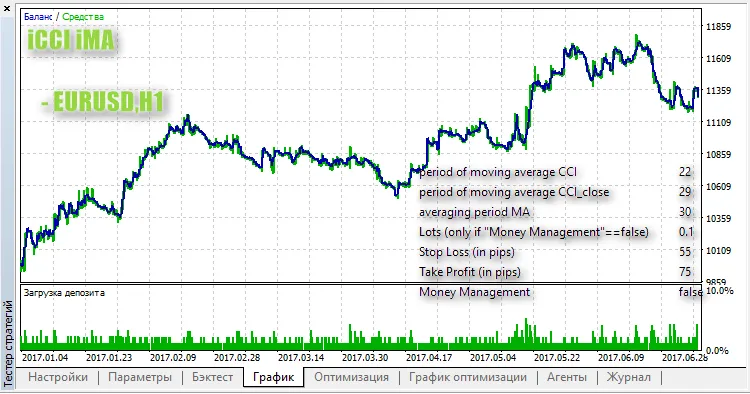
Here's a quick look at testing this strategy on the EUR/USD pair using the H1 timeframe:




Comments 0