
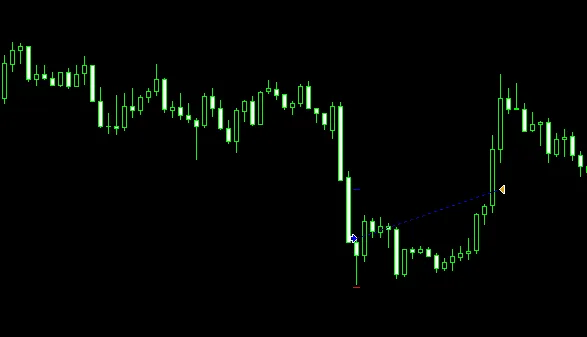
If you're looking to enhance your trading strategy, let’s talk about using an Expert Advisor (EA) to identify tops and bottoms in market trends. This EA is designed to buy when a new low appears during a downtrend, especially when the RSI indicates oversold conditions.
Here are the key inputs you can adjust to tailor the EA to your trading style:
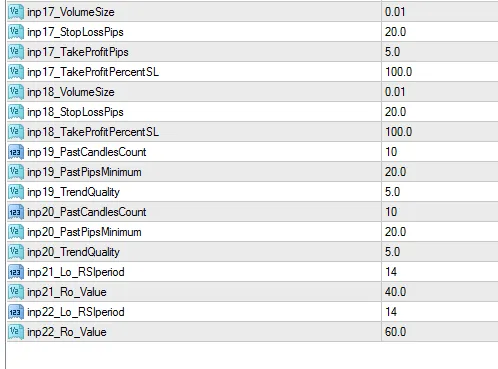
- Past Candle Count: Set the look-back period to determine trend conditions.
- Past Pips: Specify the minimum pip range for your look-back period.
- Trend Quality: Rate the trend on a scale of 1 to 10, with 1 being a loose trend and 10 indicating a strong trend.
- Stop Loss: Stops are measured in pips, while targets are set as a percentage of your stops.
- Risk-Reward Ratio: For instance, a setting of 100 means a 1:1 ratio, while 200 equates to a 1:2 ratio.
- Lot Size: Start with a lot size of 0.01, which can be adjusted based on your risk tolerance.
- RSI Settings: The RSI period is set to 14 by default, with oversold and overbought levels adjustable at 40 and 60, respectively.
- Optimization: Be mindful that preset parameters may not guarantee profitability; there are numerous inputs for optimization.
- Ignore Input 17: The take profit in pips is set to 5 pips.
With these parameters, you can effectively manage your trades and adapt to changing market conditions. Here are some screenshots to help visualize the EA in action:




Comments 0