
Hey fellow traders! Today, we're diving into the fascinating world of the ColorXPWMA_Digit Expert Advisor (EA) for MetaTrader 5. This EA combines three independent trading systems, allowing you to adapt your trade volume based on the outcomes of previous trades. So, how does it work? Let’s break it down!
The EA generates trading signals when a bar closes and a trend change is detected, indicated by a color shift in any of the three indicators. This is a game-changer for identifying entry points!
Managing Trade Volumes
You can manage the volumes of open positions through customizable input EA variables. For instance, in the first system, you can set the following:
inputuint    A_BuyTotalMMTriger=5; // Last 5 Buy trades for stop loss calculation
inputuint    A_BuyLossMMTriger=3;  // Number of losing Buy trades to reduce MM
inputuint    A_SellTotalMMTriger=5;// Last 5 Sell trades for stop loss calculation
inputuint    A_SellLossMMTriger=3; // Number of losing Sell trades to reduce MM
inputdouble  A_SmallMM=0.01;       // Deposit share for losing trades
inputdouble  A_MM=0.1;             // Deposit share during normal trading
input MarginMode A_MMMode=LOT;      // Lot setting mode
With these settings, if you select from the last five trades and find three losses in one direction, the EA will open the next trade in that direction with a volume of 0.01 lots. If there are fewer than three losses, the position volume will be 0.1 lots. Smart, right?
Second Trading System Setup
The second trading system follows a similar structure, allowing you to customize the settings:
inputuint    B_BuyTotalMMTriger=5; // Last 5 Buy trades for stop loss calculation
inputuint    B_BuyLossMMTriger=3;  // Number of losing Buy trades to reduce MM
inputuint    B_SellTotalMMTriger=5;// Last 5 Sell trades for stop loss calculation
inputuint    B_SellLossMMTriger=3; // Number of losing Sell trades to reduce MM
inputdouble  B_SmallMM=0.01;       // Deposit share for losing trades
inputdouble  B_MM=0.1;             // Deposit share during normal trading
input MarginMode B_MMMode=LOT;      // Lot setting mode
Optimizing Your EA
For the best results, it's recommended to configure each trading system separately by disabling the others using the following parameters:
inputbool    B_BuyPosOpen=true;    // Allow long positions
inputbool    B_SellPosOpen=true   // Allow short positions
You can set them to false if needed.
To ensure the EA operates smoothly, make sure you have the compiled ColorXPWMA_Digit.ex5 indicator file in the <terminal_data_directory>\MQL5\Indicators folder.
Testing Results
The default input parameters with stops were used in the tests showcased below:
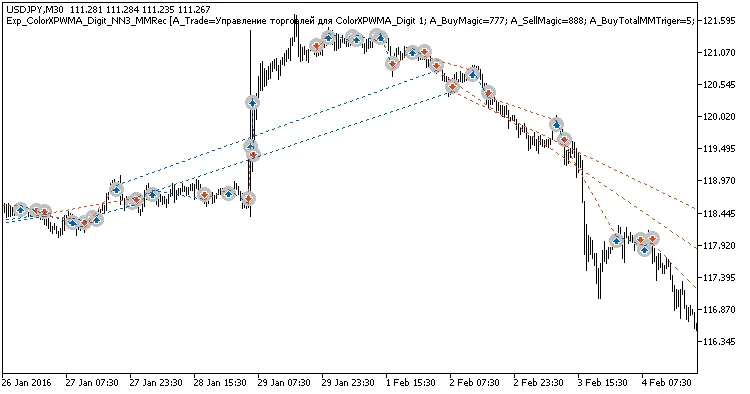
Fig. 1. Example trades on the chart
Testing results for USDJPY on H2, H4, and H8 for 2017:
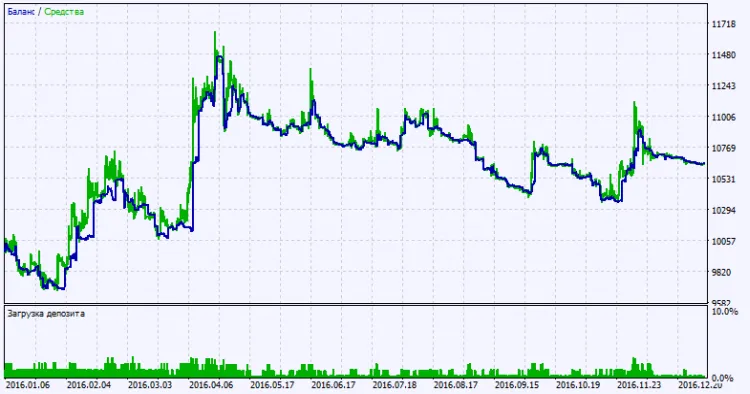
Fig. 2. Test results chart




Comments 0