
Author of the idea:Ahmad Waddah Attar, Author of the mq5 code:barabashkakvn.
Hey fellow traders! If you're looking to simplify your trading strategy on MetaTrader 5, let me introduce you to TrendMeLeaveMe. This handy tool is a semi-automated Expert Advisor (EA) that leverages trend lines to make trading easier.
Before you dive in, you just need to draw either a bullish or bearish trend line. Once that's done, set your parameters and let the EA do the heavy lifting while you turn your attention to other things.
This is an automated EA. To get started, draw an upward, downward, or horizontal trend:

Name your trend line either buystop or sellstop and configure the following parameters: BuyStop_StepUpper, BuyStop_StepLower, SellStop_StepUpper, and SellStop_StepLower.
When the price moves into the area between your buystop and BuyStop_StepLower levels, the EA will open a buystop order based on the BuyStop_StepUpper price. Similarly, if the price enters the area between your sellstop and SellStop_StepUpper levels, it’ll trigger a sellstop order following the SellStop_StepLower price.
The EA smartly adjusts the OpenPrice for both order types as long as the price continues in the trend until it exits the designated area.
You can fine-tune your settings by adjusting BuyStop_StopLoss, BuyStop_Takeprofit, and BuyStop_Lot for buystop orders, or SellStop_StopLoss, SellStop_Takeprofit, and SellStop_Lot for sellstop orders.
Take a look at how it appears on the charts:
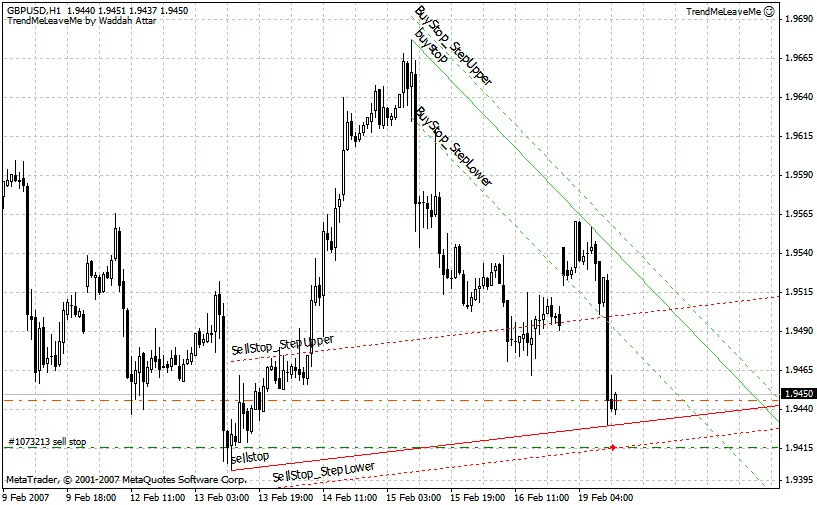
Here's another example to give you a clearer picture:
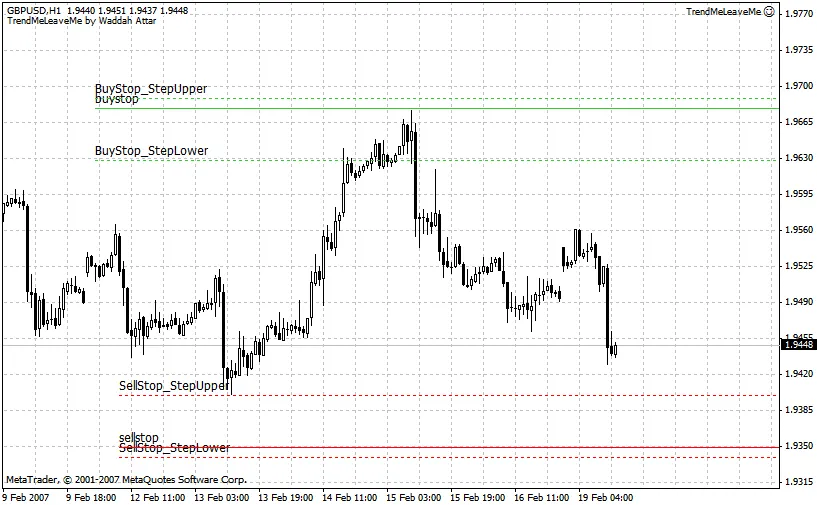
With TrendMeLeaveMe, you can enhance your trading experience and focus on what really matters while the EA handles the trade entries for you!




Comments 0